Windows Vista Forums
Vista Forums Home Join Vista Forums Windows 7 Forum Vista Tutorials Tags
Welcome to Windows Vista Forums. Our forum is dedicated to helping you find solutions with any problems, errors or issues you are experiencing with Windows Vista. The Vista forum also covers news and updates and has an extensive Windows Vista tutorial section that covers a wide range of tips and tricks.

Go Back   Vista Forums > Vista Forums > General Discussion

Vista - Vista boots to a blank screen!

Reply
 
Old 01-30-2009   #1 (permalink)


Vista Home Premium 32bit


Vista boots to a blank screen!

Hi, I am having a problem with my computer. I have scheduled a chkdsk to take place the next time I restart my computer and when I restarted it, the problem started! After the Boot Screen finished booting nothing happens, the screen stays blank. I have left it for hours and still nothing happens. How can I solve this problem? I also wanted to mention that I have changed my boot screen using this tutorial. I didn't really have any problem after following that tutorial but I only wanted to mention that...

My System SpecsSystem Spec
Old 01-30-2009   #2 (permalink)


Vista Ultimate SP2 x64 Windows 7 Ultimate x64 TECHNET


Re: Vista boots to a blank screen!

That's probably why your screen is black because you changed the boot screen. There is a warning near the top of the tutorial. You would have to change it back to normal.

WARNING
If you wanted to run chkdsk at startup or the Memory Diagnostic Tool and you have changed the default boot screen, then you will need to temporarily change the boot screen back to the default boot screen to be able to see what is happening first to be able to see what is happening when they run at startup.

My System SpecsSystem Spec
Old 01-30-2009   #3 (permalink)


VISTA HOME PREMIUM X64/ 7 x64 / 7x86


Re: Vista boots to a blank screen!

Hi,

I assume you are saying you can't get into Vista at all ?

Try restarting - tap F8 repeatedly - should get take you to Safe Mode - wait while it loads it's minimal driver set.

If you can open that bootscreen change program from there, turn it off.

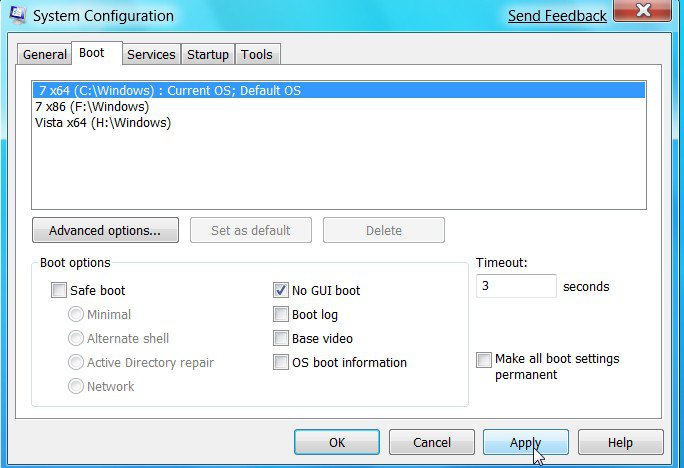
Otherwise, type msconfig in Start Search box , click it when it appears, click the Boot Tab , select No GUI Boot Apply, Ok, and restart.

msconfig2009-01-31_000110.jpg

Hope it helps

SIW2
My System SpecsSystem Spec
Old 01-31-2009   #4 (permalink)


Vista Home Premium 32bit


Re: Vista boots to a blank screen!

I'm also having a problem with Safe Mode. When loading Safe Mode it gets stuck on crcdisk.sys. How can I solve this problem?
My System SpecsSystem Spec
Old 01-31-2009   #5 (permalink)


Vista Home Premium 32bit


Re: Vista boots to a blank screen!

Till now my problem is not solved . I need help................
My System SpecsSystem Spec
Reply

Thread Tools


Similar Threads
Thread Forum
System boots then blue screen, HELP! General Discussion
Help Vista boots to windows98 startup selection screen? General Discussion
Vista 64 Ultimate - Blue Screen then - Boots to Black Screen Vista General
Help! Vista DVD boots into Black screen on a HP computer. Vista installation & setup
black screen when vista boots up.. Vista installation & setup


Vista Forums is an independent web site and has not been authorized,
sponsored, or otherwise approved by Microsoft Corporation.
"Windows Vista", the Start Orb, and related materials are trademarks of Microsoft Corp.
© Designer Media Ltd

1 2 3 4 5 6 7 8 9 10 11 12 13 14 15 16 17 18 19 20 21 22 23 24 25 26 27 28 29 30 31 32 33 34 35 36 37 38 39 40 41 42 43 44 45 46