![]() |
![]() | ![]() | ![]() | ![]() | ![]() | ![]() | ![]() |
| Welcome to Windows Vista Forums. Our forum is dedicated to helping you find solutions with any problems, errors or issues you are experiencing with Windows Vista. The Vista forum also covers news and updates and has an extensive Windows Vista tutorial section that covers a wide range of tips and tricks. |
| |||||||
![]() |
| |
| | #1 (permalink) |
| Vista Home Basic 32x SP1 | Tower not getting power? Im working on Compaq something tower. Doing a favor for the mother in law. This tower is her co-workers and asked if I could look at it. At first glance, all the internal cables and wired are firmly attached. So I direct my attention to the power source, It is equipped with a green led light (to tell its getting power I assume). This little green light is not lighting up when plugged in. Its doing nothing. Power source model is a Bestec ATX-250-12z Any ideas or suggestions? |
My System Specs![]() |
| | #2 (permalink) |
| Vista Home Premium 32-bit & Vista Ultimate 64-bit both Service Pack 2 W7 Pro RTM 7600 32 & 64 | Re: Tower not getting power? Hi garaboldi, This might sound daft, but I've done it before. Have you made sure that you have plugged it in and switched on at the wall socket? Is there power to the wall socket? Try with another appliance that you know is working. Does the fuse need changing in the plug, and is the wiring secure? |
My System Specs![]() |
| | #3 (permalink) |
| Vista Home Basic 32x SP1 | Re: Tower not getting power? Hi garaboldi, This might sound daft, but I've done it before. Have you made sure that you have plugged it in and switched on at the wall socket? Is there power to the wall socket? Try with another appliance that you know is working. Does the fuse need changing in the plug, and is the wiring secure? Keep the suggestions coming people. I will update my progress. |
My System Specs![]() |
| | #4 (permalink) |
| Vista x64 Ultimate SP2, Windows 7 Ultimate x64 | Re: Tower not getting power? I had forgot to turn the switch on at the back of the PSU once. Have you checked that as well? |
My System Specs![]() |
| | #5 (permalink) |
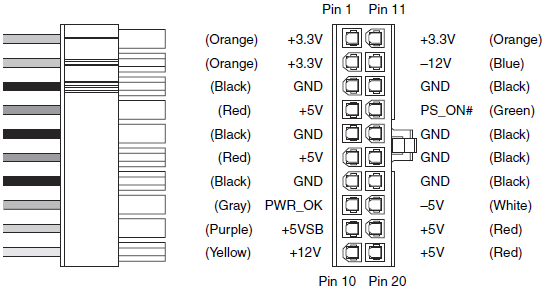
| Vista Home Premium 32-bit & Vista Ultimate 64-bit both Service Pack 2 W7 Pro RTM 7600 32 & 64 | Re: Tower not getting power? Does the PSU have a standard ATX style main power connector? ![]() If so, connect a multimeter to pins 7 and 9. Are you getting a reading of between 4.9 and 5.1 volts? |
My System Specs![]() |
| | #6 (permalink) |
| Vista Home Basic 32x SP1 | Re: Tower not getting power? Dwarf, That diagram was awesome. Thank you. Did what you said to do, and still nothing showed on the multimeter. |
My System Specs![]() |
| | #7 (permalink) |
| Windows 7 x64 build 7100 & Ubuntu 9.04 | Re: Tower not getting power? Garaboldi, I had the same problem with a brand new PSU I bought. My guess is its busted. That was the problem with mine. Also, judging by the fact that you got nothing from the MM, that confirms it. (Or am I just throwing BS around? Any concurring opinions?) ~Lordbob |
My System Specs![]() |
| | #8 (permalink) |
| Vista x64 Ultimate SP2, Windows 7 Ultimate x64 | Re: Tower not getting power? Garaboldi, I agree with Lordbob. If you got no reading with the MM, then it's time to get a new PSU. |
My System Specs![]() |
| | #9 (permalink) |
| Vista Home Premium 32-bit & Vista Ultimate 64-bit both Service Pack 2 W7 Pro RTM 7600 32 & 64 | Re: Tower not getting power? One thing that I forgot to mention - was the wiring to this connector the same as shown in my diagram, i.e. the colours? Did you have the PSU plugged in and powered on for that test? The reason for choosing this pin is that 5V is ALWAYS available here; this is what powers your system when it is sleeping (maintains the data in RAM) and allows other functions such as Wake On Lan, etc. If you have no reading here, then it is likely that the PSU has failed. If this is the case, and I'm afraid that it is looking likely, then you will need to replace it. Fortunately, if it is a standard unit, this is simple to do. Make sure that the replacement is of equal or greater rating, preferably greater, than the old one. |
My System Specs![]() |
| | #10 (permalink) |
| Vista Home Basic 32x SP1 | Re: Tower not getting power? One thing that I forgot to mention - was the wiring to this connector the same as shown in my diagram, i.e. the colours? Did you have the PSU plugged in and powered on for that test? The reason for choosing this pin is that 5V is ALWAYS available here; this is what powers your system when it is sleeping (maintains the data in RAM) and allows other functions such as Wake On Lan, etc. If you have no reading here, then it is likely that the PSU has failed. If this is the case, and I'm afraid that it is looking likely, then you will need to replace it. Fortunately, if it is a standard unit, this is simple to do. Make sure that the replacement is of equal or greater rating, preferably greater, than the old one. Before I order a replacement, I have to ask. Are the replacement units basically all uniform? (Size,cable connections and such) I'm only asking after looking at some 350 models on tigerdirect.com. They have there models with the fan on top of the unit. If I install it as is, the blower will be up against the outside case of the tower. That is never good. So I'm asking before I buy. |
My System Specs![]() |
![]() |
| Thread Tools | |
| |
Similar Threads | ||||
| Thread | Forum | |||
| Re: New tower wit vista 64 bit | Vista performance & maintenance | |||
| new tower fans | Overclocking & Cooling | |||
| PC tower mods | Chillout Room | |||
| HP Pavillion a6300f Tower with . . . | Vista General | |||
| Trouble in the tower. (Buttons gone, ect...) | Vista General | |||