

Airbot
---------------
The method used by most to upload screen shots and pictures is saving it in .jpeg/jpg/jpe format and by using the Snipping Tool and the Attachments (paperclip)  at the top of the Reply Box.
If you do not know about the Snipping Tool, please read this Tutorial on it.
How to use the Snipping Tool in Vista - Vista Forums
To start, use the Snipping Tool or whatever screenshot program you prefer and save it as a .jpeg/jpg/jpe.
When you are ready to include a screen shot in your thread/post, click on the paperclip in the reply box, where it will go to the Manage Attachments page.
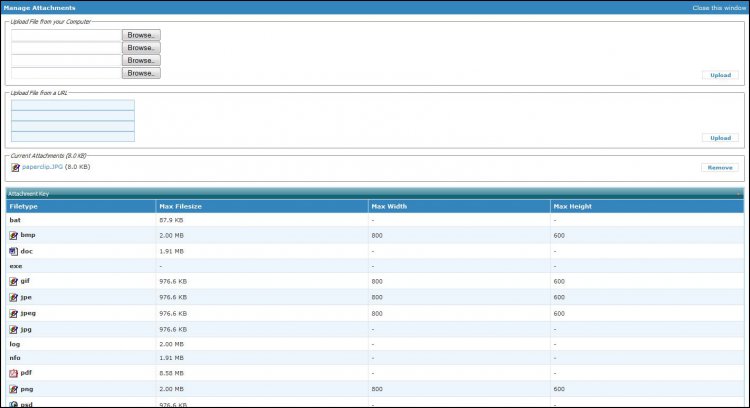
From there, click on the browse button to open up the File Upload window.
Insert you image and click on The Upload button to the right.
You can also upload the file from a url.
Now, close the Attachment window at the top right.
You can now reclick on your paperclip and pick the file to insert into your post.
It will look like this:
You can then Preview your post to see what it will look like.
This is not the only way to do this but it is one method used by many that keeps the threads/posts looking clean instead of having huge screenshots.
at the top of the Reply Box.If you do not know about the Snipping Tool, please read this Tutorial on it.
How to use the Snipping Tool in Vista - Vista Forums
To start, use the Snipping Tool or whatever screenshot program you prefer and save it as a .jpeg/jpg/jpe.
When you are ready to include a screen shot in your thread/post, click on the paperclip in the reply box, where it will go to the Manage Attachments page.
From there, click on the browse button to open up the File Upload window.
Insert you image and click on The Upload button to the right.
You can also upload the file from a url.
Now, close the Attachment window at the top right.
You can now reclick on your paperclip and pick the file to insert into your post.
It will look like this:
You can then Preview your post to see what it will look like.
This is not the only way to do this but it is one method used by many that keeps the threads/posts looking clean instead of having huge screenshots.
Last edited:
My Computer
System One
-
- Manufacturer/Model
- Airbot 2.0
- CPU
- Core i7 920 (D0) @ 4Ghz, 26c idle- 65c full load on air
- Motherboard
- Asus P6X58D Premium -Sata 6Gb/s - USB 3.0
- Memory
- 12GB Corsair Dominator -CMD12GX3M6A1600C8
- Graphics card(s)
- EVGA Nvidia GTX 480 -Fermi
- Sound Card
- ASUS Xonar D2X
- Monitor(s) Displays
- LG 24" Flatron W2453V-PF Full HD 1080p 2ms response time
- Screen Resolution
- 1920x1080@60hz
- Hard Drives
- 1 OCZ Vertex2 180GB SSD 1 TB Samsung Spinpoint F1 7200RPM 32MB cache 2 500GB WD Caviar Blacks 7200RPM 32MB cache (WD5001AALS) Pioneer DVD Burner DVR-S18M
- PSU
- Corsair HX1000W
- Case
- Cooler Master HAF 932
- Cooling
- Case Fans -3 230mm, 1 140mm/CPU - Tuniq Tower 120 Extreme
- Mouse
- Logitech Wireless MK700
- Keyboard
- Logitech Wireless MK700
- Internet Speed
- 100 MBPS DL 30.17Mbps UL 0.98Mbps
- Other Info
- Windows 7 Processor-7.7 RAM- 7.9 Graphics-7.9 Gaming Graphics- 7.9 HDD- 7.8 W.E.I final score= 7.7 Windows Vista=5.9


