Windows Vista Forums
Vista Forums Home Join Vista Forums Windows 7 Forum Vista Tutorials Tags
Welcome to Windows Vista Forums. Our forum is dedicated to helping you find solutions with any problems, errors or issues you are experiencing with Windows Vista. The Vista forum also covers news and updates and has an extensive Windows Vista tutorial section that covers a wide range of tips and tricks.

Go Back   Vista Forums > Vista Forums > General Discussion

Vista - Installed/Total Physical Memory Discrepancies

Reply
 
Old 03-07-2009   #1 (permalink)


Vista 64-bit Ultimate Win7 64-bit Ultimate XP SP3 32-bit Pro


Installed/Total Physical Memory Discrepancies

Hello all.


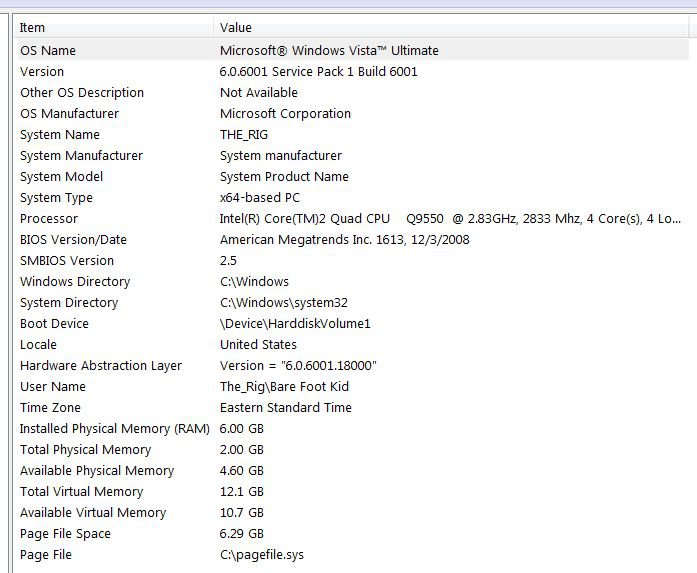
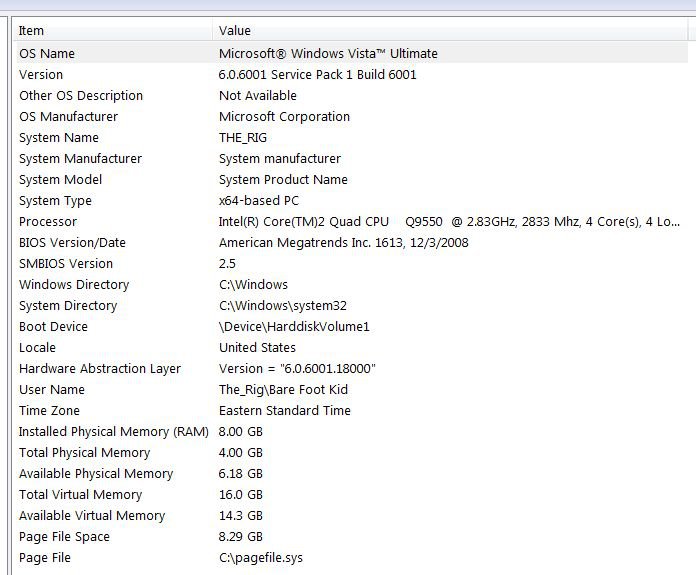
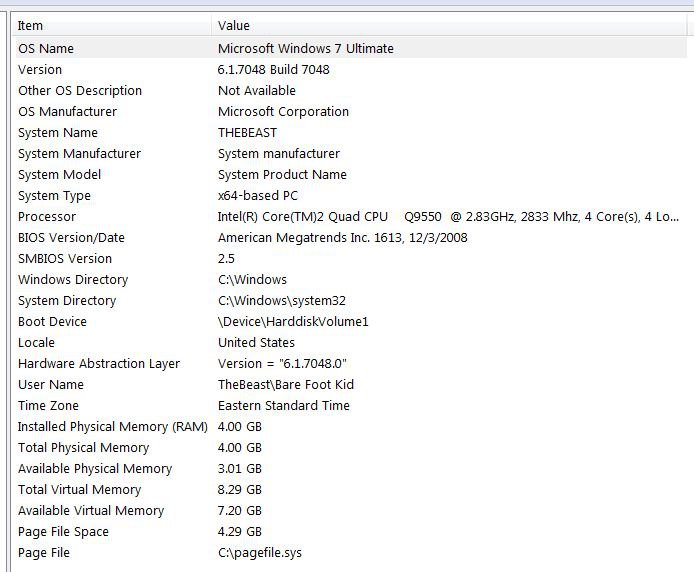
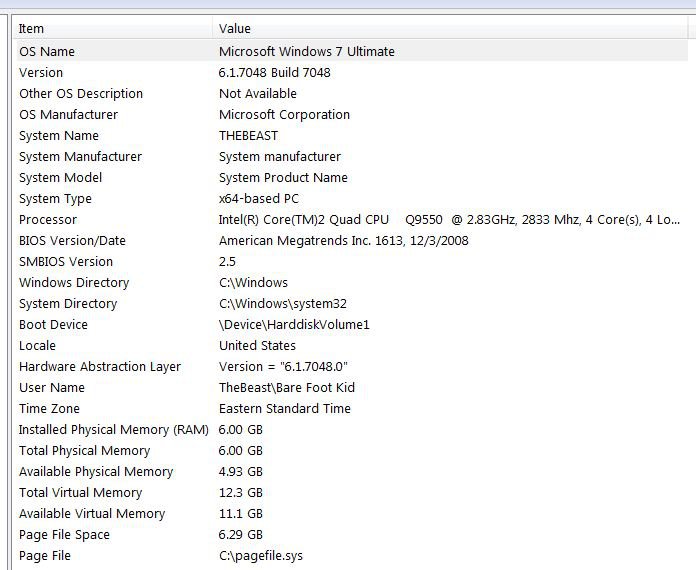
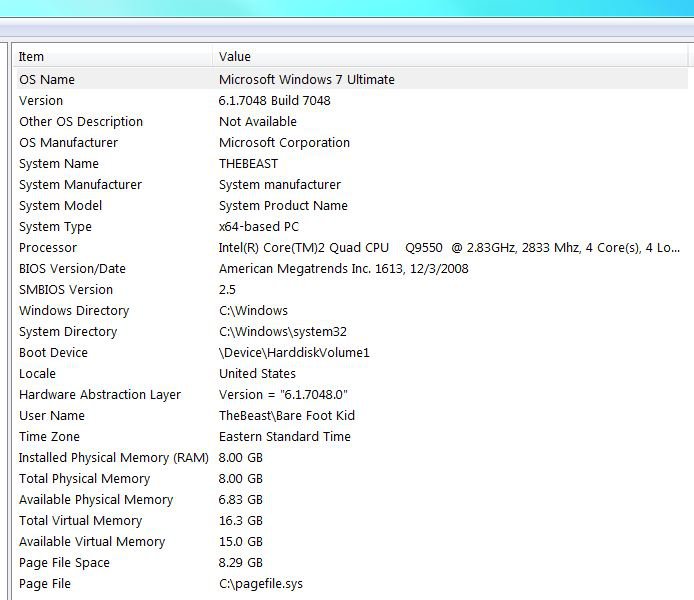
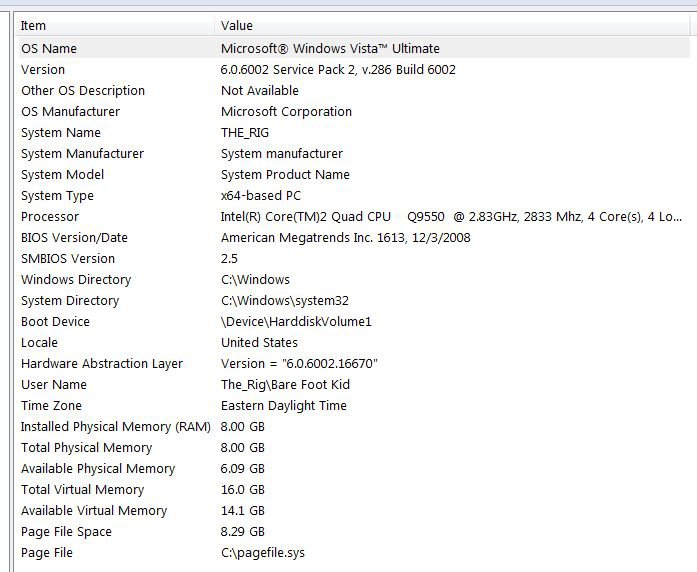
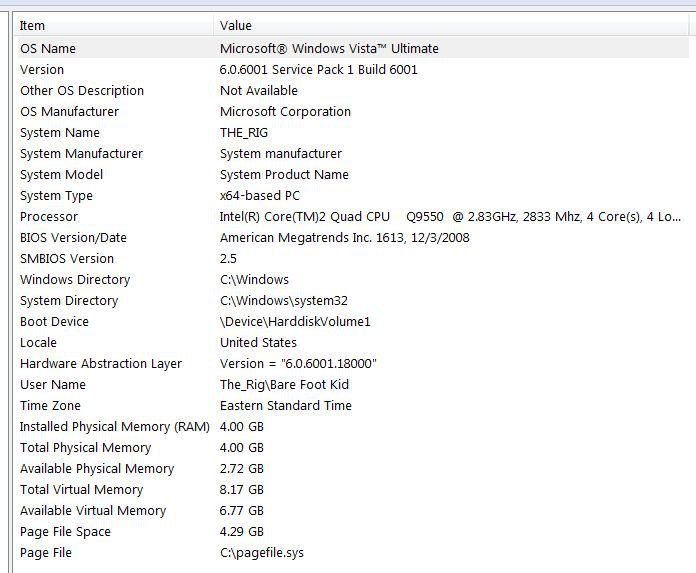
I'm wondering if someone can help me get an understanding of this? As you can see this is a 64-bit OS. I'm getting these contradictions in Vista and not Windows 7 on the same machine. A picture is worth a thousand words so ... below are 6 snips, the top 3 are Vista and the bottom 3 are Windows 7 for comparison.

Any ideas? Thanks. (click a snip to enlarge)
ram4gb-3-.jpg

ram6gb-2-.jpg

ram8gb-2-.jpg

ram4gb.jpg

ram6gb.jpg

ram8gb.jpg


Later Ted

My System SpecsSystem Spec
Old 03-08-2009   #2 (permalink)


Vista Home Premium 32-bit & Vista Ultimate 64-bit both Service Pack 2 W7 Pro RTM 7600 32 & 64


Re: Installed/Total Physical Memory Discrepancies

Hmm... Could it be a bug in System Information in Vista? From your snips, everything looks in order memory-wise, and the only discrepancy that I can find is that Total Physical Memory is being under reported by 4GB when you have more than this amount of memory physically installed, as indicated by Installed Physical Memory (RAM).

Unfortunately, I cannot check this for you because I have only 4GB installed, but perhaps someone would be kind enough to verify this for you.
My System SpecsSystem Spec
Old 03-08-2009   #3 (permalink)


Vista 64-bit Ultimate Win7 64-bit Ultimate XP SP3 32-bit Pro


Re: Installed/Total Physical Memory Discrepancies

Hello Dwarf!


Thank you for the reply, yes I'm in no hurry to get this sorted, I'll be around if anyone wants to work on this; I'll also add to their rep for help with this. ...


Later Ted
My System SpecsSystem Spec
Old 03-08-2009   #4 (permalink)


Vista Home Premium 32-bit & Vista Ultimate 64-bit both Service Pack 2 W7 Pro RTM 7600 32 & 64


Re: Installed/Total Physical Memory Discrepancies

You're welcome, Ted.
My System SpecsSystem Spec
Old 03-08-2009   #5 (permalink)


Windows 7 Ultimate x64 (Vista went bye-bye on this rig)


Re: Installed/Total Physical Memory Discrepancies

you have to request a hotfix from microsoft to fix the problem.

The Microsoft System Information (Msinfo32.exe) tool reports the incorrect amount of physical memory in a Windows Server 2008-based or Windows Vista Service Pack 1-based computer that has more than 4 GB of physical memory installed

i just performed the install. make sure you use the 64bit version of ie to access the microsoft website or the the browser will not correctly report the version of windows you have.

picture one is before the hotfix install, while, obviously, picture two is after the hotfix install.
Attached Thumbnails
capture02.jpg   capture03.jpg  
My System SpecsSystem Spec
Old 03-08-2009   #6 (permalink)


Vista 64-bit Ultimate Win7 64-bit Ultimate XP SP3 32-bit Pro


Re: Installed/Total Physical Memory Discrepancies

Quote  Quote: Originally Posted by mpcrsc562
you in charleston? i used to be stationed at the afb 1989-1997. i miss it down there--but i don't miss that heat and humidity!
Hello mpcrsc562.

Yes I'm about 20 miles out of Charleston in a little town called Summerville SC. I've been here over 30 years and I love it, it never snows here and the humidity kills me. My kid brother retired from the Air Force.

Back to business: I was going to install the hotfix but I kept getting "this page cannot be displayed" so I installed the SP2 RC instead and that fixed it; as I said; check your rep!

Thank you.

ram_corrected.jpg


Later Ted
My System SpecsSystem Spec
Old 03-08-2009   #7 (permalink)


Vista Ultimate SP2 x64 Windows 7 Ultimate x64 TECHNET


Re: Installed/Total Physical Memory Discrepancies

The SP2 fixed it fro you huh Ted. I guess like I said, I remember the SP1 fixed the full 4GB recognization problem, so I'm glad the SP2 seemed to fix this discrepancy for you as well. I don't have Vista installed right now, but I didn't check for this with my system info when I installed 8GB of memory with Vista.
My System SpecsSystem Spec
Old 03-08-2009   #8 (permalink)


Vista 64-bit Ultimate Win7 64-bit Ultimate XP SP3 32-bit Pro


Re: Installed/Total Physical Memory Discrepancies

Hello Airbot.


Yes, I should've listened to when you told me the fix yesterday. ....

Thank you!


Later Ted
My System SpecsSystem Spec
Reply

Thread Tools


Similar Threads
Thread Forum
Total vs Available Physical Memory Prob General Discussion
installed physical memory vs total physical memory General Discussion
Vista 64 Installed Physical Memory vs Total Physical Memory Vista General
Installed Physical Memory/Total Physical Memory Vista installation & setup
4GB Ram Installed / Total Physical Ram = 2.75GB? Vista hardware & devices


Vista Forums is an independent web site and has not been authorized,
sponsored, or otherwise approved by Microsoft Corporation.
"Windows Vista", the Start Orb, and related materials are trademarks of Microsoft Corp.
© Designer Media Ltd

1 2 3 4 5 6 7 8 9 10 11 12 13 14 15 16 17 18 19 20 21 22 23 24 25 26 27 28 29 30 31 32 33 34 35 36 37 38 39 40 41 42 43 44 45 46