Windows Vista Forums

Deleting remnants of a VISTA search
  1. #1


    Newbie
    Join Date : Apr 2009
    Posts : 5
    Vista 32
    Local Time: 12:09 PM

    Deleting remnants of a VISTA search

    Hi,

    I want to delete my browsing history completely from a pc. I had done all the usual, tools, internet options & delete. I have also used the Vista search function and found a couple of folders containing relevant material and deleted those. I have deleted the cookies manually by unhiding the directory and sniping those out.

    HOWEVER,

    if I type the name of a site into the VISTA search - a string of references appear above - as if they are still in the browing history - but they are not as I have deleted them.

    Is there some other reference I need to delete somewhere? perhaps some sort of shadow directory structure?

    The references appear as http// etc above - but these do not lead anywhere if I click on them. They must be embedded in some some sort of script somewhere.

    can anyone point me in the right direction?

    many thanks


      My System SpecsSystem Spec

  2. #2
    garysgold's Avatar

    Senior Member

    Join Date : Mar 2008
    Maine, USA
    Posts : 930
    Vista Ult 64bit Windows 7 64 bit Server 2008 RC2
    Local Time: 02:09 PM
    usa us maine


    Re: Deleting remnants of a VISTA search

    Hello Bacchus2,

    Welcome to the Vista Forums.

    When you start to type a URL into the address bar in IE, it will search both history and favorites. Since you have deleted browsing history, they must be coming from your favorites folder. If you find things when typing http:// into the start menu search bar, then they are finding files with http: in the name or inside of a file on your computer, but clicking should open the file unless you don't have permission to do so. Also when typing http:// into the search bar, that is listed at the top of the list. Clicking on it won't go anywhere unless you have typed in a valid URL. Hope this helps.

    Enjoy your stay.
    Gary

    Many here use CCleaner for this. I'd be careful with the registry cleaner portion of the program, however. See here for link. Free Software List for Vista

      My System SpecsSystem Spec

  3. #3


    stew2 Guest

    Re: Deleting remnants of a VISTA search

    I wouldnt use Ccleaner, a much safer alternative is iePrivacyKeeper:

    Download IE Privacy Keeper, Flash Saving Plugin, etc.

    If you want a regcleaner as well iv been using the one built into Tune Up Utilities for the last two years and have had no problems:

    http://www.tune-up.com/download/

      My System SpecsSystem Spec

  4. #4


    Newbie
    Join Date : Apr 2009
    Posts : 5
    Vista 32
    Local Time: 12:09 PM


      Thread Starter

    Re: Deleting remnants of a VISTA search

    Hi,

    Many thanks for your responses.

    I think I follow your thinking. As I am using the VISTA search the "reference" must be on my PC somewhere.

    for example I type in "autotrader" into the VISTA search and a list of http//autotrader.... web page links appear in the grey box above - that is part of the search function. if I click on them - they just take me to google (my homepage) as the references should have been removed - I deleted these out of my history and it isn;t in my favourites.

    So this reference must be stored somewhere else - perhaps in the registry? I'll try the privacy keeper one below (thanks for the hint) if it is the safer one and give the PC a good cleaning - hopefully that will sort it out

    thanks again

      My System SpecsSystem Spec

  5. #5
    MrNeeds's Avatar

    PC Geek


    Join Date : Oct 2008
    Lymm, Cheshire, UK
    Posts : 1,823
    Vista Home Premium x64 / 7 Ultimate x64
    Local Time: 07:09 PM
    uk uk england


    Re: Deleting remnants of a VISTA search

    Quote Originally Posted by Bacchus2 View Post
    Hi,

    Many thanks for your responses.

    I think I follow your thinking. As I am using the VISTA search the "reference" must be on my PC somewhere.

    for example I type in "autotrader" into the VISTA search and a list of http//autotrader.... web page links appear in the grey box above - that is part of the search function. if I click on them - they just take me to google (my homepage) as the references should have been removed - I deleted these out of my history and it isn;t in my favourites.

    So this reference must be stored somewhere else - perhaps in the registry? I'll try the privacy keeper one below (thanks for the hint) if it is the safer one and give the PC a good cleaning - hopefully that will sort it out

    thanks again
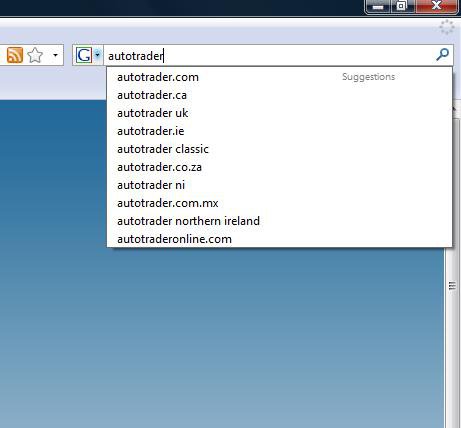
    its not vista search, its google search, and the references are from the internet searching google. like this
    search.jpg
    if this is not what you are referring to, then the vista search is what you are referring to, then you have installed google desktop search and has the same function.

      My System SpecsSystem Spec

  6. #6


    Newbie
    Join Date : Apr 2009
    Posts : 5
    Vista 32
    Local Time: 12:09 PM


      Thread Starter

    Re: Deleting remnants of a VISTA search

    Hi,

    thanks for that link - but that's not what I mean - probably just my bad description

    if you click on the "windows" button at the bottom left corner of the screen you get a search option -- it says "start search"

    it examines all the PC files - the files are located there

    I've attached a screenshot (I hope)

    this particular example is for a site called zeno. The "links" that teh Vista search shows are no longer there as I have deleted them from everywhere I can think of - yet they still appear in the Vista Search.

    I hope that's clarified.

    thanks for coming back to me

      My System SpecsSystem Spec

  7. #7


    stew2 Guest

    Re: Deleting remnants of a VISTA search

    Hi Bacchus2 if you go to the system tab in iePrivacyKeeper and tick the boxes and click cleanup now and do the same for the Internet Explore and Firefox tabs this will get rid of the data.

    Attachment 11610

    If this doesnt work then download tune up utilities and i'l guide you through it.

    Last edited by stew2; 16 Mar 2011 at 04:29 PM.
      My System SpecsSystem Spec

  8. #8


    Newbie
    Join Date : Apr 2009
    Posts : 5
    Vista 32
    Local Time: 12:09 PM


      Thread Starter

    Re: Deleting remnants of a VISTA search

    Hi - thanks - I've just got home so I'll download that and try it out tonight - hopefully that will do the trick

    you(s) have all been very helpful

    thanks again

      My System SpecsSystem Spec

  9. #9


    stew2 Guest

    Re: Deleting remnants of a VISTA search

    No problem. Just remember that search bar lists everything on your pc so for example if you type "msn" into it it will come up with a list as msn is in your Internet Explorer favorites.

      My System SpecsSystem Spec

  10. #10
    garysgold's Avatar

    Senior Member

    Join Date : Mar 2008
    Maine, USA
    Posts : 930
    Vista Ult 64bit Windows 7 64 bit Server 2008 RC2
    Local Time: 02:09 PM
    usa us maine


    Re: Deleting remnants of a VISTA search

    Did you have the autotrader link on your computer at some point? Could be that it's in the index (when you do a search, it searches the index, not the entire computer) and thus comes up as an option in search. This will clear itself in time. If you need to get rid of it immediately, you will need to turn off indexing to clear the cache then reboot and turn it back on to rebuild the cache. Not sure if the reboot is necessary, but can't hurt. I have had this occur with recently deleted files. If I click on them they don't open, as they no longer exist on the computer. More info here: Index - Enable or Disable

    Gary

      My System SpecsSystem Spec

Page 1 of 2 12 LastLast
Deleting remnants of a VISTA search problems?

Similar Threads
Thread Thread Starter Forum Replies Last Post
Deleting User Account and Remnants Zan Vista General 1 01 Aug 2009
Deleting Search Results-Vista david Vista General 0 27 May 2009
Deleting Vista Search Folders pvc Vista file management 30 03 Apr 2008
Search and deleting files in Vista atrix415 Vista General 8 23 Jan 2008
Deleting the Search Index in Vista Beta 2 =?Utf-8?B?Um9uYWxk?= Vista file management 0 04 Aug 2006