![]() |
![]() | ![]() | ![]() | ![]() | ![]() | ![]() | ![]() |
| Welcome to Windows Vista Forums. Our forum is dedicated to helping you find solutions with any problems, errors or issues you are experiencing with Windows Vista. The Vista forum also covers news and updates and has an extensive Windows Vista tutorial section that covers a wide range of tips and tricks. |
| |||||||
![]() |
| |
| | #1 (permalink) |
| Vista Ultimate x64 | Disk Partition cannot be extended I have the following setup (see below) and would like to add the unallocated space to the C_drive. Is this possible? Thanks |
My System Specs![]() |
| | #2 (permalink) |
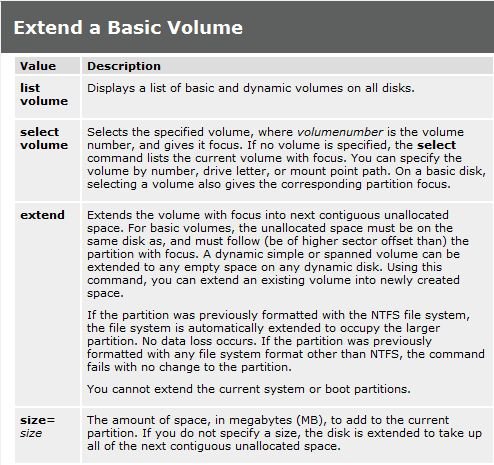
| Vista x64 Ultimate SP2, Windows 7 Ultimate x64 | Re: Disk Partition cannot be extended Hello Peter, You may be able to using METHOD TWO (steps 2 to 7) in this tutorial below to extend the C: partition (volume) into all unallocated space on that hard drive. Partition or Volume - Extend - Windows 7 Forums Hope this helps, Shawn |
My System Specs![]() |
| | #3 (permalink) |
| Vista Home Premium 32-bit & Vista Ultimate 64-bit both Service Pack 2 W7 Pro RTM 7600 32 & 64 | Re: Disk Partition cannot be extended |
My System Specs![]() |
| | #4 (permalink) |
| Vista Ultimate x64 | Re: Disk Partition cannot be extended I am afraid Dwarf is Right. I did everything that is described in option 2of the tutorial but ended up with this screen. Damn.. |
My System Specs![]() |
| | #5 (permalink) |
| Vista Ultimate X64 SP2 | Re: Disk Partition cannot be extended There is a way to extend a volume to the left- Use this partitioner: see tutorial:Dual Boot using free partitioning software Note- this states XP, but can apply to all How to remove Xp from a XP/Vista Dual boot when XP is the first Partition Make your Vista partition the active partition, run Start-up repair from the Vista DVD (may need to more than once). When you can boot into Vista, you can do what you want with the XP partition. You will need a third party product such as Paragon Partitioner to combine the space into one partition if XP is on the first partition. Remove XP Boot Start> in search bar type msconfig>click program>click continue> In System Configuration-click "boot">delete XP from Boot Disk Management-Mark Vista Partition as active/change drive letter Start>right click computer-click "manage">Click Continue>Click "Disk Management">right click on Vista Volume at bottom. |
My System Specs![]() |
| | #6 (permalink) |
| Vista Ultimate x64 | Re: Disk Partition cannot be extended Thanks for your help, but EUSEUS is working on it as we speak. So I took the "easy way" ![]() Regards, Peter BTW. Bink, this forum rocks....Big Time ![]() ![]() ![]() Thanks for all your help and support so far. |
My System Specs![]() |
| | #7 (permalink) |
| Vista Ultimate X64 SP2 | Re: Disk Partition cannot be extended The above Paragon is. It is the bootable ISO ready to be burned to disk, and booted off of. "For Vista 64 bit, Bootable CD or not a home user, you should consider purchasing a Professional Edition (cost $32)." Source: http://www.yousaytoo.com/nesher/free...download/36263 |
My System Specs![]() |
| | #8 (permalink) |
| Vista Home Premium 32-bit & Vista Ultimate 64-bit both Service Pack 2 W7 Pro RTM 7600 32 & 64 | Re: Disk Partition cannot be extended Here is a link to a webpage (sorry for it being technical ) which explains why you cannot extend a partition LEFT without using a 3rd party partition manager which you run outside of Windows.NTFS.com Partition Boot Sector on PC hard drives. Notice that it says: Quote: Originally Posted by NTFS.com When you format an NTFS volume, the format program allocates the first 16 sectors for the boot sector and the bootstrap code. |
My System Specs![]() |
| | #9 (permalink) |
| Vista 64-bit Ultimate Win7 64-bit Ultimate XP SP3 32-bit Pro | Re: Disk Partition cannot be extended Thanks Dwarf for the link. Later Ted |
My System Specs![]() |
| | #10 (permalink) |
| Vista Ultimate x64 | Re: Disk Partition cannot be extended Thanks again for your help but I needed to continue with this machine so I indeed took the shortcut of spending a few bucks, and as we speak I have recovered the diskspace and can continue working :-) |
My System Specs![]() |
![]() |
| Thread Tools | |
| |
Similar Threads | ||||
| Thread | Forum | |||
| How do u delete an extended partition?? | General Discussion | |||
| How To Delete Extended Partition Containing Logical Volume? | Vista General | |||
| How to create extended partition on Vista | Vista General | |||
| Moving free space from one extended partition to the Vista partition | Vista General | |||
| Extended Disk Cleanup | Tutorials | |||