![]() |
![]() | ![]() | ![]() | ![]() | ![]() | ![]() | ![]() |
| Welcome to Windows Vista Forums. Our forum is dedicated to helping you find solutions with any problems, errors or issues you are experiencing with Windows Vista. The Vista forum also covers news and updates and has an extensive Windows Vista tutorial section that covers a wide range of tips and tricks. |
| |||||||
![]() |
| |
| | #1 (permalink) |
| Vista home | custom folder picture not sure if it's possible or not but when you change the picture, it still shows the pic inside the folder. Is it possible to change then entire picture of a folder and not have it show a picture inside of the folder? example ![]() Instead of it showing an alien in the folder, could you make it just display an alien? I'm using vista home Thanks Shawn |
My System Specs![]() |
| | #2 (permalink) |
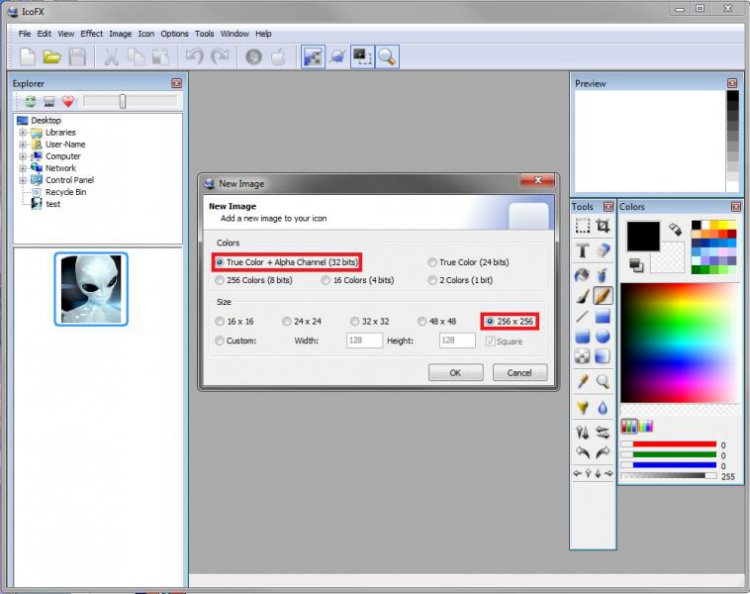
| Vista x64 Ultimate SP2, Windows 7 Ultimate x64 | Re: custom folder picture Hello Mauls, and welcome to Vista Forums. ![]() You can create a 256x256 pixel icon with the image you want using a program like the free ISOFX, then change the folder icon to the icon you have just created. Hope this helps, Shawn |
My System Specs![]() |
| | #3 (permalink) |
| Vista home | Re: custom folder picture Thanks for the reply Brink. It works great! |
My System Specs![]() |
| | #4 (permalink) |
| Vista home | Re: custom folder picture Another issue, whenever i make the icon, and go to the folder, and select view Large Icons, it stills keeps the icons small, but creates a big white blank box around it. So is there a way to make the icons be able to be view in the "large" folder view. I created them at the 256 x 256 setting, but they seem to stay a small size. |
My System Specs![]() |
| | #5 (permalink) |
| Vista x64 Ultimate SP2, Windows 7 Ultimate x64 | Re: custom folder picture Mauls, When you select the image in IsoFX, check to make sure that you have these items below selected. Afterwards, you can save the file as a .ico. It should be able to be viewed as a Large or Extra Large icon normally without the with box around it. It does for me with it set like this. ![]() Hope this helps. |
My System Specs![]() |
| | #6 (permalink) |
| Vista home | Re: custom folder picture still having issues. ![]() The pic on the left is the Icon that I made, with your exact settings, the one on the left if just a .jpg in the folder. Reason for doing this is I'm putting all my dvd's onto my external HD, and I'm wanting to make the dvd cover pic, display as an icon for each folder, but as i said earlier, I can't get it to display any larger then what you are seeing in the picture i posted. Thanks, shawn |
My System Specs![]() |
| | #7 (permalink) |
| Vista x64 Ultimate SP2, Windows 7 Ultimate x64 | Re: custom folder picture Go ahead and attach the image you want to create a icon with here, and I'll create a ICO file for it to see if I may be able to get to work for you. If so, I'll post it back for you to download. |
My System Specs![]() |
| | #8 (permalink) |
| Vista home | Re: custom folder picture Here ya go. ![]() Thanks |
My System Specs![]() |
| | #9 (permalink) |
| Vista x64 Ultimate SP2, Windows 7 Ultimate x64 | Re: custom folder picture Here you go. It works for me, so I hope it will for you as well. |
My System Specs![]() |
| | #10 (permalink) |
| Vista home | Re: custom folder picture no luck on my end, must be a setting on my laptop or something. Here it is in the different views: Medium ![]() Large: ![]() Extra Large: ![]() Notice the blank box it puts around it on the larger views. I'm out of idea's, I'll just stick with the jpeg image in the folder for now. Thanks for your time and help |
My System Specs![]() |
![]() |
| Thread Tools | |
| |
Similar Threads | ||||
| Thread | Forum | |||
| Custom Folder and Folder Association | Vista file management | |||
| Apply custom folder details to all subfolders | Vista General | |||
| Custom Picture Question | Vista account administration | |||
| Custom properties on a folder | Vista General | |||
| My Picture folder won't show thumbnail of my real picture | Vista General | |||