@H2SO4 Thanks, I've had a look at your article but it goes completely over my head. Is there any info I could post that could help identify the problem?
Already 2 more BSODs today and it isn't even lunchtime. Maybe it's time to buy a Mac

Seriously though, is this likely to be a fixable problem or is it time for a new machine?
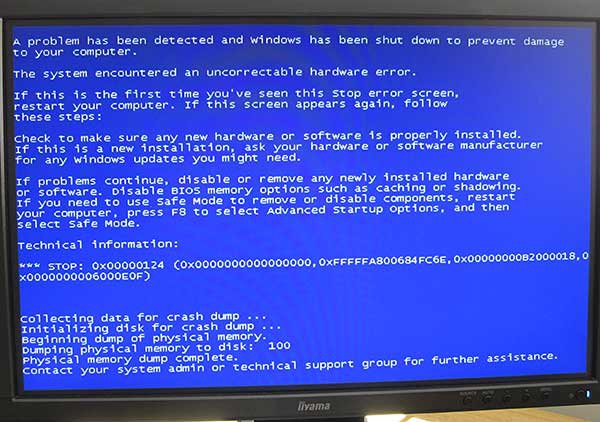
A stop 0x124 is fundamentally different from other types of bluescreens because the "we must crash now" trigger is the hardware, not software. The OS passes on the hardware error report as a "stop 0x124" because it can't do anything else once the hardware has signalled an uncorrectable error condition. It's theoretically possible for drivers to indirectly cause hardware to trigger MCEs by "driving" in ways that are confusing to the hardware, but from the point of view of a home user that disctinction is so subtle as to be irrelevant.
It's important to note that there are literally squillions of different possible causes for that hardware error report (it's called a "Machine Check Exception" - MCE), and one person's stop 0x124 is likely to be entirely different to another's. Hence, posts which begin with "I had that error too, and then I reconnected the mini-molex on my FDD to fix it..." are almost always misguided because they're random stabs in the dark which are statistically highly unlikely to help anyone else experiencing MCEs.
It's relatively simple (but painful) to interpret the hardware's error report. It's in the so-called MCi_Status register, the contents of which are actually visible as bugcheck parameters 3 and 4 in that photo of your screen, as well as each of your minidumps. Interpreting the numbers is just a matter of consulting information published by Intel and AMD. (I've done it below based on your first minidump. This is such a common request that I might code a little utility to automate the process.)
The trouble is that the hardware's complaints are never "practical", in the sense that they would tell you what's wrong in layman's terms and include a recommendation for how to fix it. Instead, it's esoteric stuff which only tends to make sense to hardware folks and driver developers. Hence, a basic "0x124 home user troubleshooting strategy" might look something like this:
0) If it's under warranty, take it back to the shop. The hardware is reporting errors and you don't want to run the risk of troubleshooting it yourself with an uncertain outcome - you just want a machine that doesn't report MCE errors. Otherwise...
1) If overclocking, don't. Hardware that is driven beyond its design specs - by overclocking - can malfunction in weird ways.
2) Open up the side of the case and point a mains fan into the guts of the PC to rule out most (lack of) cooling issues.
3) Update all hardware-related drivers: video, sound, RAID (if any), NIC... anything that interacts with a piece of hardware. This is a desparation step, but it's legit once you're faced with having to rip out and replace bits of the machine, plus it's generally good practice to run the latest drivers anyway.
4) From time to time the OS drivers themselves may be contributing to an MCE. The scenarios are very specific and very rare, but try applying the relevant updates anyway. For example:
http://support.microsoft.com/kb/956115
5) Clean and de-dust the inside of the machine. Reseat all connectors and memory modules. Use a can of compressed air to clean out the RAM DIMM connectors as much as possible.
6) If all else fails, start ripping out bits of hardware one-by-one until a culprit is found. Obviously, this is a lot easier if you've got equivalent hardware lying around to perform swaps.
=========================
The MCE info in the first of the minidumps you've posted suggests a bus parity error is being reported:
1011001000000000000000000001100000000110000000000000111000001111
3210987654321098765432109876543210987654321098765432109876543210
___6_________5_________4_________3_________2_________1
63: VAL - MCi_STATUS register valid
61: UC - Error uncorrected
60: EN - Error enabled
57: PCC - Processor context corrupt
36: component has received a parity error on the RS[2:0]# pins for a response transaction.
35: (Reserved)
27/26/25: Bus queue error type = "Response Parity Error" (011)
MCA [15:0]:
0000 1110 0000 1111
000F 1PPT RRRR IILL
F: "Normal" filtering (0)
PP: Generic (11)
T: Request did not time out (0)
RRRR: Generic Error (0000)
II: Other transaction (11)
LL: Memory hierarchy level "generic" (11)