
Windows Vista Forums
Vista Forums Home Join Vista Forums Windows 7 Forum Vista Tutorials Tags
Welcome to Windows Vista Forums. Our forum is dedicated to helping you find solutions with any problems, errors or issues you are experiencing with Windows Vista. The Vista forum also covers news and updates and has an extensive Windows Vista tutorial section that covers a wide range of tips and tricks.


Go Back   Vista Forums > Vista Forums > General Discussion

RB

Vista - Windows Features - Turn on or off. Advice needed.

Reply
 
05-11-2009   #1


Vista Home Premium 32bit [x86] - SP2


Windows Features - Turn on or off. Advice needed.

This is my current setup in Control Panel>Programs and Features>Turn Windows features on or off.
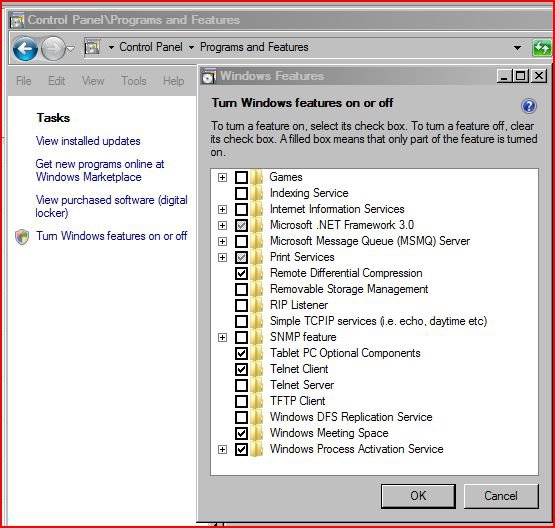
windows-features-turn-off.1.jpg

To be frank, I haven't a clue what most of these features mean or do, and Help and Support has nothing to explain the function of the majority of them.

For example, if I rest my cursor over Microsoft Message Queue (MSMQ) Server, it tells me that it 'Manages and Catalogues removable media and operates automated media devices'.

Because I do use SDHC Memory Cards, USB Memory Sticks, Cameras, Card Readers and other sundry media hardware, should I then have this box ticked? If not, then just what does this feature relate to, or do?

Similarly, what the heck is the TFTP Client, and what does that do?

Advice about the other open boxes and their functions, would be appreciated, with the exception of Games, which is self-explanatory, and something I have no interest in anyway. Recommended settings with reasons for activation, will help me understand these features.

My System SpecsSystem Spec
05-11-2009   #2


Vista Ultimate x64


Re: Windows Features - Turn on or off. Advice needed.

This site explains it: Windows Vista Feature Guide
My System SpecsSystem Spec
05-11-2009   #3


Win7x64


Re: Windows Features - Turn on or off. Advice needed.

Indexing: builds up a seachable index of one or more target directories. The index can then be exposed for querying either via the built-in UI or an API. If you have to ask, you don't need it (IYHTAYDNI)

IIS: Web server (HTTPD). Used if you want to serve web content from your machine.

.Net Framework: Used by portions of the OS as well as many apps. Should be enabled.

MSMQ: A system for dropping "messages" into a queue and having them dealt with in some fashion. Nothing to do with USB/flash memory cards per se. I don't know where that tooltip text you quoted is from, but it's not relevant to MSMQ. (IYHTAYDNI)

Print Services: Line Printer Daemon/Line Printer Remote. Used for so-called "network printing". It's unlikely you need it unless you've got (an expensive) network printer.

Remote Diff Compression: on-the-fly compression of content in the network stack. Leave it enabled unless you've got a good reason to turn it off.

RIP Listener: Allows your machine to pick up on Routing Information Protocol (RIP) broadcasts made by RIP routers. This is a way of modifying the route table to deal with changing conditions. (IYHTAYDNI)

Simple TCPIP services: a collection of network services commonly used in the UNIX world but almost entirely irrelevant under Windows. (IYHTAYDNI)

SNMP: Simple Network Management Protocol. A lie, because it's anything but simple. Used for signaling information about events and error conditions via SNMP "traps" to a management console located elsewhere on the network. (IYHTAYDNI)

Tablet PC components: includes the snipping tool and other things which are useful even if yours is not a Tablet PC. Best to leave it enabled.

Telnet client: a small utility for making outbound (client) connections to access command console functionality on another machine.

Telnet server: a listener process (on port 23) to allow incoming telnet connections. Most home users have no use for this. (IYHTAYDNI)

TFTP client: Trivial FTP client. A small utility which can make outbound connections to a TFTP server via UDP port 69. It's potentially slightly faster than FTP because there is no TCP overhead, but because there's no guaranteed delivery the data may be corrupted or incomplete. (IYHTAYDNI)

DFS: Distributed File System. Used in large enterprise situations to in effect make file shares on several machines look like the same repository. The benefit is localised access wherever you may be on the corporate network. (IYHTAYDNI)

Windows Meeting Space: a collaboration tool. http://www.microsoft.com/windows/win...ing-space.aspx

Process Activation Service: sometimes used for advanced websites running under IIS. (IYHTAYDNI)


Hope this helps
My System SpecsSystem Spec
05-11-2009   #4


Vista home premium 64 bit


Re: Windows Features - Turn on or off. Advice needed.

Quote:
Tablet PC components: includes the snipping tool and other things which are useful even if yours is not a Tablet PC. Best to leave it enabled.
Snipping will work with this turned off.

I have this feature turned off and I have a tablet. The problem is if you have this feature on and you use multiple monitors then the tablet will span both monitors reducing the horizontal resolution of the tablet by half.

Using the drivers and software of the tablet then the pen will work on one monitor (your main canvas) and when you use the mouse you can select the menus from the second monitor.
My System SpecsSystem Spec
05-11-2009   #5


Win7x64


Re: Windows Features - Turn on or off. Advice needed.

Quote  Quote: Originally Posted by roy69 View Post
Snipping will work with this turned off.
Oh, I didn't realise that was the case. Thanks.
My System SpecsSystem Spec
05-11-2009   #6
ace


32bit vista home premium


Re: Windows Features - Turn on or off. Advice needed.

when i turned thie off my snipping tool DID NOT WORK
when turned back on it was ok again
My System SpecsSystem Spec
05-11-2009   #7


Vista home premium 64 bit


Re: Windows Features - Turn on or off. Advice needed.

My mistake, I do make them.
I was refereing to the Tablet service not feature.
My System SpecsSystem Spec
05-11-2009   #8
ace


32bit vista home premium


Re: Windows Features - Turn on or off. Advice needed.

no problem
My System SpecsSystem Spec
05-12-2009   #9


Vista Home Premium 32bit [x86] - SP2


Re: Windows Features - Turn on or off. Advice needed.

Thanks all for your help and input to my enquiry. A few issues have been clarified, and I now have a hefty load of reading to do. However, most of it went well over my head as it left contrails at 30000 metres.

As far as I know, these are default settings, as I cannot recall ever making any changes or adjustments to this particular field of settings.

So I will leave well alone, and not touch a thing.

Finally, as a silly old fart, I was a bit perplexed by this person 'Eihyetta Yidnee' that H2SO4 kept referring to as [IYHTAYDNI]. I'd never seen this before and could not figure the meaning. That was until I had a bit of brainpower-food [beer!], and then realised the subliminal message that [IYHTAYDNI] contained....If you have to ask you don't need it!.......I did.......and I don't!! Thanks all.
My System SpecsSystem Spec
05-12-2009   #10


Vista Home Premium x64 SP2 / Windows 7 RC x64


Re: Windows Features - Turn on or off. Advice needed.

My System SpecsSystem Spec
Reply

RB


Thread Tools


Similar Threads for: Windows Features - Turn on or off. Advice needed.
Thread Forum
Can't turn Windows features on or off Vista General
Why in Vista Ultimate am I unable to turn on "Internet Information Services" in the turn windows features on or off ? Vista security
Cannot Turn Windows Features On or Off Vista General
Turn windows features on and off Vista General


Vista Forums is an independent web site and has not been authorized,
sponsored, or otherwise approved by Microsoft Corporation.
"Windows Vista", the Start Orb, and related materials are trademarks of Microsoft Corp.
© Designer Media Ltd