Hi... Hope someone can help me. I have a virus and am trying to do a fresh clean install of vista home premium. When I boot from the install disc and run the install program it give me error code 0x80004005 and says that my computer does not have enough free space. It advises me to free up enough space in order to copy files. Problem is I have tons of free space on my hardrive. I have two partitions and both have plenty of free space. Help!!

You are using an out of date browser. It may not display this or other websites correctly.
You should upgrade or use an alternative browser.
You should upgrade or use an alternative browser.
Vists Home premium won't install
- Thread starter dponlyme
- Start date

Delete the partions and then install Vista onto the unpartitioned drive. D0 this through the install disk.
My Computer
System One
-
- CPU
- T7600G Core2Duo 2.66 Ghz
- Motherboard
- Intel 945PM + ICH7 Chipset
- Memory
- 4GB DDR2 PC2-5300 667MHz
- Graphics card(s)
- Mobility Radeon x1900 256MB
- Sound Card
- Realtek HD
- Monitor(s) Displays
- WUXGA 17"
- Screen Resolution
- 1920X1200
- Hard Drives
- 640GB 7200RPM SATA/RAID 0 (2x320GB) and 320GB 7200RPM External
- Mouse
- Wireless Microsoft 3000
- Internet Speed
- 10 mbps/2 mbps
- Other Info
- Optical Drive: Panasonic UJ-220 DL BD-RE (Blu-Ray)

If you have a virus, you may need to delete the partition - go to Drive Options (advanced) - see this tutorial:
http://www.vistax64.com/tutorials/117366-clean-install-full-version-vista.html
You may want to copy off any important data first.
http://www.vistax64.com/tutorials/117366-clean-install-full-version-vista.html
You may want to copy off any important data first.
My Computers
System One System Two
-
- Operating System
- Vista
- CPU
- Intel E8400
- Motherboard
- ASRock1333-GLAN R2.0
- Memory
- 4gb DDR2 800
- Graphics card(s)
- nvidia 9500GT 1gb
-
- Operating System
- win7/vista
- CPU
- intel i5-8400
- Motherboard
- gigabyte b365m ds3h
- Memory
- ballistix 2x8gb 3200
It won't allow me to delete the partition. It says its an active system partition.
My Computer
You can't delete it from within Windows.
You need to boot the installation disk - it loads files into memory - then select language and keyboard, Install Now - when you see a window like this :
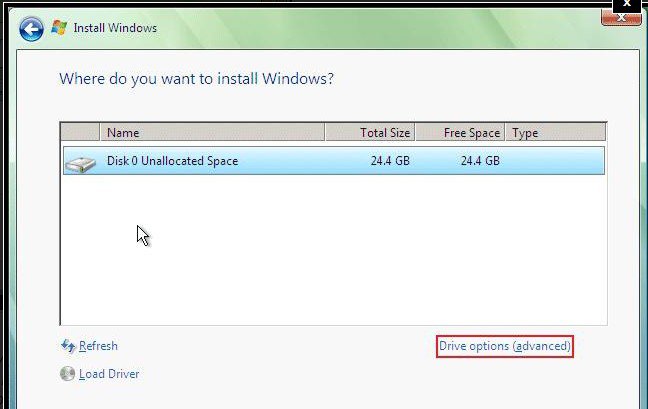
Click Drive Options (advanced).
Click on the partition you wish to delete to highlight it.
Click Delete.
Click New to create a new one from the unallocated space.
Click Format.
Then make sure the partition you want to install on is highlighted ( if not, click on it to highlight it ).
Click Next - it will then install on that partition.
You need to boot the installation disk - it loads files into memory - then select language and keyboard, Install Now - when you see a window like this :
Click Drive Options (advanced).
Click on the partition you wish to delete to highlight it.
Click Delete.
Click New to create a new one from the unallocated space.
Click Format.
Then make sure the partition you want to install on is highlighted ( if not, click on it to highlight it ).
Click Next - it will then install on that partition.
My Computers
System One System Two
-
- Operating System
- Vista
- CPU
- Intel E8400
- Motherboard
- ASRock1333-GLAN R2.0
- Memory
- 4gb DDR2 800
- Graphics card(s)
- nvidia 9500GT 1gb
-
- Operating System
- win7/vista
- CPU
- intel i5-8400
- Motherboard
- gigabyte b365m ds3h
- Memory
- ballistix 2x8gb 3200
I don't get that far... I boot from the install disc and then click on install and the next thing that happens is the error that says there isn't enough space on the disc. I don't get a chance to pick anything.
My Computer
You might rty a bootable partition Manager.
Gparted is free :
SourceForge.net: GParted: Downloading ...
SourceForge.net: GParted: Files
Burn the iso image to cd - do not format the cd - here is an isoburner
View attachment Burn CDCC.zip
Boot the cd.
Gparted is free :
SourceForge.net: GParted: Downloading ...
SourceForge.net: GParted: Files
Burn the iso image to cd - do not format the cd - here is an isoburner
View attachment Burn CDCC.zip
Boot the cd.
My Computers
System One System Two
-
- Operating System
- Vista
- CPU
- Intel E8400
- Motherboard
- ASRock1333-GLAN R2.0
- Memory
- 4gb DDR2 800
- Graphics card(s)
- nvidia 9500GT 1gb
-
- Operating System
- win7/vista
- CPU
- intel i5-8400
- Motherboard
- gigabyte b365m ds3h
- Memory
- ballistix 2x8gb 3200
I finally got vista to install tonight. The solution was ridiculously simple. I just recently bought a new keyboard and it was USB based. Even though I had set the boot order in the bios to cd/dvd it was still booting off of the hard drive. The computer would ask me to push any key if I wanted to boot from the cd. Well I pushed a key and it did load up windows. Problem was that the USB keyboard was inactive and it was apparently booting from the hard drive as a matter of course when the computer didn't detect a key stroke. Once I switched to a non-USB keyboard the fresh install went like clockwork.
My Computer

JMH
Banned
I finally got vista to install tonight. The solution was ridiculously simple. I just recently bought a new keyboard and it was USB based. Even though I had set the boot order in the bios to cd/dvd it was still booting off of the hard drive. The computer would ask me to push any key if I wanted to boot from the cd. Well I pushed a key and it did load up windows. Problem was that the USB keyboard was inactive and it was apparently booting from the hard drive as a matter of course when the computer didn't detect a key stroke. Once I switched to a non-USB keyboard the fresh install went like clockwork.
Well done dponlyme. It's always very satisfying when you can solve your own problems.
 :D
:DMy Computer
System One
-
- Manufacturer/Model
- LAPTOP. HP Pavilion dv7-1005TX .
- CPU
- IntelCore [email protected] x2
- Memory
- 4.00 GB installed, max capacity 8 GB.
- Graphics card(s)
- Nvidia GeForce 9600M GT & 512MB DDR2 dedicated graphics mem.
- Monitor(s) Displays
- 17.0" diagonal WXGA + High definition brightview widescreen infinity display.
- Screen Resolution
- 1440 x 900
- Hard Drives
- SPECS. Drive 1. 298.09 GB Fujitzu MHZ2320BH G2 ATA Device Drive 2. [ All as above.] CONFIG. C:\287.65 GB, D:\298.09 GB, E:\10.44 GB.
- Case
- Laptop / notebook.
- Cooling
- Stock.
- Mouse
- Synaptics PS/2 Port touch pad.
- Keyboard
- IBM enhanced
- Internet Speed
- ADSL [ Too slow.]
- Other Info
- Webcam.