![]() |
![]() | ![]() | ![]() | ![]() | ![]() | ![]() | ![]() |
| Welcome to Windows Vista Forums. Our forum is dedicated to helping you find solutions with any problems, errors or issues you are experiencing with Windows Vista. The Vista forum also covers news and updates and has an extensive Windows Vista tutorial section that covers a wide range of tips and tricks. |
| |||||||
![]() |
| |
| | #1 (permalink) |
| vista | I am in a loop trying to grant myself permission I was trying to give myself permission to the file C:\Users\Tom\Local Settings. Now, no matter what I hit I keep getting the attached error messages and there is no exit. Nothing happens when I hit edit, so I can't change anything back. Nothing happens when I hit cancel. So, my only option is to hit ok, but this gives me the attached error messages. Should I use task manager to end the task? What are the dangers of "an inconsistent state" as displayed in the last error screen? Is there a utility I can use to set the ownership and permissions back to there original status? This is my first post to a forum for help, so I hope I followed the correct protocol. I thank you in advance for any help. |
My System Specs![]() |
| | #2 (permalink) |
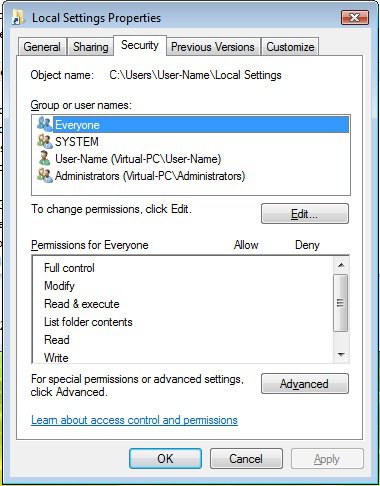
| Vista x64 Ultimate SP2, Windows 7 Ultimate x64 | Re: I am in a loop trying to grant myself permission Hello Durangoforcards, and welcome to Vista Forums. The C:\Users\Tom\Local Settings folder is a protected operating system folder and should not be messed with. The actual folder that the C:\Users\Tom\Local Settings points to for you local settings would be C:\Users\Tom\AppData\Local instead. Clicking on Cancel (Error Applying Security) and OK (Windows Security) and OK (Local Setting Properties) closed them for me. Here are the default settings for that folder. Everyone has nothing checked, and all of the other user groups have full control by default. ![]() Hope this helps, Shawn |
My System Specs![]() |
| | #3 (permalink) |
| vista | Re: I am in a loop trying to grant myself permission I can't thank you enough. Your tip about the folder to use was invaluable. I really appreciate the help |
My System Specs![]() |
| | #4 (permalink) |
| Vista x64 Ultimate SP2, Windows 7 Ultimate x64 | Re: I am in a loop trying to grant myself permission You're most welcome Durangoforcards. |
My System Specs![]() |
![]() |
| Thread Tools | |
| |
Similar Threads | ||||
| Thread | Forum | |||
| why won't it grant me access | Vista account administration | |||
| Grant permission using ICACLS | Vista file management | |||
| How to grant credential to install a SnapIn ? | PowerShell | |||
| grant read/write permission for a folder | Vista General | |||
| grant or deny this application permission to use this key prompt | Vista security | |||