Windows Vista Forums

"Program Files (x86)" not showing up anymore
  1. #1


    Newbie
    Join Date : Jun 2009
    Posts : 9
    Vista Home Premium 64bit
    Local Time: 12:15 AM

    "Program Files (x86)" not showing up anymore

    Sorry if this is the wrong spot, was trying to figure out where to post for help..
    My computer: Windows Vista Home Premium SP2 AMD 64bit

    I am aware of the two folder for program files, but this scrn shot(attachment) will explain it more..
    My "Program Files (x86)" folder is not showing up in my C drive list, it is still there, but not appearing any ideas? I think other folders are not showing as well..


      My System SpecsSystem Spec

  2. #2


    Old and cranky

    Join Date : Apr 2009
    Southeastern CT, USA
    Posts : 1,364
    Vista Ultimate x64; Win 7 x64 and x32
    Local Time: 01:15 AM
    usa us connecticut


    Re: "Program Files (x86)" not showing up anymore

    Try enabling "Show hidden files/folders" in the View tab of Folder Options under the Tools menu item.

      My System SpecsSystem Spec

  3. #3


    Newbie
    Join Date : Jun 2009
    Posts : 9
    Vista Home Premium 64bit
    Local Time: 12:15 AM


      Thread Starter

    Re: "Program Files (x86)" not showing up anymore

    Tried that already and no luck.

      My System SpecsSystem Spec

  4. #4
    SIW2's Avatar

    Senior Member


    Join Date : Jul 2008
    Posts : 2,677
    VISTA HOME PREMIUM X64/ 7 x64 / 7x86
    Local Time: 07:15 AM


    Re: "Program Files (x86)" not showing up anymore

    Hi ,

    Try typing Program Files (x86) into start search box - what pops up?

      My System SpecsSystem Spec

  5. #5


    Newbie
    Join Date : Jun 2009
    Posts : 9
    Vista Home Premium 64bit
    Local Time: 12:15 AM


      Thread Starter

    Re: "Program Files (x86)" not showing up anymore

    This shows up
    C:\Users\Kris\AppData\Local\VirtualStore\Program Files (x86)

    But not the actual C:\Program Files (x86)

    EDIT: I also did tweaks to my search since I do not use it so lemme enable indexing and stuff..

    Now nothing is showing up

      My System SpecsSystem Spec

  6. #6
    Crispy2007's Avatar

    64 |3!T G33|<
    Join Date : Mar 2009
    Aus, QLD
    Posts : 160
    Windows 7 Ultimate x64 (Build 6.1.7600.16385)
    Local Time: 04:15 PM
    australia au queensland


    Re: "Program Files (x86)" not showing up anymore

    This may sound stupid but, check in your system that it is 64-bit not 32-bit just to be sure.

      My System SpecsSystem Spec

  7. #7


    Newbie
    Join Date : Jun 2009
    Posts : 9
    Vista Home Premium 64bit
    Local Time: 12:15 AM


      Thread Starter

    Re: "Program Files (x86)" not showing up anymore

    Quote Originally Posted by Crispy2007 View Post
    This may sound stupid but, check in your system that it is 64-bit not 32-bit just to be sure.
    I know its 64 bit, I made sure my purchase was 64bit..

      My System SpecsSystem Spec

  8. #8
    SIW2's Avatar

    Senior Member


    Join Date : Jul 2008
    Posts : 2,677
    VISTA HOME PREMIUM X64/ 7 x64 / 7x86
    Local Time: 07:15 AM


    Re: "Program Files (x86)" not showing up anymore

    Hi,

    You say other files are also missing.

    Have you scanned for malware?

    You might like to try the free version - update and scan manually :

    Malwarebytes.org

    Once you are sure it is clean , you could try a repair install:

    Repair Install For Vista

      My System SpecsSystem Spec

  9. #9


    Newbie
    Join Date : Jun 2009
    Posts : 9
    Vista Home Premium 64bit
    Local Time: 12:15 AM


      Thread Starter

    Re: "Program Files (x86)" not showing up anymore

    Okay so I found the folder, but I had to go to folder options and check view hidden folders as well as uncheck hide protected operating system files..

    Now I have read all over the internet that Vista does that if an attempt of a virus happen or if a virus is present.. I scanned my computer and there is no viruses..

    I have tried the command prompt using the attrib command and I got it to be unhidden and normal again, but once I restart the computer it hides it again.. How would I go on about making Vista stop treating it as a protected operating system files because before it did not and I was able to view once I was in the C drive along with the Program Files folder???

      My System SpecsSystem Spec

  10. #10
    SIW2's Avatar

    Senior Member


    Join Date : Jul 2008
    Posts : 2,677
    VISTA HOME PREMIUM X64/ 7 x64 / 7x86
    Local Time: 07:15 AM


    Re: "Program Files (x86)" not showing up anymore

    You could try a system restore to a point before the problem.

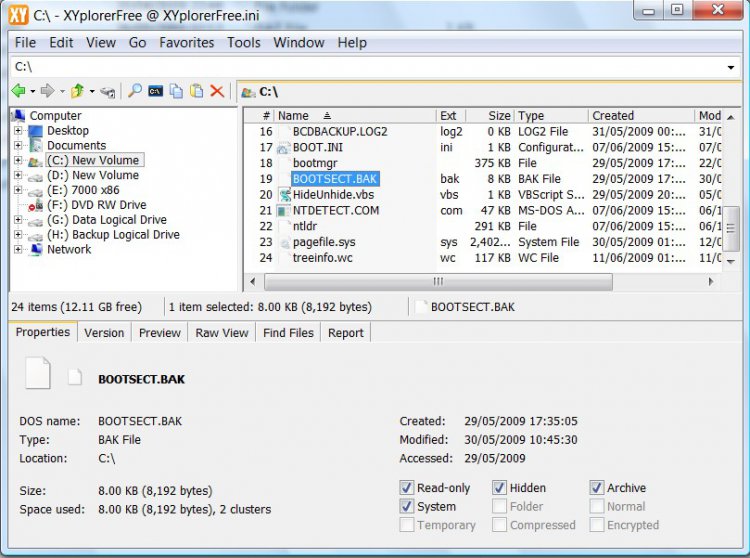
    You may also like to try xyplorer free - handy app.that can show/change attributes amongst other things - useful for the future

    xyplorer-2009-06-13_032509.jpg

    http://www.xyplorer.com/download/xyplorer_free.zip

    XYplorer - A Windows File Manager and Explorer Replacement

      My System SpecsSystem Spec

Page 1 of 2 12 LastLast
"Program Files (x86)" not showing up anymore problems?

Similar Threads
Thread Thread Starter Forum Replies Last Post
Icons/Files from "User" folder showing up in "Computer" folder aster General Discussion 5 04 Dec 2009
Windows 2008 "Downloaded Program Files" folder is empty UnderCoverGuy Server General 0 01 Sep 2009
"Public Documents" Folder Showing Up With EXE Files Of Unknown Origin Five By Five Vista General 2 08 May 2009
Files not showing as "in-use" when folder has been sync'd. DaddyO Vista networking & sharing 18 24 May 2007
Offline Files Showing "Not Available" Eric Sambell Vista General 0 15 May 2007