I've just installed Vista Home Premium recently and there appears to be no Aero. I've checked through the personalization menu, control panel, etc, but still no Aero. I I have a bad graphics card, but it's at least 128MB. My score for Desktop Performance for Aero is 1.9.

You are using an out of date browser. It may not display this or other websites correctly.
You should upgrade or use an alternative browser.
You should upgrade or use an alternative browser.
Aero in Windows Vista Home Premium
- Thread starter rynem
- Start date

Blackstickman
New Member
Look for "Enable Transparency" under Personalization ->Color and Appearance. Take a look at this: Create a Shortcut to Enable/Disable Aero Transparency in Vista :: the How-To Geek
My Computer

I have a bad graphics card, but it's at least 128MB.
???
Can you tell us what graphics card you have? It would help in troubleshooting your problem.
My Computer
System One
-
- Manufacturer/Model
- Custom Built
- CPU
- Intel Core 2 Quad Q6600 2.4GHz
- Motherboard
- Intel D975XBX2
- Memory
- Corsair TWIN2X4096-PC8500 (2x2GHz)
- Graphics card(s)
- ATI Radeon HD 4890 (1GHz)
- Sound Card
- X-Fi Titanium - Fatality Pro Series
- Monitor(s) Displays
- hp w2207h (22" widescreen)
- Screen Resolution
- 1680 x 1050
- Hard Drives
- One 750GB, 2x500GB Western Digital Caviar Black Hard Drives (32meg)
- PSU
- Antec Neo HE 550
- Case
- Antec P182
- Cooling
- Zalman CNPS9500 AT
- Mouse
- Logitech MX Revolution
- Keyboard
- Logitech Wireless Wave
- Internet Speed
- "High" Speed DSL? Is that like low speed FIOS?
- Other Info
- Q6600 B3 Revision OC to 3.0GHz
sis 760i have a bad graphics card, but it's at least 128mb.
???
Can you tell us what graphics card you have? It would help in troubleshooting your problem.
My Computer
There is no "Enable Transparency"Look for "Enable Transparency" under Personalization ->Color and Appearance. Take a look at this: Create a Shortcut to Enable/Disable Aero Transparency in Vista :: the How-To Geek
My Computer
sis 760
I'm not sure that card can run Aero in Vista. Click on this link Pixel shader 2.0 in hardware and notice that your card isn't listed.
Video card requirements for Aero:
a DirectX 9 compatible graphics processor with a Windows Display Driver Model (WDDM) driver, Pixel shader 2.0 in hardware, and a minimum of 128 MB of Video RAM.
Windows Display Driver Model = "Vista" driver for that video card! Did you look for a Vista driver? To be honest, I don't think you'll find one and thus won't be able to run Aero with that card.
There is no "Enable Transparency"Look for "Enable Transparency" under Personalization ->Color and Appearance. Take a look at this: Create a Shortcut to Enable/Disable Aero Transparency in Vista :: the How-To Geek
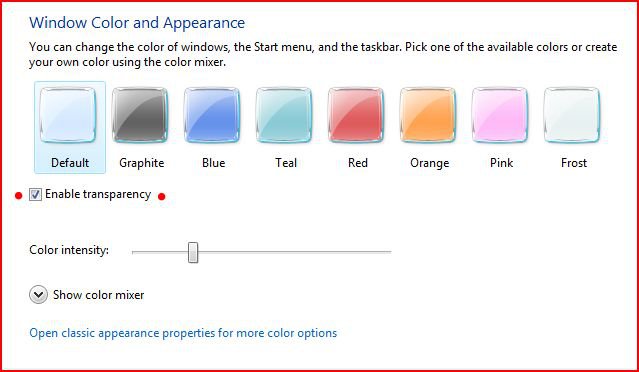
Notice the red dots. If you don't have that option, again, your video card may not be able to run Aero.
Good luck.
My Computer
System One
-
- Manufacturer/Model
- Custom Built
- CPU
- Intel Core 2 Quad Q6600 2.4GHz
- Motherboard
- Intel D975XBX2
- Memory
- Corsair TWIN2X4096-PC8500 (2x2GHz)
- Graphics card(s)
- ATI Radeon HD 4890 (1GHz)
- Sound Card
- X-Fi Titanium - Fatality Pro Series
- Monitor(s) Displays
- hp w2207h (22" widescreen)
- Screen Resolution
- 1680 x 1050
- Hard Drives
- One 750GB, 2x500GB Western Digital Caviar Black Hard Drives (32meg)
- PSU
- Antec Neo HE 550
- Case
- Antec P182
- Cooling
- Zalman CNPS9500 AT
- Mouse
- Logitech MX Revolution
- Keyboard
- Logitech Wireless Wave
- Internet Speed
- "High" Speed DSL? Is that like low speed FIOS?
- Other Info
- Q6600 B3 Revision OC to 3.0GHz

Aero transparency available with WEI score of 3.0 and upwards. Unfortunately,your score of 1.9 is not enough.
My Computer
System One
-
- Manufacturer/Model
- Biostar
- CPU
- AMD Athlonx64 Dual Core 3800+ 2.0GHz
- Motherboard
- Biostar MCP6P-M2
- Memory
- 4GB
- Graphics card(s)
- NVIDIA GeForce 8400GS
- Monitor(s) Displays
- CIBOX
- Screen Resolution
- 1280x800
- Hard Drives
- Hitachi 160GB
You're right, I only have Mirage. Thanks for the information.sis 760
I'm not sure that card can run Aero in Vista. Click on this link Pixel shader 2.0 in hardware and notice that your card isn't listed.
Video card requirements for Aero:
a DirectX 9 compatible graphics processor with a Windows Display Driver Model (WDDM) driver, Pixel shader 2.0 in hardware, and a minimum of 128 MB of Video RAM.
Windows Display Driver Model = "Vista" driver for that video card! Did you look for a Vista driver? To be honest, I don't think you'll find one and thus won't be able to run Aero with that card.
There is no "Enable Transparency"Look for "Enable Transparency" under Personalization ->Color and Appearance. Take a look at this: Create a Shortcut to Enable/Disable Aero Transparency in Vista :: the How-To Geek
View attachment 13491
Notice the red dots. If you don't have that option, again, your video card may not be able to run Aero.
Good luck.
My Computer
Alright, thanks.Aero transparency available with WEI score of 3.0 and upwards. Unfortunately,your score of 1.9 is not enough.