Windows Vista Forums
Vista Forums Home Join Vista Forums Windows 7 Forum Vista Tutorials Tags
Welcome to Windows Vista Forums. Our forum is dedicated to helping you find solutions with any problems, errors or issues you are experiencing with Windows Vista. The Vista forum also covers news and updates and has an extensive Windows Vista tutorial section that covers a wide range of tips and tricks.

Go Back   Vista Forums > Vista Forums > General Discussion

Vista - Can I delete the C drive from a dual boot system?

Reply
 
Old 07-09-2009   #1 (permalink)


Vista Home Premium x64 & Vista Ultimate x64


Can I delete the C drive from a dual boot system?

I have a dual-boot setup. Volume C runs Vista Home Premium. Volume F runs Vista Ultimate. (Vol. D is a recovery volume.) I would like to blow away C: and boot only from F. Would the following be a possible/advisable solution?

1. Boot from F.
2. Delete C.
3. Rename F "C".
4. Expand F (the new "C") to include the old C.

Thanks!

My System SpecsSystem Spec
Old 07-09-2009   #2 (permalink)


vista ultimate 32bit,64bit,Seven Ultimate 64bit


Re: Can I delete the C drive from a dual boot system?

i dont think its possible without screwing up all your installed programs.
My System SpecsSystem Spec
Old 07-09-2009   #3 (permalink)


VISTA HOME PREMIUM X64/ 7 x64 / 7x86


Re: Can I delete the C drive from a dual boot system?

It should be possible to do that.

Please post a screenshot of Disk Management, like this:

diskmanagement2009-02-04_031947.jpg


How to Post a Screenshot in Seven Forums - Windows 7 Forums
My System SpecsSystem Spec
Old 07-10-2009   #4 (permalink)


Vista Home Premium x64 & Vista Ultimate x64


Re: Can I delete the C drive from a dual boot system?

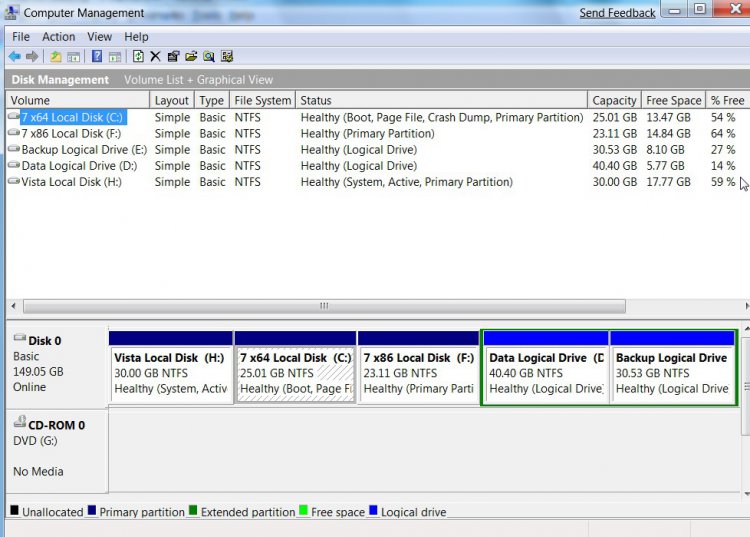
The requested screen shot of Computer Management is attached.
Attached Thumbnails
compmgt.jpg  
My System SpecsSystem Spec
Old 07-10-2009   #5 (permalink)


VISTA HOME PREMIUM X64/ 7 x64 / 7x86


Re: Can I delete the C drive from a dual boot system?

C is the System partition - it contains files needed to boot into either C or F.

You can make F the system partition - then you don't need C anymore.

1. Boot into F - go to folder options and make sure Hidden files and proteceted operating system files are showing.

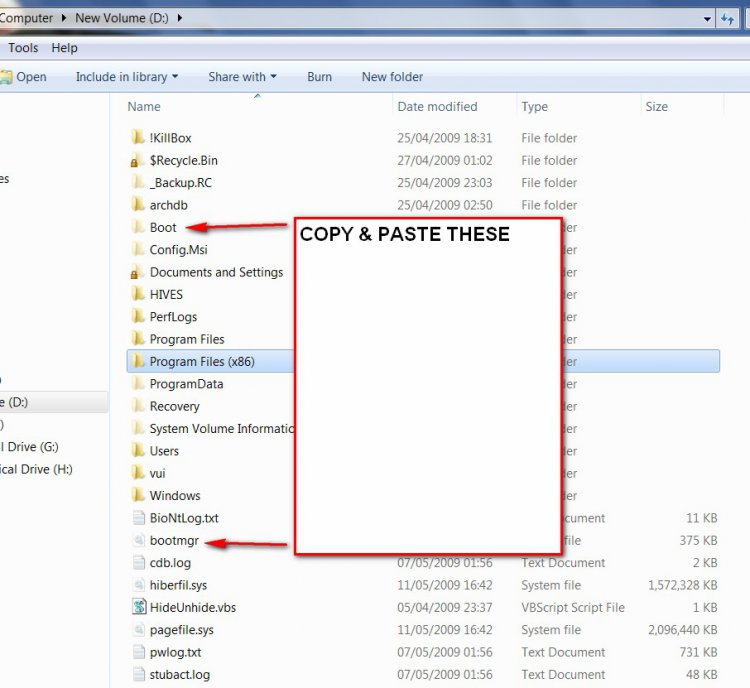
2. Copy and paste bootmgr and the pale yellow Boot folder from C to F. ( You will get a message bcd is in use and can't be copied - skip it and copy the rest).

bootmgr2009-05-11_182540.jpg


3. Open an elevated command prompt and type: (press enter after the command )

bcdedit /export F:\Boot\bcd

4. In Disk Management, rt click F and mark as Active.

5. Reboot. F is now the system partition - you can delete C.

6. Use a partition manager to copy the F partition to the unallocated space that was C.

7. You should now be able to boot into either F or C - if not, run startup repair from the Vista dvd.

8. You can mark C active , reboot to hand the system status to the new copied C. You can now delete F and extend C to incorporate however much of the unallocated space you like.

Hope it helps
My System SpecsSystem Spec
Old 07-10-2009   #6 (permalink)


Vista Home Premium x64 & Vista Ultimate x64


Re: Can I delete the C drive from a dual boot system?

Excellent! Thanks a lot for your assistance!!
My System SpecsSystem Spec
Reply

Thread Tools


Similar Threads
Thread Forum
System Restore Points - Stop XP Dual Boot Delete Tutorials
Accesing system folders on dual boot system Vista security
Dual boot - How to hide XP System Drive Vista installation & setup
Vista Blocking Shared System Drive when in WinXP (Dual Boot System) Vista security
Issues with System drive in Disk Management on a Dual Boot system Vista General


Vista Forums is an independent web site and has not been authorized,
sponsored, or otherwise approved by Microsoft Corporation.
"Windows Vista", the Start Orb, and related materials are trademarks of Microsoft Corp.
© Designer Media Ltd

1 2 3 4 5 6 7 8 9 10 11 12 13 14 15 16 17 18 19 20 21 22 23 24 25 26 27 28 29 30 31 32 33 34 35 36 37 38 39 40 41 42 43 44 45 46