Windows Vista Forums

Unable to Create Restore Point
  1. #1


    Junior Member
    Join Date : Jan 2009
    Posts : 17
    Vista Home Premium 64bit SP2
    Local Time: 12:38 AM

    Unable to Create Restore Point

    Vista 64bit has been running really well on my desktop after a clean install in March. Suddenly, Windows update is failing to install, because it can't create a systen restore point. When I try to create one in System Restore, manually, it fails also, citing the shadow file timeout, or some such.....I am worried, because I can't use backup, either! Anyone know what's going on?

    Diskeeper is working, but not for backing up system files, etc.


      My System SpecsSystem Spec

  2. #2


    Senior Member
    Join Date : Jul 2009
    Posts : 618
    Vista Home Premium 32bit
    Local Time: 11:38 PM


    Re: Unable to Create Restore Point

    kivatrader:

    Unless you are already fully backed up external to your computer, do so now.
    Copying the files in your <Username> folder to writable DVDs should do.

    Next go to:

    Start > Control Panel > Classic view (left pane) > System >
    Advanced System Settings (left pane ) > System Protection tab.

    Look to see if there's an odd extra C (none) drive listed.
    If so uncheck it,and check the normal C: box. Restart computer and try to set a restore point.
    ----------------------------------------------------------------

    If there is no extra C: there,uncheck C:. Then, replace the check mark in the C: box that you just removed.

    Restart computer,try to set a Restore Point.

    Let me know whether this works.


    Ardneh

      My System SpecsSystem Spec

  3. #3


    Junior Member
    Join Date : Jan 2009
    Posts : 17
    Vista Home Premium 64bit SP2
    Local Time: 12:38 AM


      Thread Starter

    Re: Unable to Create Restore Point

    Ardneh;
    Thanks, but it doesn't make a difference. I get a very slow progress window, and then an error window saying the Restore point could not be created:
    The creation of a shadow copy has timed out -- try again the operation (0x81000101) Please try again. I've tried six times today, with no luck at all.
    I'm going to turn the restore system off (uncheck the C: drive) and reboot, then re-check the C: drive to see if that works.

    I notice also that Windows update will not work proerl,y, and I get a message saying the Windows Modules Installer has stopped running -- I use the ADVANCED SYSTEMS/SERVICES APPLET TO CHECK tRUSTED inSTALLERS PROPERTIES, BUT THEY ARE ALL AS THEY SHOULD BE WITH A MANual (dammned caps lock key!) start.

    Any other ideas?

      My System SpecsSystem Spec

  4. #4


    Senior Member
    Join Date : Jul 2009
    Posts : 618
    Vista Home Premium 32bit
    Local Time: 11:38 PM


    Re: Unable to Create Restore Point

    kivatrader:

    This may help:

    Repair Install For Vista

    You may need to borrow somebody's retail Vista-SP2-Integrated
    install disc to make this work, if your situation doesn't meet the
    prerequisites, described at the link.

    Just remember to use your Product Key if re-activation is needed.

    Ardneh

      My System SpecsSystem Spec

  5. #5
    delphin's Avatar

    Eager to learn

    Join Date : Nov 2008
    Chennai
    Posts : 636
    Windows 7
    Local Time: 12:08 PM
    india


    Re: Unable to Create Restore Point

    Quote Originally Posted by kivatrader View Post
    Vista 64bit has been running really well on my desktop after a clean install in March. Suddenly, Windows update is failing to install, because it can't create a systen restore point. When I try to create one in System Restore, manually, it fails also, citing the shadow file timeout, or some such.....I am worried, because I can't use backup, either! Anyone know what's going on?

    Diskeeper is working, but not for backing up system files, etc.
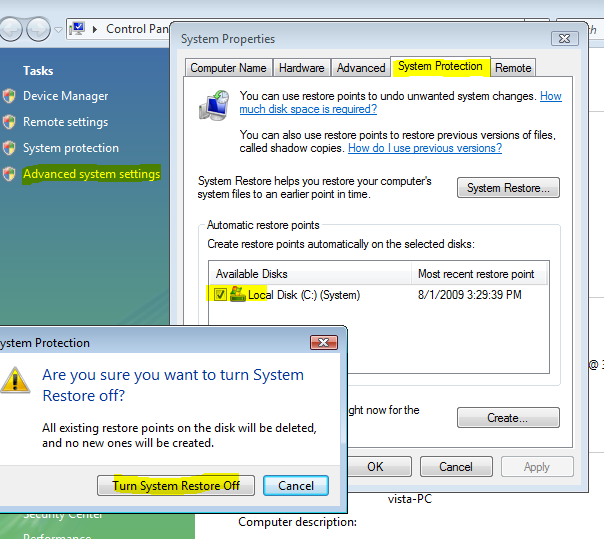
    try resetting your restore points,
    right click on my computer and go to properties,

    capture.png

    click advanced system settings>system protection, now remove the check mark in c drive, click on turn system restore off.

    Restart your computer.

    right click on my computer and go to properties, click advanced system settings>system protection. now put a check mark on c drive and turn on your system restore.

    restart your computer and try

      My System SpecsSystem Spec

  6. #6
    whs's Avatar

    Senior Member


    Join Date : May 2008
    Germany/Florida
    Posts : 1,983
    Vista home premium 32bit
    Local Time: 08:38 AM
    germany us florida


    Re: Unable to Create Restore Point

    Maybe there is an allocation problem with your shadowstorage. To check that, type. VSSADMIN LIST SHADOWSTORAGE into Command Prompt (run as admin). See what is maximum and allocated. Typically you should have 15% of your OS disk partition as maximum.

      My System SpecsSystem Spec

  7. #7


    Expelled
    Join Date : Apr 2008
    Posts : 2,049
    Vista Bussiness x64 PL
    Local Time: 10:38 PM
    poland


    Re: Unable to Create Restore Point

    You should also make sure Volume Shadow Copy service is correct set:

    Start>>Search>>services.msc

    and make sure Volume Shadow Copy service is set: MANUAL

      My System SpecsSystem Spec

Unable to Create Restore Point

Similar Threads
Thread Thread Starter Forum Replies Last Post
unable to create system restore point playboycensored Vista General 4 31 May 2009
System Restore error (create restore point), event ID: 8193 Sven Pran Vista General 12 13 Feb 2009
Unable to create a restore point,run sfc /scannow,uninstall 64 bits apps,install 32 b horiageorg Vista General 3 02 Jan 2009
Unable to create Restore Point-different error message ebrogren Vista performance & maintenance 4 26 Apr 2008
WINDOWS VISTA unable to create a 'manual' restore point Horshio Vista General 0 26 Aug 2007