![]() |
![]() | ![]() | ![]() | ![]() | ![]() | ![]() | ![]() |
| Welcome to Windows Vista Forums. Our forum is dedicated to helping you find solutions with any problems, errors or issues you are experiencing with Windows Vista. The Vista forum also covers news and updates and has an extensive Windows Vista tutorial section that covers a wide range of tips and tricks. |
| |||||||
![]() |
| |
| | #1 (permalink) |
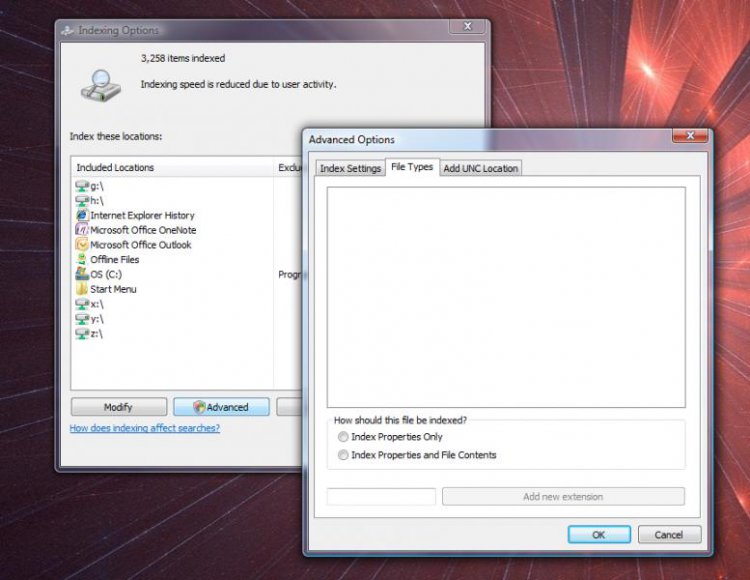
| Vista Ultimate x32 | Advanced Indexing Options File Types GONE Hello, everyone. I'm new to Vista Forums and a new Vista user. I'm just getting used to Vista.. I went to tweak my indexing settings, and noticed something rather odd (and somewhat disturbing). Under "Control Panel"-->"Indexing Options"-->"Advanced" button-->"File Types" tab, there are NO filetypes listed. (see attached image) How can I fix this? ![]() Thanks! Joe C |
My System Specs![]() |
| | #2 (permalink) |
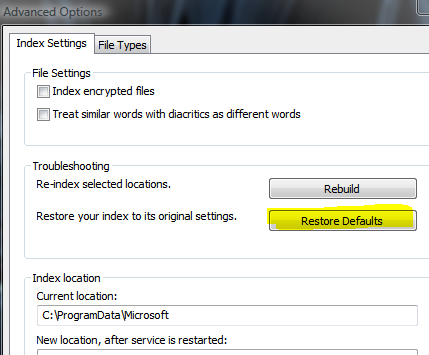
| Windows 7 | Re: Advanced Indexing Options File Types GONE Tried restore defaults? click on the button and restart. ![]() Keep us informed |
My System Specs![]() |
![]() |
| Thread Tools | |
| |
Similar Threads | ||||
| Thread | Forum | |||
| Advanced Indexing Options--No File Types! | Vista General | |||
| Default file types in indexing | Vista General | |||
| Indexing Options / Advanced Options | Vista file management | |||
| Tools/Folder Options/File Types/Advanced | Vista file management | |||
| How to Access Advanced File Types ?? | Vista General | |||