
Windows Vista Forums
Vista Forums Home Join Vista Forums Windows 7 Forum Vista Tutorials Tags
Welcome to Windows Vista Forums. Our forum is dedicated to helping you find solutions with any problems, errors or issues you are experiencing with Windows Vista. The Vista forum also covers news and updates and has an extensive Windows Vista tutorial section that covers a wide range of tips and tricks.

Go Back   Vista Forums > Vista Forums > General Discussion

Vista - Virtual Memory - Changing the Paging File Size

Reply
 
Old 08-12-2009   #1 (permalink)


Vista Home Premium 32bit [x86] - SP2


Virtual Memory - Changing the Paging File Size

I currently have 4GB of RAM installed, of which in real terms, only 3.07GB is actually being used by my system.

I am wondering, given that my RAM is sitting at max. levels, if there are any reasons, advantages or benefits to be had in changing the Virtual Memory - Paging File Size for all Drives, from the current size of 3369MB to the recommended size of 4603MB, or more....say 4950MB??

Current situation here;
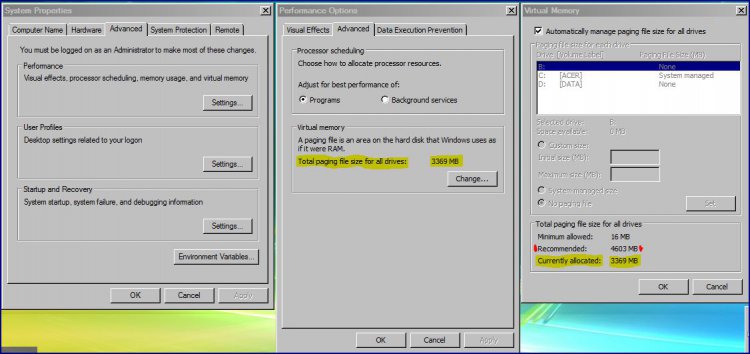
virtual-memory-paging-file-size.jpg

My System SpecsSystem Spec
Old 08-12-2009   #2 (permalink)


Vista x64 Ultimate SP2, Windows 7 Ultimate x64


Re: Virtual Memory - Changing the Paging File Size

Hi Tony,

I have always found it best to just let the system manage it to let it adjust it as needed automatically. You can benefit by moving the page file to a separate hard drive though.

You can read more about this here if you like:
Virtual Memory Paging File - Change

Hope this helps some,
Shawn
My System SpecsSystem Spec
Old 08-12-2009   #3 (permalink)


Vista Home Premium 64bit SP2


Re: Virtual Memory - Changing the Paging File Size

As a gamer i have to fiddle and tweak everything , its a default setting i have , i have made it bigger , made it smaller got rid of it altogether (that was a bad idea) and put it on a differant drive. (there are benifits to this but not for me)

After all this i found that "let windows manage my virtual memory" was far and away the best and easiest solution to a problem that never existed in the first place
My System SpecsSystem Spec
Old 08-12-2009   #4 (permalink)


Vista Home Premium 32-bit & Vista Ultimate 64-bit both Service Pack 2 W7 Pro RTM 7600 32 & 64


Re: Virtual Memory - Changing the Paging File Size

Hi Tony,

I agree with the comments made here. Both Vista (and its successor, W7) manage the paging file much more efficiently than XP and earlier OSes. The only thing I would do, and I would only do this if you are running out of space on your drive, is to create a custom size of around 2x RAM amount. Otherwise, leave it as system managed.
My System SpecsSystem Spec
Old 08-12-2009   #5 (permalink)


Vista Ultimate x64; Win 7 x64 and x32


Re: Virtual Memory - Changing the Paging File Size

I've managed my pagefile size (through a lot of research).
I've put my pagefile on a separate drive.
I've done without a pagefile.

But all of these required a lot of work for very little gain. I'm not only a member of the Windows-managed pagefile club, but I'm gonna run for President of it at the next election!
My System SpecsSystem Spec
Old 08-12-2009   #6 (permalink)


Vista Home Premium 32bit [x86] - SP2


Re: Virtual Memory - Changing the Paging File Size

Thanks guys for all your answers, and I now have a better grip on this function. The comments in dark blue italics, are my responses....saves a lot of mucking around typing out repeat statements, in addressing individual comments and advice.

Quote  Quote: Originally Posted by Brink View Post
Hi Tony
I have always found it best to just let the system manage it to let it adjust it as needed automatically. Thanks Shawn..and I will be doing just that, because....

You can benefit by moving the page file to a separate hard drive though....wouldn't that mean having an additional external HD as a permanent feature?

You can read more about this here if you like:
Virtual Memory Paging File - Change
..went there first, posted, then found that the door was shut solid. However, in using the math formula for recommended MB of page file/GB RAM, I find that my system is doing just that. It recognises the 4GB RAM installed [the recommended page file size] but has applied the page filing size to my actual RAM usage [the 3369MB]
Hope this helps some,..some?...a lot!
Shawn
Quote  Quote: Originally Posted by archie123 View Post
As a gamer i have to fiddle and tweak everything , its a default setting i have , i have made it bigger , made it smaller got rid of it altogether (that was a bad idea) and put it on a differant drive. (there are benifits to this but not for me)

After all this i found that "let windows manage my virtual memory" was far and away the best and easiest solution to a problem that never existed in the first place Cheers archie123....in light of your experiences, that is precisely what I also intend to do....leave well alone, and get on with other mischief. This ain't Rome, I ain't no Roman Gamer and I ain't Nero= No fiddling!
Quote  Quote: Originally Posted by Dwarf View Post
Hi Tony,

I agree with the comments made here. Both Vista (and its successor, W7) manage the paging file much more efficiently than XP and earlier OSes. The only thing I would do, and I would only do this if you are running out of space on your drive, is to create a custom size of around 2x RAM amount.

Otherwise, leave it as system managed. Thanks Dwarf...however, since installing a brand new HD just last week [see Spec], I've developed agoraphobia with the amount of space that I now have. I will, as advised, leave the system to manage itself as it now stands....like a Mini-Cooper with Turbo twin Carbs, on Steroids!!
Quote  Quote: Originally Posted by usasma View Post
I've managed my pagefile size (through a lot of research).
I've put my pagefile on a separate drive.
I've done without a pagefile.

But all of these required a lot of work for very little gain. I'm not only a member of the Windows-managed pagefile club, but I'm gonna run for President of it at the next election! Cheers usasma...your election is a foregone conclusion. That'll turn the tables.... for very little work, one helluva lot of gain. Salary in Zlotys will lift you into 'Fortune's' Top 10
So, that's that sorted then. I can now rest easy and devise ways to fill up the new HD . Thanks one and all.
My System SpecsSystem Spec
Old 08-12-2009   #7 (permalink)


Vista x64 Ultimate SP2, Windows 7 Ultimate x64


Re: Virtual Memory - Changing the Paging File Size

You're welcome Tony.

You can use a separate internal drive instead of an external one though.

On older threads, it just requires that you check the box at the bottom of your post before it is allowed to be posted to acknowledge that it is an older thread.
My System SpecsSystem Spec
Old 08-12-2009   #8 (permalink)


Vista Home Premium 32bit [x86] - SP2


Re: Virtual Memory - Changing the Paging File Size

Thanks Shawn,

Dimwit found the check box after re-posting. And I've just put up a thread about HD partitioning, not just for my own interest, but in case others are also wondering about creating additional internal drives. That's the option I will use if it pans out right.
My System SpecsSystem Spec
Old 08-12-2009   #9 (permalink)


Vista Ultimate 32bit / Windows 7 RTM x64


Re: Virtual Memory - Changing the Paging File Size

Quote  Quote: Originally Posted by sassofalco View Post
I currently have 4GB of RAM installed, of which in real terms, only 3.07GB is actually being used by my system.

I am wondering, given that my RAM is sitting at max. levels, if there are any reasons, advantages or benefits to be had in changing the Virtual Memory - Paging File Size for all Drives, from the current size of 3369MB to the recommended size of 4603MB, or more....say 4950MB??

Current situation here;

Attachment 14902
I wonder why you don't have a x64 OS... Or do you?
My System SpecsSystem Spec
Old 08-13-2009   #10 (permalink)


Vista Home Premium 32bit [x86] - SP2


Re: Virtual Memory - Changing the Paging File Size

Quote  Quote: Originally Posted by Ojaser6 View Post
I wonder why you don't have a x64 OS... Or do you?
....nope! Just check my System Specs. And I'll tell you for why.

It's because until 25 months ago, I had never had anything to do whatsoever with PCs, Laptops, Systems etc. etc., that is until I bought this setup and started from deep frozen cold. Everything I know now has been self-taught, but since Sep '08, with much appreciated help and support through the guidance and advice of great Members of this Forum. You might say that the Vista Forums have been, and are for me at least, the 'Windows University of the Internet'.

So bearing that in mind, you might understand why I am trying to learn as much as I can within one set of specifications, [32 bit (x86 OS)], before venturing out to join the great unwashed in the lands of x64 OS and W7.

Greater minds than mine are constantly grumbling about some of the limitations of the x64 OS, and I don't yet wish to join that muttering community. I'm quite content playing in my own x86 OS sandpit, well for the time being anyway.

I wish to become proficient with my current system and setup, by taking one small step forward at a time. I want to avoid at all costs, the possible scenario of "One small step for Man. One gigantic topple backwards for sassofalco"
My System SpecsSystem Spec
Reply

Thread Tools


Similar Threads
Thread Forum
Virtual Memory Paging File - Clear at Shutdown Tutorials
Virtual Memory Paging File - Change Tutorials
Virtual Memory Paging File General Discussion
System Paging File/Virtual Memory Vista General
Does Virtual Memory(paging file not in system HD) or ReadyBoost have better performance? Vista General


Vista Forums is an independent web site and has not been authorized,
sponsored, or otherwise approved by Microsoft Corporation.
"Windows Vista", the Start Orb, and related materials are trademarks of Microsoft Corp.
© Designer Media Ltd

1 2 3 4 5 6 7 8 9 10 11 12 13 14 15 16 17 18 19 20 21 22 23 24 25 26 27 28 29 30 31 32 33 34 35 36 37 38 39 40 41 42 43 44 45 46