Windows Vista Forums

Q6600 @ 2.4Ghz right....
  1. #1
    Crispy2007's Avatar

    64 |3!T G33|<
    Join Date : Mar 2009
    Aus, QLD
    Posts : 160
    Windows 7 Ultimate x64 (Build 6.1.7600.16385)
    Local Time: 02:22 PM
    australia au queensland

    Q6600 @ 2.4Ghz right....

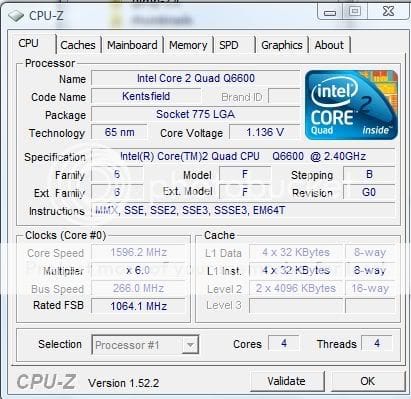
    I just D/Led CPU-Z and it came up with this, now what I am wondering is why its saying 266x6 but that equals 1600Mhz and the 6600 is meant to be rated at 2.4Ghz?


      My System SpecsSystem Spec

  2. #2
    Martee's Avatar

    Vista Die-Hard

    Join Date : Mar 2009
    Posts : 584
    Vista Ultimate x64 sp2, Solaris x64
    Local Time: 08:22 PM


    Check what's your power plan, I guess you currently run the balanced one.

      My System SpecsSystem Spec

  3. #3
    archie123's Avatar

    I Tunes hates Me


    Join Date : Jul 2008
    UK
    Posts : 1,831
    Win 7 Home Premium 64bit
    Local Time: 04:22 AM
    uk uk yorkshire

     
    its fine mate its intels speedstep , it downclocks your multiplier when your cpu isnt under load to save power

    as soon as its needed your multipliyer will shoot up to 9x and you'll be back at 2.4

    you can turn it off in your bios if you want but unless your an overclocker i wouildnt bother

      My System SpecsSystem Spec

  4. #4


    Junior Member
    Join Date : Aug 2009
    Posts : 12
    Vista Home Premium SP2 x64
    Local Time: 11:22 PM


    just so you know, even if you disable it in the bios, vista can enable it itself. but you can disable it in vista's "power options"

    for dell computers, i think you need to use a "high performance" plan to disable speedstep. that's what it says in the manual.

    i currently don't mind it though, so i let speedstep do its thing.

    p. s. you should overclock your q6600 to 3ghz

      My System SpecsSystem Spec

  5. #5


    Junior Member
    Join Date : Aug 2009
    Posts : 12
    Vista Home Premium SP2 x64
    Local Time: 11:22 PM


    Quote Originally Posted by archie123 View Post
    its fine mate its intels speedstep , it downclocks your multiplier when your cpu isnt under load to save power

    as soon as its needed your multipliyer will shoot up to 9x and you'll be back at 2.4

    you can turn it off in your bios if you want but unless your an overclocker i wouildnt bother
    overclocking + speedstep can work together.

    my q6600 is overclocked to 3ghz and speedstep will slow it down sometimes to like 2ghz when i'm not doing anything. but it jumps back up to 3ghz when i do something.

      My System SpecsSystem Spec

  6. #6
    archie123's Avatar

    I Tunes hates Me


    Join Date : Jul 2008
    UK
    Posts : 1,831
    Win 7 Home Premium 64bit
    Local Time: 04:22 AM
    uk uk yorkshire

     
    if you disable c1e and eist in bios windows cannot manage the cpu power however you set your power optons.

    If your overclocking it is recommended , by me and everyone else , that leaving any thing like that on can cause instability in a system , especially if the voltage has been tweaked.

    im saying "CAN" you have a small overclock which is obviously fine

    Last edited by archie123; 16 Aug 2009 at 01:40 AM.
      My System SpecsSystem Spec

  7. #7
    Crispy2007's Avatar

    64 |3!T G33|<
    Join Date : Mar 2009
    Aus, QLD
    Posts : 160
    Windows 7 Ultimate x64 (Build 6.1.7600.16385)
    Local Time: 02:22 PM
    australia au queensland

      Thread Starter
    I'm not overclocking iv been through that before already, not with this system.

      My System SpecsSystem Spec

  8. #8
    archie123's Avatar

    I Tunes hates Me


    Join Date : Jul 2008
    UK
    Posts : 1,831
    Win 7 Home Premium 64bit
    Local Time: 04:22 AM
    uk uk yorkshire

     
    Quote Originally Posted by Crispy2007 View Post
    I'm not overclocking iv been through that before already, not with this system.
    no i didnt say you were , i told you speedstep could be disabled so i thought it worth mentioning that if you overclock its a bad idea to switch it off.

    my other posts were to correct somebody else , who's information is a little scewed

    just answering your question with as much info as i think you might need

    sometimes i like to waffle

      My System SpecsSystem Spec

  9. #9
    archie123's Avatar

    I Tunes hates Me


    Join Date : Jul 2008
    UK
    Posts : 1,831
    Win 7 Home Premium 64bit
    Local Time: 04:22 AM
    uk uk yorkshire

     
    oh and ill take that comment as a thank you..............

    next time ill leave it to somebody else (jk)

    Last edited by archie123; 16 Aug 2009 at 02:08 AM.
      My System SpecsSystem Spec

  10. #10
    Crispy2007's Avatar

    64 |3!T G33|<
    Join Date : Mar 2009
    Aus, QLD
    Posts : 160
    Windows 7 Ultimate x64 (Build 6.1.7600.16385)
    Local Time: 02:22 PM
    australia au queensland

      Thread Starter
    Quote Originally Posted by archie123 View Post
    oh and ill take that comment as a thank you..............

    next time ill leave it to somebody else (jk)
    Ya its all good man, didn't mean anything buy it just wondering why is was saying 1600Mhz that's all, the overclocking side that I have been through was a long road and tuns off blue screens, just don't really want to go through it again but in thinking about it.

      My System SpecsSystem Spec

Page 1 of 2 12 LastLast
Q6600 @ 2.4Ghz right.... problems?

Similar Threads
Thread Thread Starter Forum Replies Last Post
Bluetooth and WiFi 2.4ghz interferring Dag Magnus Vista General 1 08 Jun 2008
Duel boot a 1.4Ghz MS ME HD on my Vista 2.1 Ghz - WIll it work? Jon Vista General 3 26 Aug 2007
Dirvers for SMC2802W 2.4GHz 54 Mbps Wireless PCI Adapter =?Utf-8?B?Q2FycmlsaG8=?= Vista hardware & devices 1 06 Feb 2007
Vista reports e6600@2.4ghz 900mhz jon Vista hardware & devices 0 29 Jan 2007
SMC2802W 2.4GHz 54 Mbps Wireless PCI Adapter =?Utf-8?B?Q2FycmlsaG8=?= Vista hardware & devices 0 24 Jul 2006