![]() |
![]() | ![]() | ![]() | ![]() | ![]() | ![]() | ![]() |
| Welcome to Windows Vista Forums. Our forum is dedicated to helping you find solutions with any problems, errors or issues you are experiencing with Windows Vista. The Vista forum also covers news and updates and has an extensive Windows Vista tutorial section that covers a wide range of tips and tricks. |
| |||||||
![]() |
| |
| | #1 (permalink) |
| Vista Home Premium 32bit | My HardDrive Local disk E won't work My hardrive can show folders. But there's nothing in them all the files have been deleted!!!!!! Please help all my precious memories and important files are in there. Before the breakdown i had to turn off the computer because it was stuck when i was trying to access my hardrive heeeeeeeeeeeeeelp! Im in distressEDIT: I cant see the files on there but it says that 365 of 465 gb is free so the data might still be there. When I try to make a new folder in there is says it can't find <%3NULL:OpText> and to make sure its there then i can run it. the problem is i have no idea what that is. I really hope this can be fixed heeeeelp! Last edited by Karoltgreat; 08-25-2009 at 05:23 AM.. |
My System Specs![]() |
| | #2 (permalink) |
| Vista Ultimate x64 sp2, Solaris x64 | Hi Karoltgreat, Can't promise it will work in your case, but try to boot from live Linux CD (if you have CD, if not, you can download it here, do not install Linux, just run it from the disc) and navigate to and open your folders to see what you have there. Recently, I had problem with one of my files which appeared to be empty and I couldn't delete them in Windows. Thanks to Linux I saved them, I could move all of them to the external drive. |
My System Specs![]() |
| | #3 (permalink) |
| Vista Home Premium 32bit | Thanks I'll try that but Local disk e is an external hard drive (I was so nervous I forgot to mention that) Oh and how do I use it? I don't get it when you said run it from a CD. What does it do? And one more specification. There is a light on my external hard drive to show its plugged in. I found out that the light goes on for about 5 seconds, flashes and dies. Last edited by Karoltgreat; 08-25-2009 at 03:03 AM.. Reason: extra information |
My System Specs![]() |
| | #4 (permalink) |
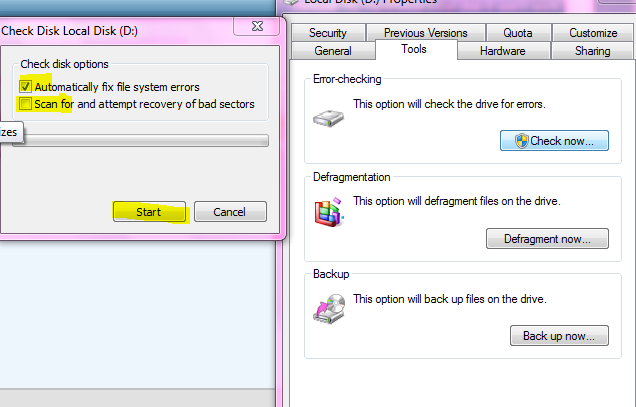
| Windows 7 | Right click on the drive and select propertied. Got to tools tab and select Check now. Put a check mark on the both and give start. ![]() Let the disk checking complete, once its completed restart your system and try to open the folders. |
My System Specs![]() |
| | #5 (permalink) |
| Vista Home Premium 32bit | Right click on the drive and select propertied. Got to tools tab and select Check now. Put a check mark on the both and give start. Attachment 15163 Let the disk checking complete, once its completed restart your system and try to open the folders. EDIT: this time it didnt get stuck but when I press start the check disk local disk d window disappears. does it mean it's checking or is there a problem? Last edited by Karoltgreat; 08-25-2009 at 05:14 AM.. Reason: later consequences |
My System Specs![]() |
| | #6 (permalink) |
| Windows 7 | It will take more than one hour. Are you talking about the time delay? If your hard disk capacity is more it can take even more than 2,3 hours. Let it finish |
My System Specs![]() |
| | #7 (permalink) |
| Vista Home Premium 32bit | Right click on the drive and select propertied. Got to tools tab and select Check now. Put a check mark on the both and give start. Attachment 15163 Let the disk checking complete, once its completed restart your system and try to open the folders. |
My System Specs![]() |
| | #8 (permalink) |
| Windows 7 | Open elevated command prompt by running command probmt as administrator, and type, chkdsk e: /f hit enter. Assuming that E: is the problematic drive. Let it finish |
My System Specs![]() |
| | #9 (permalink) |
| Vista Ultimate x64 sp2, Solaris x64 | Thanks I'll try that but Local disk e is an external hard drive (I was so nervous I forgot to mention that) Oh and how do I use it? I don't get it when you said run it from a CD. What does it do? And one more specification. There is a light on my external hard drive to show its plugged in. I found out that the light goes on for about 5 seconds, flashes and dies. It doesn't matter whether you have the external drive or the one inside the computer. First you have to download and burn the Ubuntu CD. Next connect your external drive to the machine put the CD into the DVD drive and boot the computer. Choose the language and press Enter. Next select Try Ubuntu Without Any Change To Your Computer and hit Enter. When Ubuntu set up, you will see its desktop. In the upper taskbar hit Places, next double click Computer. In the Computer window you should see the external drive, double click it. You should see all your folders there, double click one of them to find out if you still have the files inside the folder. If you do, copy or move the folders to the other location, for example the pendrive or any other location on the main drive. Just click the folder, in the Menu Bar hit Edit, next select Send To, in the another window, choose the destination and press Send. After you finish, click the red switch off button in the upper right corner of the desktop, then click Shut Down. Remove the CD and hit Enter to shut the computer down completely. |

My System Specs![]() |
| | #10 (permalink) |
| Vista Home Premium 32bit | Re: My HardDrive Local disk E won't work My mum says I should bring it to a professional. Or wait. The key to this is <%3 NULL:OpText> whatever that is because whenever i try anything it says unable to locate <%3 NULL:OpText> soooooo yeah and Ive seen this on another thread with the same problem look here Vista "forgets" USB Device Locations |
My System Specs![]() |
![]() |
| Thread Tools | |
| |
Similar Threads | ||||
| Thread | Forum | |||
| System restore wont work says local disk has errors? | Vista hardware & devices | |||
| how to use local disk D | Vista General | |||
| Disk Cleanup Just Emptied Most of My Harddrive | Vista file management | |||
| How do you save Local folders to an external harddrive or to Documents? | Vista mail | |||
| problem on CPU usage and Harddrive disk access | Vista hardware & devices | |||