![]() |
![]() | ![]() | ![]() | ![]() | ![]() | ![]() | ![]() |
| Welcome to Windows Vista Forums. Our forum is dedicated to helping you find solutions with any problems, errors or issues you are experiencing with Windows Vista. The Vista forum also covers news and updates and has an extensive Windows Vista tutorial section that covers a wide range of tips and tricks. |
| |||||||
![]() |
| |
| | #1 (permalink) |
| vista | First time poster, My apologies if this thread has been posted earlier, i have seen similar threads but have not found a resolution, windows vista home premium x32, i recently have been unable to add printers, each time i receive the same error msg- "Windows can't open Add Printer. The local print spooler is not running. Please restart the spooler or restart the machine." I have attempted to restart service in Admin mode through run_rt click run as admin, deleted all print drivers but all attempts have been unsuccessful, all attempts end in error 5- access denied although i am the admin on the system any help would be much appreciated, thanks in advance i have a canon pixma mp500 all in one printer |
My System Specs![]() |
| | #2 (permalink) |
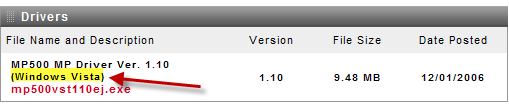
| Vista Home Premium 32bit OS / Sp2 | Re: cannot restart print spooler error 5 permission denied ![]() Did you update the firmware for Wds Vista .....? http://www.usa.canon.com/consumer/co...&modelid=11995 |
My System Specs![]() |
| | #3 (permalink) |
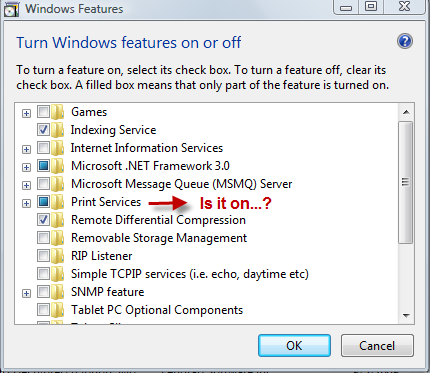
| vista | Re: cannot restart print spooler error 5 permission denied Thank you kindly for your help thus far, I have been unable to update the firmware as the error regarding "stopped print spooler" appears. In regards to turning print services on, the Internet Printing client is turned on but I am unable to turn either the LPR Print Monitor or the LPD Print Service on. |
My System Specs![]() |
| | #4 (permalink) |
| Vista Home Premium 32bit OS / Sp2 | Re: cannot restart print spooler error 5 permission denied Ok ...Tom ....Here is what i'd do ..... Unplug all printers ..... Delete "Uninstall" all printer drivers ..."all of them" .... Run this .." Just click Fix-it" ...: Fix printing problems by resetting the print spooler Go to Canon site that i gave you ...: Download the firmware ....follow the procedure until it asks you to plug-in the printer so it can recognize .... Restart ..... |
My System Specs![]() |
| | #5 (permalink) |
| vista | Re: cannot restart print spooler error 5 permission denied Thank you again! I had already uninstalled all drivers, the results of running Microsoft FixIt was "This Microsoft Fix It failed to process." |
My System Specs![]() |
| | #6 (permalink) |
| vista | Re: cannot restart print spooler error 5 permission denied Any other suggestions would be greatly appreciated. |
My System Specs![]() |
| | #7 (permalink) |
| vista | Re: cannot restart print spooler error 5 permission denied Any other suggestions? Upgrading to Windows 7 in a month would solve this issue? |
My System Specs![]() |
| | #8 (permalink) |
| Win7x64 | Re: cannot restart print spooler error 5 permission denied There's no guarantee that an "upgrade" will fix any particular settings breakdown, mostly because the upgrade process aims to preserve what it finds in situ. It's possible to diagnose everything, but you may have to do some fairly convoluted things to get there. I'd be interested in the results of the following: - Run a CMD instance as admin (right-click the CMD shortcut, "Run as administrator..."). - Attempt to start the spooler service from there: C:\Windows\system32>net start spooler The Print Spooler service is starting. The Print Spooler service was started successfully. Assuming yours doesn't "start successfully", what's the exact error message? If it's a simple "access denied"... - Run services.msc and check the properties of the spooler service. What account is it configured to run under? - Have you ever used Process Monitor? If not, this is a good opportunity. You might want to download it (Process Monitor) and have a play. The aim is to generate a log of what the spoolsv.exe process does during its brief lifespan, assuming the process starts at all. Analysis of a ProcMon log may reveal the source of the "access denied" message. |
My System Specs![]() |
| | #9 (permalink) |
| vista | Re: cannot restart print spooler error 5 permission denied H2SO4, your username brings back memories of working as a pharmaceutical chemist! Thank you kindly for your help thus far! I have run command prompt as an admin w/the following results; [IMG]file:///C:/Users/Tom/AppData/Local/Temp/moz-screenshot-2.png[/IMG]System error 5 has occurred. Access is denied. Then running services.msc, there is no spooler service listed. I downloaded the Process Monitor but do not really understand how to make heads/tails of the info. Please advise, thanks again. Tom |
My System Specs![]() |
| | #10 (permalink) |
| Win7x64 | Re: cannot restart print spooler error 5 permission denied Are you quite sure it's not listed? I'd expect a different error in that case. The services.msc applet calls it the "Print Spooler" service. What do you get in response to this on a command prompt? SC QUERYEX SPOOLER It's not particularly trivial but it can be very useful. If you're still keen I'll try to help you use ProcMon after I've got more info regarding the questions above (I need to know whether we're going to be monitoring spoolsv.exe or SCM itself.) |
My System Specs![]() |
![]() |
| Thread Tools | |
| |
Similar Threads | ||||
| Thread | Forum | |||
| Print Spooler Error | Vista print fax & scan | |||
| Print Spooler Error | Vista General | |||
| Print Spooler Error | Vista print fax & scan | |||
| Print Spooler Error Durring Download | Vista print fax & scan | |||
| print spooler not on error message | Vista print fax & scan | |||