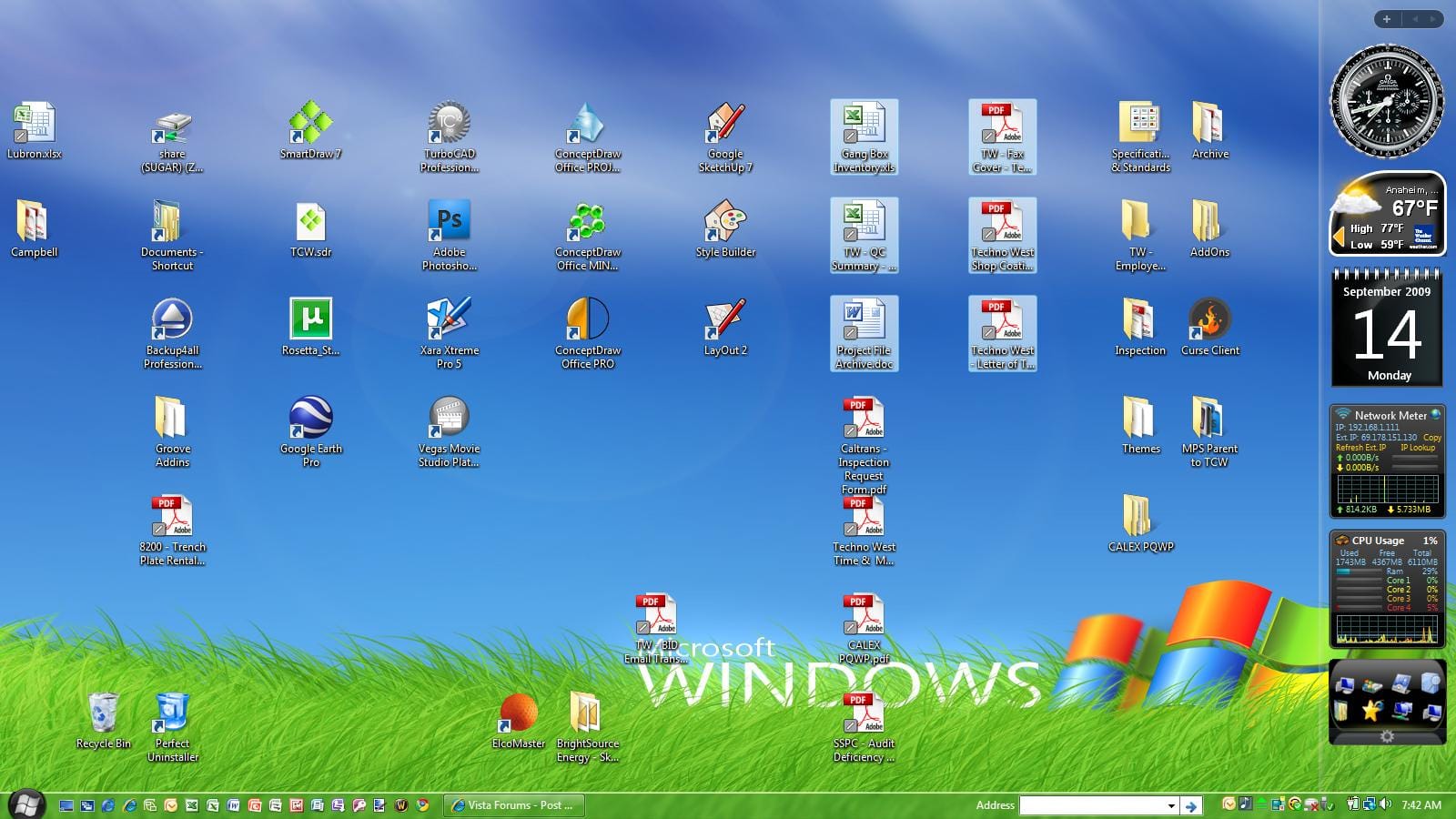
Fired up my x64 Vista Home Premium this morning and found something odd....Gray forward slash marks on document icons. Cannot interact with them, nor can i find any information about what they might be?!? Anyone?
By not being able to interact with them, do you mean that you cannot move the icons on the desktop and that if you click or double-click them that the relevant document does not open?
4 x 4GB DDR3-1600 Corsair Vengeance CMZ8GX3M2A1600C9B (16GB)
Graphics card(s)
MSI GeForce GTX770 Gaming OC 2GB
Sound Card
Realtek High Definition on board solution (ALC 898)
Monitor(s) Displays
ViewSonic VA1912w Widescreen
Screen Resolution
1440x900
Hard Drives
OCZ Agility 3 120GB SATA III x2 (RAID 0)
Samsung HD501LJ 500GB SATA II x2
Hitachi HDS721010CLA332 1TB SATA II
Iomega 1.5TB Ext USB 2.0
WD 2.0TB Ext USB 3.0
Cannot interact...meaning that a left or right click on the slash produces no apparent result. The only thing I've done different in the past few days was to install Norton 360, but I can find no information from Norton about the slash marks...Weird
A double click on the icon opens the document as normal, so nothing has changed there.
I've had a look at your attached image, and the gray slash occupies the same position on the icons as the normal shortcut arrow. This indicates that it is some form of icon overlay.
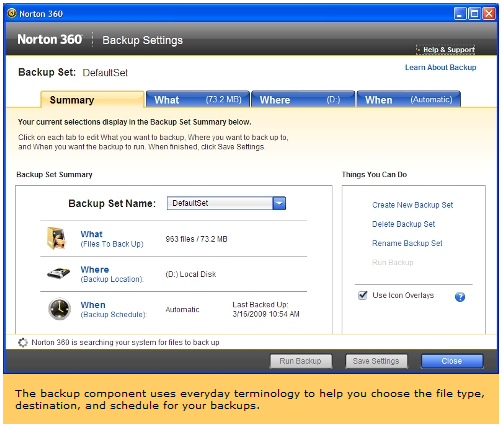
Checking with Google, I've managed to come up with this from Norton 360 3.0 - Computer Shopper It would appear that this overlay has got something to do with the backup function of Norton 360.
Referring to the above image, what information do you get if you click the question mark next to Use Icon Overlays?
4 x 4GB DDR3-1600 Corsair Vengeance CMZ8GX3M2A1600C9B (16GB)
Graphics card(s)
MSI GeForce GTX770 Gaming OC 2GB
Sound Card
Realtek High Definition on board solution (ALC 898)
Monitor(s) Displays
ViewSonic VA1912w Widescreen
Screen Resolution
1440x900
Hard Drives
OCZ Agility 3 120GB SATA III x2 (RAID 0)
Samsung HD501LJ 500GB SATA II x2
Hitachi HDS721010CLA332 1TB SATA II
Iomega 1.5TB Ext USB 2.0
WD 2.0TB Ext USB 3.0
4 x 4GB DDR3-1600 Corsair Vengeance CMZ8GX3M2A1600C9B (16GB)
Graphics card(s)
MSI GeForce GTX770 Gaming OC 2GB
Sound Card
Realtek High Definition on board solution (ALC 898)
Monitor(s) Displays
ViewSonic VA1912w Widescreen
Screen Resolution
1440x900
Hard Drives
OCZ Agility 3 120GB SATA III x2 (RAID 0)
Samsung HD501LJ 500GB SATA II x2
Hitachi HDS721010CLA332 1TB SATA II
Iomega 1.5TB Ext USB 2.0
WD 2.0TB Ext USB 3.0
Just a quickie on how to get rid of slash overlay.... 1) Open Norton 360 window 2) Click on "settings" at top of window 3) Uncheck "backup Status Overlays" and close window Grey slash boxes will be gone when you reboot (or simply log off and log back on)