
Windows Vista Forums

Useful tool for power enthusiasts on the go (advanced power options)
  1. #1
    VaguelyRapt's Avatar

    Electrosexual
    Join Date : Feb 2009
    Posts : 222
    Vista Home Premium x86 / Win7 Ultimate x86
    Local Time: 08:27 PM
    israel

    Useful tool for power enthusiasts on the go (advanced power options)

    Want to change advanced power options with a few keyboard presses?


    I like changing advanced power options all the time, mostly CPU throttle and brightness (the two most important factors in battery life). I used to have a separate power plan just for different CPU throttles, but that seemed a little inefficient (as did opening advanced power options under several layers of GUI). So I just finished writing up some batch scripts to change advanced power settings.

    All you need to do is copy the attached files into the System32 folder (C:\Windows\System32\), for which you'll need to provide administrator privileges. Then, just press Win+R and type the name of the setting followed by the value. For example:

    "bri 30" will change the screen brightness to 30%.
    "maxp 50" will change the maximum CPU throttle to 50%.
    "sleep 5" will change the time until sleep to 5 minutes.

    Like so:apo.jpg
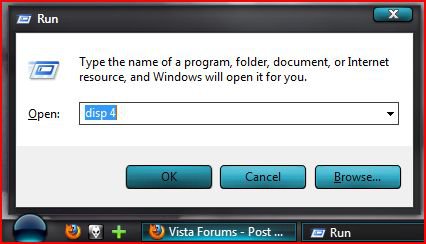
    By the way, you can change the command just by changing the name of the file. Renaming "disp.bat" to "Display Brightness.bat" will let you type "Display Brightness 4" instead of "disp 4".

    Let me know what you think. I can make one for each and every advanced power setting, all you gotta do is ask. Enjoy! (Don't mind giving me rep if you use this, I spent quite some time on this )

    System32.zip

      My System SpecsSystem Spec

  2. #2


    Banned
    Join Date : Jul 2009
    Posts : 1,340
    Windows 7 Ultimate x64
    Local Time: 05:27 AM


    Re: Useful tool for power enthusiasts on the go (advanced power options)

    Well written! Rep given.

    You might also find this batch file interesting. It deletes all file in the .tmp folder. You'll have to edit it in Notepad to change the xxx's to your user name though. After, just right click it and select run as administrator.

    More info if anyone wants to write batch files:

    http://www.infionline.net/~wtnewton/batch/batguide.html

      My System SpecsSystem Spec

  3. #3
    VaguelyRapt's Avatar

    Electrosexual
    Join Date : Feb 2009
    Posts : 222
    Vista Home Premium x86 / Win7 Ultimate x86
    Local Time: 08:27 PM
    israel

      Thread Starter

    Re: Useful tool for power enthusiasts on the go (advanced power options)

    No need to edit, there's a built-in variable that expands to the user profile folder. (I switched the "C:\Users\xxx" with %userprofile% which translates to "C:\Users\yourusername\")

    deltemp.bat

    Batch files (the command line in general) is extremely useful. I'm glad I took the time to learn a little bit about it. I also wrote a script that syncs your Firefox bookmarks and history across different Firefox profiles, it runs right before Firefox and then launches FF for me. I'll never get tired of making my computer as efficient as can be.

      My System SpecsSystem Spec

  4. #4


    Banned
    Join Date : Jul 2009
    Posts : 1,340
    Windows 7 Ultimate x64
    Local Time: 05:27 AM


    Re: Useful tool for power enthusiasts on the go (advanced power options)

    Quote Originally Posted by VaguelyRapt View Post
    No need to edit, there's a built-in variable that expands to the user profile folder. (I switched the "C:\Users\xxx" with %userprofile% which translates to "C:\Users\yourusername\")

    deltemp.bat

    Batch files (the command line in general) is extremely useful. I'm glad I took the time to learn a little bit about it. I also wrote a script that syncs your Firefox bookmarks and history across different Firefox profiles, it runs right before Firefox and then launches FF for me. I'll never get tired of making my computer as efficient as can be.
    You could also take a look at windows powershell. Its looking to be the replacement to .bat file scripting:

    http://www.microsoft.com/windowsserv...l/default.mspx

      My System SpecsSystem Spec

  5. #5


    Newbie
    Join Date : Jul 2012
    Posts : 1
    7 Ultimate x64
    Local Time: 07:27 PM


    Re: Useful tool for power enthusiasts on the go (advanced power options)

    Quote Originally Posted by VaguelyRapt View Post
    Want to change advanced power options with a few keyboard presses?

    I like changing advanced power options all the time, mostly CPU throttle and brightness (the two most important factors in battery life). I used to have a separate power plan just for different CPU throttles, but that seemed a little inefficient (as did opening advanced power options under several layers of GUI). So I just finished writing up some batch scripts to change advanced power settings.

    All you need to do is copy the attached files into the System32 folder (C:\Windows\System32\), for which you'll need to provide administrator privileges. Then, just press Win+R and type the name of the setting followed by the value. For example:

    "bri 30" will change the screen brightness to 30%.
    "maxp 50" will change the maximum CPU throttle to 50%.
    "sleep 5" will change the time until sleep to 5 minutes.

    Like so:Click image for larger version. 

Name:	APO.JPG 
Views:	195 
Size:	30.4 KB 
ID:	15664

    By the way, you can change the command just by changing the name of the file. Renaming "disp.bat" to "Display Brightness.bat" will let you type "Display Brightness 4" instead of "disp 4".

    Let me know what you think. I can make one for each and every advanced power setting, all you gotta do is ask. Enjoy! (Don't mind giving me rep if you use this, I spent quite some time on this )

    System32.zip
    Sorry for the kick, but can I use those batches with Windows 7 (Ultimate, x64) as well? Not just Vista I mean. And is the effect instantaneous? Don't want to have to reboot before it takes effect...

    It's mainly about minp.bat, because Multisim can't get the CPU to throttle up making the simulation run very slow, slower than usual that is. So I figured, why not make a batch to increase the minimum processor state setting which also lowers it after Multisim shuts down. While looking for a way I ended up here.

      My System SpecsSystem Spec

Useful tool for power enthusiasts on the go (advanced power options) problems?

Similar Threads
Thread Thread Starter Forum Replies Last Post
Solved Power Options Corrupt (power plan unavailable) Domsy General Discussion 27 04 Mar 2010
problem advanced power management mblackburn13676 General Discussion 1 11 Sep 2008
Vista Ultimate:Battery tab missing on Power Options - Advanced set GW Vista General 2 10 Sep 2008
Power Management/Power Options in Vista MarkR Vista General 4 29 Aug 2008
Vista Advanced Power and Network Connection CoCUser Vista General 3 07 Apr 2007