Windows Vista Forums
Vista Forums Home Join Vista Forums Windows 7 Forum Vista Tutorials Tags
Welcome to Windows Vista Forums. Our forum is dedicated to helping you find solutions with any problems, errors or issues you are experiencing with Windows Vista. The Vista forum also covers news and updates and has an extensive Windows Vista tutorial section that covers a wide range of tips and tricks.

Go Back   Vista Forums > Vista Forums > General Discussion

Vista - Cant get past boot up screen

Reply
 
Old 3 Weeks Ago   #1 (permalink)


Vista 32


Cant get past boot up screen

Hi I hope someone can help me
I just put some more memory in my computer and now cant get past boot bios screen as I cant use keyboard to go past but I am guessing as usb is not active at this point keyboard or mouse does not work

Thanks in advance

My System SpecsSystem Spec
Old 3 Weeks Ago   #2 (permalink)


Vista Ultimate SP2 x64 : Seven Ultimate x64


Re: Cant get past boot up screen

You must enable legacy support in the BIOS to use your USB kb/mouse.

Exactly where are you being held up? Does the Windows loading bar appear, or it 'hangs' at the BIOS / POST screen?

Was the extra memory you installed the same specs as your existing memory?
My System SpecsSystem Spec
Old 3 Weeks Ago   #3 (permalink)


Vista 32


Re: Cant get past boot up screen

Thanks for quick reply
I held up at bios screen it sayes Esc to enter boot menu Tab to continue delete enter setup
Memory was the same 2gb 667 which is the same as in the other port
I surpose the way around it is buy a old keyboard but dont really want to do this !
My System SpecsSystem Spec
Old 3 Weeks Ago   #4 (permalink)


Vista Ultimate SP2 x64 : Seven Ultimate x64


Re: Cant get past boot up screen

Quote  Quote: Originally Posted by ian986 View Post
I surpose the way around it is buy a old keyboard but dont really want to do this !
I'd try removing that new module first to see if it restores your functionality first. If it does, I'd then enter the BIOS to confirm that USB Legacy Support is Enabled.

I suspect though, that despite being the same mhz Ram speed, the modules may actually be incompatible with each other in regards to what is called CAS Latency timings. ie ddr2 667 5-5-5-18, 4-4-4-12 etc

I have to sleep now, so hopefully somebody else has some ideas - otherwise I shall check back tomorrow with a much less vague description.

Best of luck.
My System SpecsSystem Spec
Old 3 Weeks Ago   #5 (permalink)


Vista 32


Re: Cant get past boot up screen

Thanks for your help smarteyeball!
I spoke to the people who supplied the ram and I used there ram on it on and pc booted up fine swapped memory around in the slots still no joy! i also tried foxconn web site not much help as maybe a later version of bios would help but went way over my head ! in the end just put old memory back in and is running fine now just wanted more memory

So if you have anymore ideas please tell me!
Thanks again
My System SpecsSystem Spec
Old 3 Weeks Ago   #6 (permalink)


Vista Ultimate SP2 x64 : Seven Ultimate x64


Re: Cant get past boot up screen

Flashing a BIOS is relatively simple, however it is not without risk.

Generally speaking there are two main ways of doing it.

One is downloading and putting the new BIOS on a USB flash drive, floppy disc or burnt to a CD and updating through the BIOS itself. This method is the most preferable, as there is 'less risk'.

The other method is to flash the BIOS from within Windows itself, usually via an downloaded BIOS *.exe .

However while it's a 'simpler' process, it has a much higher risk of causing a 'bad flash'. A bad flash can render some motherboards inoperable.

If you wouldn't mind, could you please download CPU-Z and post a screenshot of the 'mainboard' and tab:

CPUID

Example:
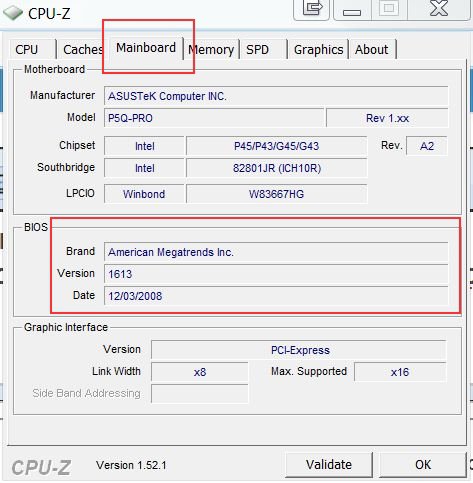
cpu-z-mainboard.jpg

To post a screenshot:
A Preferred Method of Uploading/Posting Screen Shots - Windows 7 Forums

(It's our sister site, but the method is the same)


Quote  Quote: Originally Posted by ian986 View Post
I used there ram on it on and pc booted up fine swapped memory around in the slots still no joy!
By this, do you mean the PC worked fine with only the new ram installed?

If so the supplier was correct in that it is compatible with your board, but not necessarily compatible with your existing modules. The good news is that you may not have to flash your BIOS.

Now for the annoying part which involves more ram swapping

In CPU-Z could you also post a screenshot of the 'SPD' tab of both your old ram only and your new ram only. This will determine if the CAS Latency timings I mentioned earlier match or not.

Example:
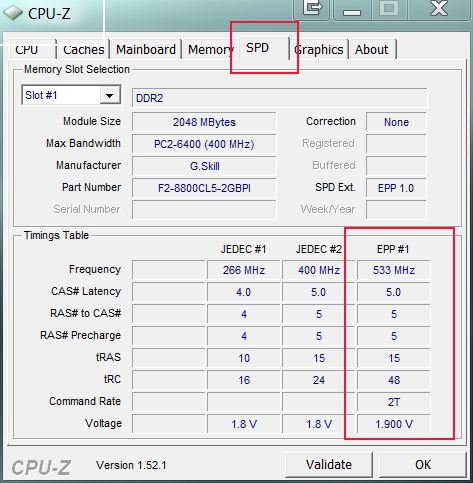
cpu-z-spd-tab.jpg

If they do not match, then there may be some further things to try. If they do match then it's back to the drawing board.

One last possibility is that depending on your board, it may have a maximum limit of 2GB and if that is the case, then unfortunately there is nothing that can be done

(* Before swapping your ram modules, I'd like to check the specs of your mobo first (mainboard screenshot) - I should have added this step first, but I thought of it last )

My System SpecsSystem Spec
Old 3 Weeks Ago   #7 (permalink)


Vista 32


Re: Cant get past boot up screen

That is a cool program!
Here is the link!
I did notice that memory in pc now as per scan is original says 333 or am i reading this wrong? Could that be the problem? That would be to easy HUH
Thanks again for all your help as i have not got a clue where to start.

CPU-Z Validator 3.1
My System SpecsSystem Spec
Old 3 Weeks Ago   #8 (permalink)


Vista 32


Re: Cant get past boot up screen

I dont think you can see this page so thought I would add too
Thanks again

DIMM # 1
SMBus address 0x50
Memory type DDR2
Module format Regular UDIMM
Manufacturer (ID) Corsair (7F7F9E0000000000)
Size 2048 MBytes
Max bandwidth PC2-5300 (333 MHz)
Part number VS2GB667D2
Manufacturing date Week 12/Year 07
Number of banks 2
Data width 64 bits
Correction None
Nominal Voltage 1.80 Volts
EPP no
XMP no
JEDEC timings table CL-tRCD-tRP-tRAS-tRC @ frequency
JEDEC #1 3.0-3-3-9-11 @ 200 MHz
JEDEC #2 4.0-4-4-12-15 @ 266 MHz
JEDEC #3 5.0-5-5-15-18 @ 333 MHz
My System SpecsSystem Spec
Old 3 Weeks Ago   #9 (permalink)


Vista Ultimate SP2 x64 : Seven Ultimate x64


Re: Cant get past boot up screen

Quote  Quote: Originally Posted by ian986 View Post
I did notice that memory in pc now as per scan is original says 333 or am i reading this wrong?
No, that's normal. DDR stands for Double Data Rate, so 333x2=667mhz


Quote  Quote: Originally Posted by ian986 View Post

JEDEC #3 5.0-5-5-15-18 @ 333 MHz
In the CPU-Z validation shot, it is showing the ram running at 5-5-5-15, whereas the above page you posted shows it is rated for 5-5-5-18.

The difference between 15 and 18 may not seem to be much, but it is most likely the cause of the incompatibility. It appears as if one the modules cannot handle the 'tighter timing' of 15.

With the original module installed , enter the BIOS and look for the ram settings. I'm not familiar with the layout of your BIOS, so you may have to look. Usually it's under 'Advanced options' or something similar.

If the options are available, enter the timings manually to 5-5-5-18, save and exit, shut down and add the new module.


Hopefully that BIOS has the options to allow you to adjust the timings. Not all BIOS'es do and there is no guarantee a BIOS flash will add the options.
My System SpecsSystem Spec
Old 3 Weeks Ago   #10 (permalink)


Vista 32


Re: Cant get past boot up screen

I put the new memory back in tonight and did the test again
I have also learned how to snip tonight too. I really hope the answer is here.
Attached Thumbnails
capture-1.jpg   capture2.jpg  
My System SpecsSystem Spec
Reply

Thread Tools


Similar Threads
Thread Forum
Can't Get past Black Screen General Discussion
Wont load past login screen? General Discussion
Login dialog screen is gone... can't get past windows screen Vista installation & setup
After first restart, I can't get past the loading screen Vista installation & setup
Computer skips past dual boot screen on startup Vista installation & setup


Vista Forums is an independent web site and has not been authorized,
sponsored, or otherwise approved by Microsoft Corporation.
"Windows Vista", the Start Orb, and related materials are trademarks of Microsoft Corp.
© Designer Media Ltd

1 2 3 4 5 6 7 8 9 10 11 12 13 14 15 16 17 18 19 20 21 22 23 24 25 26 27 28 29 30 31 32 33 34 35 36 37 38 39 40 41 42 43 44 45 46