Windows Vista Forums

extreme problem!!! Need Help ASAP
  1. #1


    Junior Member
    Join Date : Nov 2009
    BROCKLEY,LONDON
    Posts : 12
    Vista Home Premium 32bit
    Local Time: 12:28 AM
    uk uk england

    extreme problem!!! Need Help ASAP

    My Problem: When i log on to my laptop it runs for about an hour and then shuts down completely. Sometimes it can run for longer or shorter
    I've lost a lot of work due to this

    I have a Samsung R505 Vista premium


    Can Someone help me please!!

      My System SpecsSystem Spec

  2. #2


    Newbie
    Join Date : Dec 2009
    Posts : 3
    Windows 7
    Local Time: 06:28 PM


    Re: extreme problem!!! Need Help ASAP

    Quote Originally Posted by messyguy View Post
    My Problem: When i log on to my laptop it runs for about an hour and then shuts down completely. Sometimes it can run for longer or shorter
    I've lost a lot of work due to this

    I have a Samsung R505 Vista premium


    Can Someone help me please!!
    It could be a setting in your BIOS that when
    your laptop reaches a certain temperature it will shut down. Check out your settings and see if there is something going on.

      My System SpecsSystem Spec

  3. #3
    Brink's Avatar

    Administrator


    Join Date : Apr 2007
    Texas, USA
    Posts : 30,534
    64-bit Vista Ultimate SP2, Windows 7 Ultimate SP1, Windows 8 Enterprise
    Local Time: 07:28 PM
    usa us texas


    Re: extreme problem!!! Need Help ASAP

    Hello MessyGuy,

    It sounds like you may be having a overheating issue. You can get a can of compressed air and see if blowing out the dust in the heatsink vents on the laptop may help. Plus, to keep the vents clear and free while in use. Check in your Advanced Power Plan settings (Control Panel) and look in your "System Cooling" options. You may need to use "Active" instead of "Passive". If all else fails, they have "laptop cooler fans" that can attach to your laptop to help keep it cooler to help prevent it from overheating.

    Hope this helps,
    Shawn

      My System SpecsSystem Spec

  4. #4


    Junior Member
    Join Date : Nov 2009
    BROCKLEY,LONDON
    Posts : 12
    Vista Home Premium 32bit
    Local Time: 12:28 AM
    uk uk england

      Thread Starter

    Re: extreme problem!!! Need Help ASAP

    Quote Originally Posted by Brink View Post
    Hello MessyGuy,

    It sounds like you may be having a overheating issue. You can get a can of compressed air and see if blowing out the dust in the heatsink vents on the laptop may help. Plus, to keep the vents clear and free while in use. Check in your Advanced Power Plan settings (Control Panel) and look in your "System Cooling" options. You may need to use "Active" instead of "Passive". If all else fails, they have "laptop cooler fans" that can attach to your laptop to help keep it cooler to help prevent it from overheating.

    Hope this helps,
    Shawn
    How do i get to the system cooling option?

      My System SpecsSystem Spec

  5. #5
    Brink's Avatar

    Administrator


    Join Date : Apr 2007
    Texas, USA
    Posts : 30,534
    64-bit Vista Ultimate SP2, Windows 7 Ultimate SP1, Windows 8 Enterprise
    Local Time: 07:28 PM
    usa us texas


    Re: extreme problem!!! Need Help ASAP

    This is for Windows 7, but it's the same steps in the Control Panel (Start Menu).

    Power Plan Settings - Change - Windows 7 Forums

      My System SpecsSystem Spec

  6. #6


    Junior Member
    Join Date : Nov 2009
    BROCKLEY,LONDON
    Posts : 12
    Vista Home Premium 32bit
    Local Time: 12:28 AM
    uk uk england

      Thread Starter

    Re: extreme problem!!! Need Help ASAP

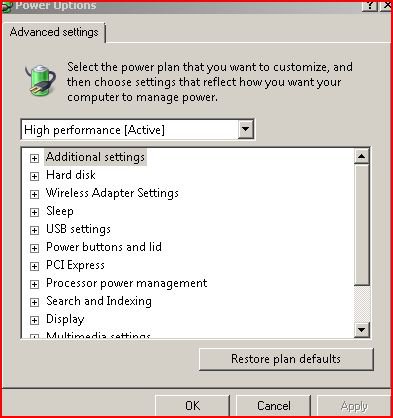
    .jpg

    Can't seem to find the system cooling option.

      My System SpecsSystem Spec

  7. #7
    Brink's Avatar

    Administrator


    Join Date : Apr 2007
    Texas, USA
    Posts : 30,534
    64-bit Vista Ultimate SP2, Windows 7 Ultimate SP1, Windows 8 Enterprise
    Local Time: 07:28 PM
    usa us texas


    Re: extreme problem!!! Need Help ASAP

    It should be under the "Processor power management" folder tree.

      My System SpecsSystem Spec

  8. #8


    Junior Member
    Join Date : Nov 2009
    BROCKLEY,LONDON
    Posts : 12
    Vista Home Premium 32bit
    Local Time: 12:28 AM
    uk uk england

      Thread Starter

    Re: extreme problem!!! Need Help ASAP

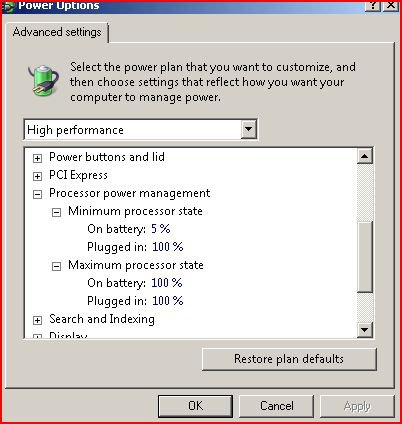
    as2.jpg
    Is this Right?

      My System SpecsSystem Spec

  9. #9
    Brink's Avatar

    Administrator


    Join Date : Apr 2007
    Texas, USA
    Posts : 30,534
    64-bit Vista Ultimate SP2, Windows 7 Ultimate SP1, Windows 8 Enterprise
    Local Time: 07:28 PM
    usa us texas


    Re: extreme problem!!! Need Help ASAP

    It doesn't look like you have this option, and would need to try the other suggestions instead to see if they may be able to help with this if it's a over heating issue.

      My System SpecsSystem Spec

  10. #10


    Junior Member
    Join Date : Nov 2009
    BROCKLEY,LONDON
    Posts : 12
    Vista Home Premium 32bit
    Local Time: 12:28 AM
    uk uk england

      Thread Starter

    Re: extreme problem!!! Need Help ASAP

    Ok, Thanks for you help anyways

      My System SpecsSystem Spec

Page 1 of 2 12 LastLast
extreme problem!!! Need Help ASAP problems?

Similar Threads
Thread Thread Starter Forum Replies Last Post
vista boot up problem, pls help ASAP jokesy Vista performance & maintenance 5 21 Jul 2009
Vista installation problem,, i need help ASAP Hussam Software 26 05 Jul 2009
Vista installation problem,, i need help ASAP Hussam General Discussion 10 22 Jun 2009
Problem with some services! HELP MEEEE ASAP! giwrgos Network & Sharing 0 11 Feb 2009
Help Urgent Asap Asap Asap George M Vista General 13 31 Oct 2007