Windows Vista Forums

Customize Vista Start Menu Dark side
  1. #1
    maccaquacker's Avatar
    Join Date : Mar 2010
    Posts : 125
    Vista Home Premium 32bit
    Local Time: 12:09 AM
    uk uk yorkshire

    Customize Vista Start Menu Dark side

    I have windows vista and was wondering if it was possible to CHANGE the links on the right hand side of thee toolbar. I know how to turn the default ones on and off but I want to change my options. For example, Pictures is in at the moment and I would rather this be another folder in my user folder, called "photos"


      My System SpecsSystem Spec

  2. #2


    Banned

    Join Date : Dec 2009
    Posts : 3,375
    Vista Home Premium x86 SP2
    Local Time: 01:09 AM
    uk european union


    Re: Customize Vista Start Menu Dark side

    Hi,

    Yes this can be done. Right on Pictures and click Rename. Change name to "Photos" and press enter. Now right click on Photos again, click Properties, on the Location tab, type a new directory and click Move. I think this answers your question.

    Richard

      My System SpecsSystem Spec

  3. #3
    Bare Foot Kid's Avatar

    Technophile Wannabe


    Join Date : Feb 2008
    The Lowcountry
    Posts : 2,617
    Vista 64-bit Ultimate Win7 64-bit Ultimate XP SP3 32-bit Pro
    Local Time: 08:09 PM
    usa us south carolina


    Re: Customize Vista Start Menu Dark side

    Hello maccaquacker, welcome to Vista Forums.


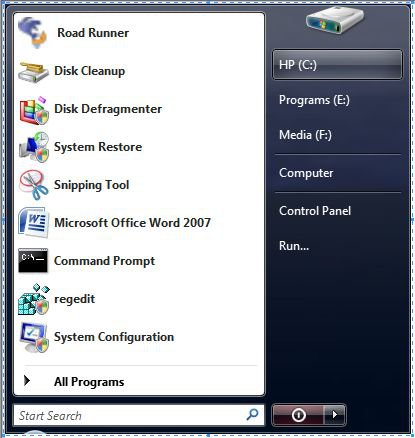
    I fooled around with this when I first got Vista, I found 3 of the right side links "moveable" have a look at what niemiro said.

    c-r-side.jpg

      My System SpecsSystem Spec

  4. #4
    SIW2's Avatar

    Senior Member


    Join Date : Jul 2008
    Posts : 2,676
    VISTA HOME PREMIUM X64/ 7 x64 / 7x86
    Local Time: 01:09 AM


    Re: Customize Vista Start Menu Dark side

    You can edit where the Pictures link is pointing with regedit:

    HKCU\Software\Microsoft\Windows\CurrentVersion\Explorer\Shell Folders\My Pictures

    Change C:\users\Username\Pictures to <path_to your_photos_folder>

    HKCU\Software\Microsoft\Windows\CurrentVersion\Explorer\User Shell Folders\My Pictures

    Change %USERPROFILE%\Pictures to <path_to your_photos_folder>

    Restart for it to take effect. Clicking on Pictures Link will open "photos".

      My System SpecsSystem Spec

  5. #5
    Bare Foot Kid's Avatar

    Technophile Wannabe


    Join Date : Feb 2008
    The Lowcountry
    Posts : 2,617
    Vista 64-bit Ultimate Win7 64-bit Ultimate XP SP3 32-bit Pro
    Local Time: 08:09 PM
    usa us south carolina


    Re: Customize Vista Start Menu Dark side

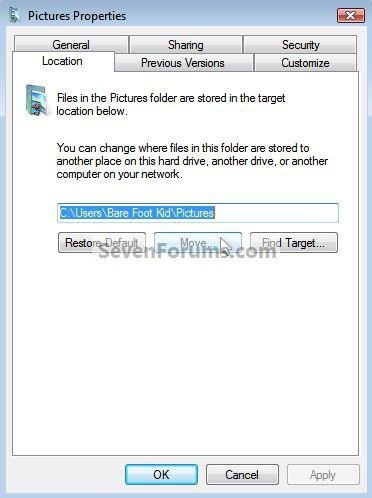
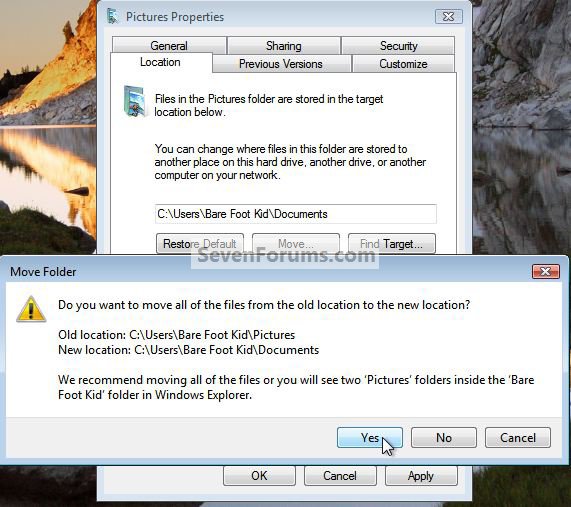
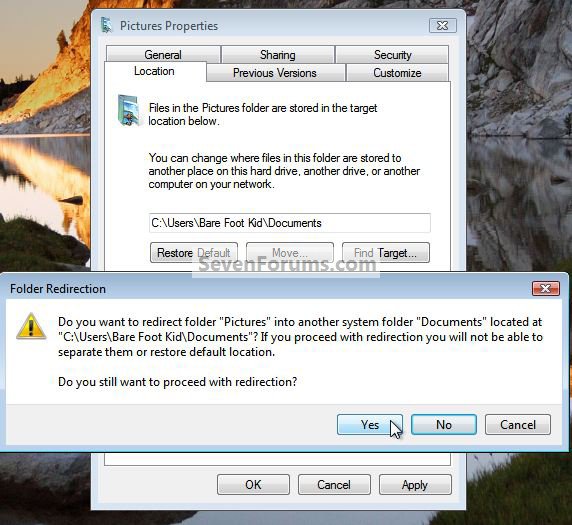
    I just moved the pictures to documents with no problems, right click, properties.

    click these images to enlarge
    move.jpg
    move2.jpg
    move3.jpg
    move9.jpg
    move10.jpg

      My System SpecsSystem Spec

  6. #6
    SIW2's Avatar

    Senior Member


    Join Date : Jul 2008
    Posts : 2,676
    VISTA HOME PREMIUM X64/ 7 x64 / 7x86
    Local Time: 01:09 AM


    Re: Customize Vista Start Menu Dark side

    I don't think maccaquaker wants to move the Pictures folder.

    It seems to me he wants to click the Pictures link on the start menu , and have his own separate "photos" folder open up.

      My System SpecsSystem Spec

  7. #7
    Bare Foot Kid's Avatar

    Technophile Wannabe


    Join Date : Feb 2008
    The Lowcountry
    Posts : 2,617
    Vista 64-bit Ultimate Win7 64-bit Ultimate XP SP3 32-bit Pro
    Local Time: 08:09 PM
    usa us south carolina


    Re: Customize Vista Start Menu Dark side

    Quote Originally Posted by SIW2 View Post
    I don't think maccaquaker wants to move the Pictures folder.

    It seems to me he wants to click the Pictures link on the start menu , and have his own separate "photos" folder open up.


    Hello SIW, I was just goofing around, trying to give them some ideas; you can point it to any location you choose, look at the snip of my old start menu in my first post in this thread.

      My System SpecsSystem Spec

  8. #8
    maccaquacker's Avatar
    Join Date : Mar 2010
    Posts : 125
    Vista Home Premium 32bit
    Local Time: 12:09 AM
    uk uk yorkshire

      Thread Starter

    Re: Customize Vista Start Menu Dark side

    Quote Originally Posted by SIW2 View Post
    I don't think maccaquaker wants to move the Pictures folder.

    It seems to me he wants to click the Pictures link on the start menu , and have his own separate "photos" folder open up.
    SIW2 Is right, I have two folders, "Photos" and "Pictures."
    They have totally separate items in them and I do not want them to merge, just simply have the shortcut on the start menu point to another location

      My System SpecsSystem Spec

  9. #9


    Banned

    Join Date : Dec 2009
    Posts : 3,375
    Vista Home Premium x86 SP2
    Local Time: 01:09 AM
    uk european union


    Re: Customize Vista Start Menu Dark side

    Hello,

    So is this issue solved now?

    Richard

      My System SpecsSystem Spec

  10. #10
    maccaquacker's Avatar
    Join Date : Mar 2010
    Posts : 125
    Vista Home Premium 32bit
    Local Time: 12:09 AM
    uk uk yorkshire

      Thread Starter

    Re: Customize Vista Start Menu Dark side

    No,

    I need it changing as if it were a shorcut, not an entire folder location

      My System SpecsSystem Spec

Page 1 of 2 12 LastLast
Customize Vista Start Menu Dark side problems?

Similar Threads
Thread Thread Starter Forum Replies Last Post
custom links in the right, dark area of the start menu? Yuuki_Minoru General Discussion 4 05 Jun 2009
Start Menu - Customize Context Menu Brink Tutorials 5 23 May 2009
Customize Vista Start Menu? Bob Newman Vista General 3 13 Nov 2008
Start Menu (Right side) Broken Link (Pictures) VISTA Roger W. Vista General 4 21 Jul 2008
Vista Start Menu (right side) Chris Vista General 1 06 Oct 2007