Windows Vista Forums
Vista Forums Home Join Vista Forums Windows 7 Forum Vista Tutorials Tags
Welcome to Windows Vista Forums. Our forum is dedicated to helping you find solutions with any problems, errors or issues you are experiencing with Windows Vista. The Vista forum also covers news and updates and has an extensive Windows Vista tutorial section that covers a wide range of tips and tricks.


Go Back   Vista Forums > Vista Forums > General Discussion

RB

Vista - tray clock showing date

Reply
 
03-02-2009   #11


Windows 7 x64 (7229)


Re: tray clock showing date

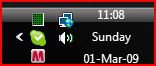
If you drag your taskbar up, it shows the time, day, and date. Also you can double-stack minimized windows. Also you can make the quick launch icons bigger. I have loved it since I found the little trick.

My System SpecsSystem Spec
04-29-2009   #12


Vista Home Premium 64bit


Re: tray clock showing date

Is there no free- or cheap-ware that puts the date IN the system tray? I have looked and the cheapest one I can find for Vista is $29.95. There used to be a freebie called T-Clock Ex which worked great for XP but I can't seem to find one for Vista.

No, I don't want to take off another 1/2 of my desktop space to pull up the task bar to 3x, and no I don't want to have to move my hands/mouse to go to the desktop to see the date, I want to be able to just look at the systray at any time to see the date and preferably the day too. (yeah, sometimes I do forget... ;-) )

UPDATE:
I Found this:
http://www.start64.com/index.php?opt...=716&Itemid=72

Not sure how good it is, so use at your own risk. This is based on the old T-Clock ex which I used for years with XP, but this version says it's an "Alpha". Maybe some adventuresome types want to test it...?

Last edited by pdsnickles; 04-29-2009 at 04:41 PM..
My System SpecsSystem Spec
05-01-2009   #13


Vista Home Premium 64-bit


Re: tray clock showing date

Quote  Quote: Originally Posted by pdsnickles View Post
Thanks for pointing that out. Unfortunately, when I tried it with 64-bit Vista, it crashed Explorer (!) when I tried changing some of its options.

Also, while it lets you choose the text color, it doesn't let you choose its background color, as TClockEx did—which means you can't get that nice and useful effect where the clock area is distinctly different from the rest of the system tray. So it clearly has a bit of work to be done.
My System SpecsSystem Spec
05-04-2009   #14


Vista Home Premium 64bit


Re: tray clock showing date

Thanks for testing. I was just about ready to try it... I assume you DID make sure you got the 64-bit version?

It appears then, that the one system tray clock that works for Vista is 1st Clock which costs $19.99 for just the clock and $29.99 for the clock and the Alarm software.
It does work well, I tried the trial version for a week or so. But I find it irksome to pay $30 for a clock and alarm. If it was $19.99 for the both, I could do it, but that extra $10 seems like gouging to me for a program that is almost exactly like TClock Ex, which was free...

I wish Vista had included this. It would have been so easy for them to do. And I find the idea of a calendar on the deskstop somewhat ridiculous, I don't want to have to go to the desktop to see the date, I want it in the system tray. (For me, it's not about the CLOCK, it's about the date/day!)
My System SpecsSystem Spec
05-12-2009   #15


Vista Home Premium 64-bit


Re: tray clock showing date

Quote:
Thanks for testing. I was just about ready to try it... I assume you DID make sure you got the 64-bit version?
Yes.

Quote:
It appears then, that the one system tray clock that works for Vista is 1st Clock which costs $19.99 for just the clock and $29.99 for the clock and the Alarm software. It does work well, I tried the trial version for a week or so. But I find it irksome to pay $30 for a clock and alarm. If it was $19.99 for the both, I could do it, but that extra $10 seems like gouging to me for a program that is almost exactly like TClock Ex, which was free...
Yes. It's ridiculous for something as relatively simple as a practical system-tray clock to cost money.

Quote:
I wish Vista had included this. It would have been so easy for them to do. And I find the idea of a calendar on the deskstop somewhat ridiculous, I don't want to have to go to the desktop to see the date, I want it in the system tray. (For me, it's not about the CLOCK, it's about the date/day!)
Exactly. But then, MS hasn't fixed the bug that shows (and requires you to dismiss) a disk-checking message each time you plug in a USB flash drive. You'd think they would've thought of something like that, too.
My System SpecsSystem Spec
05-12-2009   #16


Vista Home Premium 64bit


Re: tray clock showing date

I did buy the 1st-clock app, and actually it's not that bad of a deal; a bit overpriced, yes, but it works well and is not just a clock. (You can get JUST the clock for $20, or you can get what I got which includes a very nice alarm system for $30.)

Again, while I do think it is overpriced and I do think MS should include at least the date in the system tray option, 1st-clock has a very sophisticated and nice alarm system for creating quick and easy alarms (like "remind me in 5 min" -or 10 or 15...) and giving the alarm various priorities, etc. I find it very useful and thus was willing to spend the $30 for a clock/date/day in System Tray, with alarm system.
My System SpecsSystem Spec
05-21-2009   #17


Vista Home Premium 64-bit


Re: tray clock showing date

Yup. 3rd parties usually creep in to profit from MS's apathy and/or incompetence.

I'm not going to shell out $20 just to have a system-tray clock that shows the date. I'm not cheap; it's just a matter of principle. So I wrote one in Visual Basic. Works great. If I have time to add a fancy GUI and an installer, I'll upload it to the freeware sites.
My System SpecsSystem Spec
05-21-2009   #18


Vista Home Premium 64bit


Re: tray clock showing date

Cool! Glad to hear it! I already bought one as I said above, but there SHOULD be a freeware one. Take a look at TClockEx for XP, it is exactly what is needed for Vista and someone made one but apparently it doesn't work well.
My System SpecsSystem Spec
05-29-2009   #19


Vista Home Premium 64-bit


Re: tray clock showing date

Quote:
Take a look at TClockEx for XP, it is exactly what is needed for Vista and someone made one but apparently it doesn't work well.
Yes, used it for years; then couldn't w/Vista. From my previous post:

Quote:
Also, while it lets you choose the text color, it doesn't let you choose its background color, as TClockEx did.
My System SpecsSystem Spec
06-16-2009   #20


Vista Home Premium 64-bit


Re: tray clock showing date

Okay, I've found a nice, polished, freeware clock that works fine with Vista:

DS Clock
http://www.dualitysoft.com/dsclock/

When I first tried DS Clock, it didn't stay on top of the system tray, even though "Always on top" was selected. But I contacted the author, and he fixed that right away. Enjoy!
My System SpecsSystem Spec
Reply

RB


Thread Tools


Similar Threads for: tray clock showing date
Thread Forum
Display date and time in sys tray Vista General
Can't access system tray or windows clock Vista performance & maintenance
Show seconds on clock in System tray? Vista General
Weeknumbers in the tray clock/Calendar Vista General
How to display clock at system tray Vista General


Vista Forums is an independent web site and has not been authorized,
sponsored, or otherwise approved by Microsoft Corporation.
"Windows Vista", the Start Orb, and related materials are trademarks of Microsoft Corp.
© Designer Media Ltd