Windows Vista Forums

Can't Access NVIDIA Control Panel
  1. #1
    Kotuku's Avatar

    Member
    Join Date : Jul 2008
    Tauranga
    Posts : 65
    Ultimate x64
    Local Time: 02:49 PM
    newzealand

    Can't Access NVIDIA Control Panel

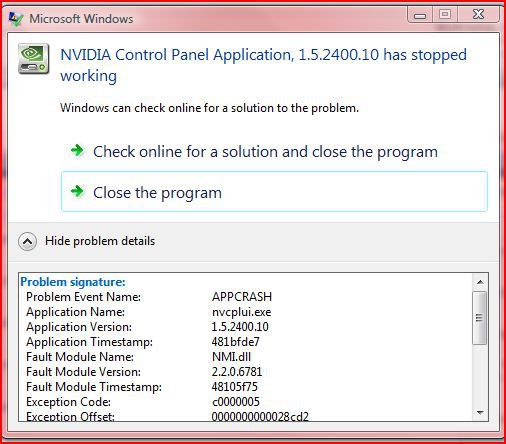
    All of a sudden (probably started 10+ days ago) I can't access the NVIDIA Control panel, I get an instant error message, as per attached. I am running 175.16 driver and I can't install newest driver as I need to access the NVIDIA Control panel so I can set up dual monitors.

    I can't even run Driver Sweeper, it leaves 3 files behind and I don't think it does an uninstall.

    HELP!

    nvidia_crash.jpg


      My System SpecsSystem Spec

  2. #2
    Brink's Avatar

    Administrator


    Join Date : Apr 2007
    Texas, USA
    Posts : 30,535
    64-bit Vista Ultimate SP2, Windows 7 Ultimate SP1, Windows 8 Enterprise
    Local Time: 09:49 PM
    usa us texas


    Re: Can't Access NVIDIA Control Panel

    Hello Kotuku,

    I would try uninstalling the video driver from Programs and Features, then reinstall or install the latest driver version to see if that helps.

    Latest NVIDIA ForceWare Video Drivers

    Hope this helps,
    Shawn

      My System SpecsSystem Spec

  3. #3
    Kotuku's Avatar

    Member
    Join Date : Jul 2008
    Tauranga
    Posts : 65
    Ultimate x64
    Local Time: 02:49 PM
    newzealand

      Thread Starter

    Re: Can't Access NVIDIA Control Panel

    Thanks Shawn, as I have NVIDIA MoBo etc, my Prog & Features shows 5 entries

    NVIDIA Drivers
    NVIDIA Forceware Network Access Manager
    NVIDIA Performance
    NVIDIA System Monitor
    NVIDIA System Update

    The first two show nothing in the SIZE column. Now it would seem the first is what I need to uninstall, yet I don't want to remove all my MoBo drivers etc. It is not specificall there anything that says Video Drivers
    I think I may have a bum installation of the 175.16 drivers? Maybe I should first re-install that.
    Can installation of the Video drivers be done in Safe Mode to make sure nothing interferes, or is it better in normal?

    Thanks
    Frenchy

      My System SpecsSystem Spec

  4. #4
    Brink's Avatar

    Administrator


    Join Date : Apr 2007
    Texas, USA
    Posts : 30,535
    64-bit Vista Ultimate SP2, Windows 7 Ultimate SP1, Windows 8 Enterprise
    Local Time: 09:49 PM
    usa us texas


    Re: Can't Access NVIDIA Control Panel

    Hi Frenchy,

    It would be the NVIDIA Drivers entry. It can be uninstalled in Safe Mode if you like, but it should not matter.

    Hope this helps,
    Shawn

      My System SpecsSystem Spec

  5. #5
    Kotuku's Avatar

    Member
    Join Date : Jul 2008
    Tauranga
    Posts : 65
    Ultimate x64
    Local Time: 02:49 PM
    newzealand

      Thread Starter

    Re: Can't Access NVIDIA Control Panel

    OK, When I Uninstalled the Vista Drivers, a screen popped up to give me the option of what driver I wanted uninstalled. I did that and installed 175.19 and that still would not let the NVIDIA Control Panel start. Uninstalled that and back to 175.16 but still will not allow control panel to run, with an APPCRASH error. I am stuck!

      My System SpecsSystem Spec

  6. #6


    Banned
    Join Date : Jul 2008
    San Diego
    Posts : 21
    Vista x64 Home Premium
    Local Time: 07:49 PM
    usa us california


    Re: Can't Access NVIDIA Control Panel

    When you uninstall the drivers, get there though the "control panel home"/choose uninstall a program, choose nvidia drivers/click "remove only the following"/nvidia display driver, this will also take you into safe mode at which point you would also use driver sweeper..."while still in safe mode" choose/nvidia display/choose clean/driver sweeper will now remove the rest of the display drivers entries, then restart and install new driver.
    Once you restart right click on desk top and choose nvidia control panel/choose advanced settings/let it adjust resolution if needed. It should be there now, if not you have other problems.

      My System SpecsSystem Spec

  7. #7
    Kotuku's Avatar

    Member
    Join Date : Jul 2008
    Tauranga
    Posts : 65
    Ultimate x64
    Local Time: 02:49 PM
    newzealand

      Thread Starter

    Re: Can't Access NVIDIA Control Panel

    Quote Originally Posted by chevell View Post
    When you uninstall the drivers, get there though the "control panel home"/choose uninstall a program, choose nvidia drivers/click "remove only the following"/nvidia display driver, this will also take you into safe mode at which point you would also use driver sweeper..."while still in safe mode" choose/nvidia display/choose clean/driver sweeper will now remove the rest of the display drivers entries, then restart and install new driver.
    Once you restart right click on desk top and choose nvidia control panel/choose advanced settings/let it adjust resolution if needed. It should be there now, if not you have other problems.
    Thanks for that, that was 'slightly better', but no solution! The trick was I needed to run the Driver Sweeper as an Administrator other wise it didn't do its thing. All files removed and I installed 175.19 and a clean install but again the NVIDIA Control Panel didn't start and failed with an APPCRASH. I uninstalled 175.19 cleanly and installed 175.16, again same problem and the error code is for the APPCRASH is
    >>
    Problem signature:
    Problem Event Name: APPCRASH
    Application Name: nvCplUI.exe
    Application Version: 1.5.2400.10
    Application Timestamp: 481bfde7
    Fault Module Name: NMI.dll
    Fault Module Version: 2.2.0.6781
    Fault Module Timestamp: 48105f75
    Exception Code: c0000005
    Exception Offset: 0000000000028cd2
    OS Version: 6.0.6001.2.1.0.256.1
    Locale ID: 5129
    Additional Information 1: 6ee2
    Additional Information 2: 9811633d2846e0fec22dbfdde637c6b1
    Additional Information 3: 2201
    Additional Information 4: 7913f394dae755f6ac53a46114693bcc
    >>
    If anyone can interpret that, I will be eternally grateful. I have Rollback Rx on board, so I take a snapshot before any of this and then roll back when it fails.

      My System SpecsSystem Spec

  8. #8
    Kotuku's Avatar

    Member
    Join Date : Jul 2008
    Tauranga
    Posts : 65
    Ultimate x64
    Local Time: 02:49 PM
    newzealand

      Thread Starter

    Re: Can't Access NVIDIA Control Panel

    OK, I bit the bullet and rolled back my system to 29 Aug. That solved the problem. Unfortunately I have no idea what caused the problem as only normal Windows Vista updates and a quick install and uninstall a few days later of Google Chrome. I have re-installed the Vista Updates and the problem has not re-occurred.
    This problem went away (I have my Control Panel back) plus a few other niggles, like not able to create a restore point. I had installed Rollback Rx earlier in August, so this REALLY saved my bacon! I have to say this program is a God send when doing Video driver installs that don't work and a few seconds later able to revert the system back. However, this ain't a plug for that program, just reporting the problem solved.

      My System SpecsSystem Spec

Can't Access NVIDIA Control Panel problems?

Similar Threads
Thread Thread Starter Forum Replies Last Post
Nvidia Control Panel Crashing.. xguntherc Graphic cards 30 22 Jan 2009
NVIDIA Control Panel Applet 1.3.7.37 Sallee63 Vista General 2 21 Jun 2007
Nvidia Control Panel problem helpme Vista installation & setup 2 31 Jan 2007
NVidia Control Panel in 88.61 Stephen White Vista hardware & devices 2 15 Jun 2006
Nvidia Control Panel? Dan P Vista hardware & devices 3 10 Jun 2006