
![]() |
![]() | ![]() | ![]() | ![]() | ![]() | ![]() | ![]() |
| Welcome to Windows Vista Forums. Our forum is dedicated to helping you find solutions with any problems, errors or issues you are experiencing with Windows Vista. The Vista forum also covers news and updates and has an extensive Windows Vista tutorial section that covers a wide range of tips and tricks. |
| |||||||
![]() |
| |
| | #1 (permalink) |
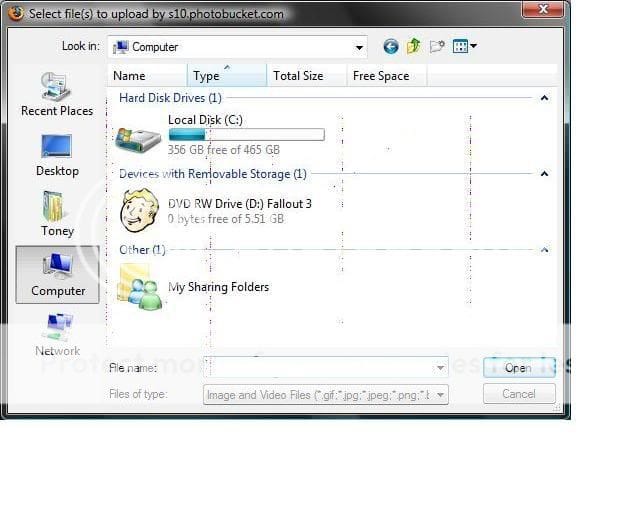
| Vista Home Premium x64 | Pixel lines problem Ok, I've done research all over the place that I can think of before coming here. I looked on here and found a few things like it, but not what I have. This has only been happening since I reformated my hard drive 2 times in a week. ![]() These lines usually only show up in my files and programs like the one above, but sometimes they show up in my Firefox as well. I can see them popping up and going away as I'm writing this. They last about 2-10 seconds so far. It doesn't seem to be getting any worse as the last week has gone by, but I'm curious why this is happening and if anybody can help me. The picture is blurry much worse than my screen looks, just fyi. I've got a 17" Plasma LCD. I've also got a few others from Fallout 3 white load screens that I'm going to post that are not the same, but are happening and may help. http://i10.photobucket.com/albums/a1...creenShot0.jpg http://i10.photobucket.com/albums/a1...creenShot1.jpg http://i10.photobucket.com/albums/a1...creenShot2.jpg http://i10.photobucket.com/albums/a1...creenShot3.jpg Last edited by Dwarf; 12-23-2008 at 04:44 PM.. Reason: Corrected final link |
My System Specs![]() |
| | #2 (permalink) |
| Vista Home Premium x64 | Re: Pixel lines problem i dont think its anything to do with you formatting your hard drive, but have you full formatted or quick formatted? that may cause corruption, full format will take about 20 mins to 1 hour to complete? |
My System Specs![]() |
| | #3 (permalink) |
| Vista Home Premium 32-bit & Vista Ultimate 64-bit both Service Pack 2 W7 Pro RTM 7600 32 & 64 | Re: Pixel lines problem Hi Kavoc, This is indeed puzzling. It is unlikely to be the result of you formatting your HDD as I would expect that you would have other operational issues, but rather your connection between your graphics card and the monitor. You might like to check these, and set your graphics refresh frequency to 60Hz to see if that makes a difference. From your other photobucket images, I notice that the graphical defect is in the same place and of very much the same pattern. It looks as though you are having colour bleeding in certain areas of the screen, the amount and extent of which is dependant on the image being displayed. Do you use your monitor as a TV as well, and, if so, are you getting similar graphical distortion? |
My System Specs![]() |
| | #4 (permalink) |
| Vista Home Premium x64 | Re: Pixel lines problem I reformated with the quick delete of the partition option then format when you go to install a new OS. I've always had problems with my monitor and GPU connection. My screen turning blue here or there and having to move my tower a little to get it to go away. It's mostly gone away since I've learned that's the problem. I've also had the "Video driver has failed but recovered" message a few times where it goes black then comes back. I found, so far, that I had my OC set a little too high, so I backed it down and no more of that. Setting the monitor to 60 refresh rate didn't help either. =( They are still visible as I type this. The only show up in the white backgrounds, or closer to white. Never while playing games. The vertical ones are different than my diagnal ones from Fallout 3. As in, Fallout 3 has much larger globe looking ones, and the vertical ones look more like pixels are showing up then going away. They show up as usually red, blue, and yellow. |
My System Specs![]() |
| | #5 (permalink) |
| Vista Home Premium 32-bit & Vista Ultimate 64-bit both Service Pack 2 W7 Pro RTM 7600 32 & 64 | Re: Pixel lines problem Have you tried an alternative monitor cable? Do you have access to an alternative monitor to see if the fault occurs on that? It could be that the monitor is producing some form of interference which is travelling down the lead and causing problems that way. Just in case it is a driver problem, here is a link to the latest WHQL driver for your graphics card: GeForce Release 180 |
My System Specs![]() |
| | #6 (permalink) |
| Vista Home Premium x64 | Re: Pixel lines problem I have an alternate cable I could try. I'll do so after work tomorrow. I keep getting the forceware driver update wanting to install. Media Shield, Ethernet update, things like that. For some reason it won't install. When I was running 32bit it worked fine, maybe it's the 64bit is causing troubles. Either way, that's another discussion completely. I've got the latest video. I uninstalled old drivers and let it delete the registry entries. Completely wiped and rebooted with EVGA standard drivers. Then installed the new one. So that far, I'm good and the lines are still here. I work with a bunch of copier technicians that are always playing on computers, one even being Vista certified if I remember correctly. Maybe I'll take in the rig to work and see if he will look at it. Of course, if I connect to one of those at work and the lines are there. =) Last edited by Kavoc; 12-23-2008 at 08:22 PM.. |
My System Specs![]() |
| | #7 (permalink) |
| Vista Home Premium 32-bit & Vista Ultimate 64-bit both Service Pack 2 W7 Pro RTM 7600 32 & 64 | Re: Pixel lines problem Hi Kavoc, Just another thought. What is the exact model number of your monitor? The fact that you said it was working fine when you had 32-bit leads me to think that it could be something as simple as you require the monitor driver. This file is not actually a driver per se, rather it informs the system of the monitor capabilities. |
My System Specs![]() |
| | #8 (permalink) |
| Vista Home Premium x64 | Re: Pixel lines problem dwarf i disagree with your theory, the reason i disagree is that if it was a cable issue, why does it show in screenshots? surely the graphics card will not show corruption but the monitor will. Thats why i believe it maybe something to do with either your hard drive not formatted and showing corruption in a graphics driver or the graphics card maybe on the way out, or it could be as simple as your ram is dying, check all these components and try and get back to us |
My System Specs![]() |
| | #9 (permalink) |
| Vista Home Premium x64 | Re: Pixel lines problem I've checked for the monitor, and found mine. I registered the product, since it was never done when I got it. The problem then becomes that it isn't a real one in their system. Any ideas? As for the ram, I was planning to grab a few 2g sticks with the tax return so maybe I'll do that. I've read elsewhere that RAM could be the problem. Dwarf, where could I find monitor "Drivers"? Could I just google it and see if something comes up? Last edited by Kavoc; 12-24-2008 at 09:55 PM.. |
My System Specs![]() |
| | #10 (permalink) |
| Vista Home Premium x64 | Re: Pixel lines problem I've checked for the monitor, and found mine. I registered the product, since it was never done when I got it. The problem then becomes that it isn't a real one in their system. Any ideas? As for the ram, I was planning to grab a few 2g sticks with the tax return so maybe I'll do that. I've read elsewhere that RAM could be the problem. Dwarf, where could I find monitor "Drivers"? Could I just google it and see if something comes up? |
My System Specs![]() |
![]() |
| Thread Tools | |
| |
Similar Threads | ||||
| Thread | Forum | |||
| scrolling pixel by pixel rather than line by line? | Vista General | |||
| help !!! pixel or vertex shaders | Vista Games | |||
| Pixel Shader version & Aero | Vista music pictures video | |||