Windows Vista Forums
Vista Forums Home Join Vista Forums Windows 7 Forum Vista Tutorials Tags
Welcome to Windows Vista Forums. Our forum is dedicated to helping you find solutions with any problems, errors or issues you are experiencing with Windows Vista. The Vista forum also covers news and updates and has an extensive Windows Vista tutorial section that covers a wide range of tips and tricks.

Go Back   Vista Forums > Vista Forums > Graphic cards

Vista - Monitor too bright

Reply
 
Old 01-23-2009   #1 (permalink)


vista ultimate 32bit SP1/VM:XP SP3


Monitor too bright

Hi Guys

My monitor is too bright on the eyes, since my monitor is not hooked up analog
i don't have the option to lower brightness directly on panel settings.

Sometime ago (not sure how i did it, can't remember) i had changed the internet webpages background to grey(easier on the eyes).

Any help would be appreciated

My System SpecsSystem Spec
Old 01-23-2009   #2 (permalink)


Windows 7 x64


Re: Monitor too bright

Why would not having it hooked up by analogue make a difference? Mine's hooked up with DVI and has the monitor control panel to adjust brightness.

I don't have an ATI card, but in the Nvidia control panel for me there's options to adjust screen brightness, so there's more than likely going to be the same option in the Catalyst Control Centre.
My System SpecsSystem Spec
Old 01-23-2009   #3 (permalink)


Vista Home Premium 32-bit & Vista Ultimate 64-bit both Service Pack 2 W7 Pro RTM 7600 32 & 64


Re: Monitor too bright

Hi Steve,

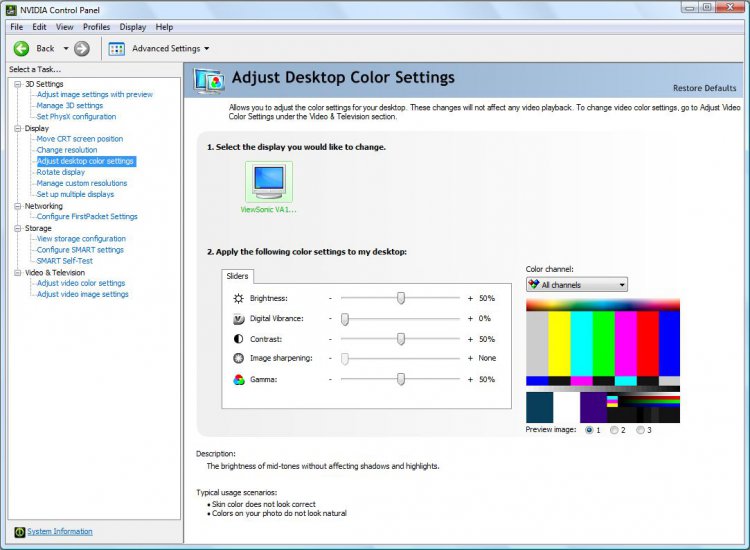
You should be able to do this through your graphic adapter's control panel.
capture.jpg
This is for NVidia, which is what I use. As for ATI, I am not sure of the exact screen, but it should be similar.
My System SpecsSystem Spec
Old 01-23-2009   #4 (permalink)


Vista Home Premium 32-bit & Vista Ultimate 64-bit both Service Pack 2 W7 Pro RTM 7600 32 & 64


Re: Monitor too bright

Hi Steve,

I have just had a look at the User Manual for your monitor. In the section OSD Functions, under Color Adjust, do you have it set as sRGB as with this setting the Contrast and Brightness adjustments are disabled?
My System SpecsSystem Spec
Old 01-23-2009   #5 (permalink)


vista ultimate 32bit SP1/VM:XP SP3


Re: Monitor too bright

Quote  Quote: Originally Posted by Everlong18 View Post
Why would not having it hooked up by analogue make a difference? Mine's hooked up with DVI and has the monitor control panel to adjust brightness.

I don't have an ATI card, but in the Nvidia control panel for me there's options to adjust screen brightness, so there's more than likely going to be the same option in the Catalyst Control Centre.
DVI won't give me the option to adjust brightness. It's there but greyed out(can't choose it)
My System SpecsSystem Spec
Old 01-23-2009   #6 (permalink)


vista ultimate 32bit SP1/VM:XP SP3


Re: Monitor too bright

Thanks for all the help guys, i managed to lower the brightness with ATI Catalyst Control Centre , didn't know i even had it
My System SpecsSystem Spec
Old 01-23-2009   #7 (permalink)


Windows 7 x64


Re: Monitor too bright

Quote  Quote: Originally Posted by bells401 View Post
Quote  Quote: Originally Posted by Everlong18 View Post
Why would not having it hooked up by analogue make a difference? Mine's hooked up with DVI and has the monitor control panel to adjust brightness.

I don't have an ATI card, but in the Nvidia control panel for me there's options to adjust screen brightness, so there's more than likely going to be the same option in the Catalyst Control Centre.
DVI won't give me the option to adjust brightness. It's there but greyed out(can't choose it)
Ahh that's odd. Atleast you got it sorted from the CCC
My System SpecsSystem Spec
Reply

Thread Tools


Similar Threads
Thread Forum
whose bright idea was this?!?!?! Vista mail
Screen Dim but Pointer Bright Vista General
Changing the background from bright white to ? Vista General
Transferring files, settings, etc. from moldy oldie to bright & sh Vista General
On the bright side Vista General


Vista Forums is an independent web site and has not been authorized,
sponsored, or otherwise approved by Microsoft Corporation.
"Windows Vista", the Start Orb, and related materials are trademarks of Microsoft Corp.
© Designer Media Ltd

1 2 3 4 5 6 7 8 9 10 11 12 13 14 15 16 17 18 19 20 21 22 23 24 25 26 27 28 29 30 31 32 33 34 35 36 37 38 39 40 41 42 43 44 45 46