Windows Vista Forums
Vista Forums Home Join Vista Forums Windows 7 Forum Vista Tutorials Tags
Welcome to Windows Vista Forums. Our forum is dedicated to helping you find solutions with any problems, errors or issues you are experiencing with Windows Vista. The Vista forum also covers news and updates and has an extensive Windows Vista tutorial section that covers a wide range of tips and tricks.

Go Back   Vista Forums > Vista Forums > Graphic cards

Vista - Screen Resolution problem

Reply
 
Old 01-26-2009   #1 (permalink)


Vista Home Premium 32bit


Screen Resolution problem

System Specs:
Dell XPS M1710 -

80gb HDD
Intel Core Duo T2600 (2.16 GHz)
2 gb RAM
NVIDIA GeForce Go 7900 GTX 512 MB graphics card
WUXGA Truelife Glossy screen


I recently reformatted my harddrive with gparted. Created a primary partition (nfts) and installed vista home premium 32 bit on it. On the remaining unallocated space I installed Ubuntu 8.10. Before I did this my display in vista was beautiful, 1920x1200 resolution. Ever since I reinstalled vista and reinstalled my nvidia driver it lists the current resolution as 1920x1200, but I can definitely tell that it is not the same resolution as before. I'm very frustrated because my monitor/graphics card is definitely not running at 1920x1200 resolution, but it says that it is under my display settings.

Any ideas why this is happening?

My System SpecsSystem Spec
Old 01-26-2009   #2 (permalink)


Vista Home Premium x64


Re: Screen Resolution problem

Quote  Quote: Originally Posted by ubunturocks View Post
System Specs:
Dell XPS M1710 -

80gb HDD
Intel Core Duo T2600 (2.16 GHz)
2 gb RAM
NVIDIA GeForce Go 7900 GTX 512 MB graphics card
WUXGA Truelife Glossy screen


I recently reformatted my harddrive with gparted. Created a primary partition (nfts) and installed vista home premium 32 bit on it. On the remaining unallocated space I installed Ubuntu 8.10. Before I did this my display in vista was beautiful, 1920x1200 resolution. Ever since I reinstalled vista and reinstalled my nvidia driver it lists the current resolution as 1920x1200, but I can definitely tell that it is not the same resolution as before. I'm very frustrated because my monitor/graphics card is definitely not running at 1920x1200 resolution, but it says that it is under my display settings.

Any ideas why this is happening?
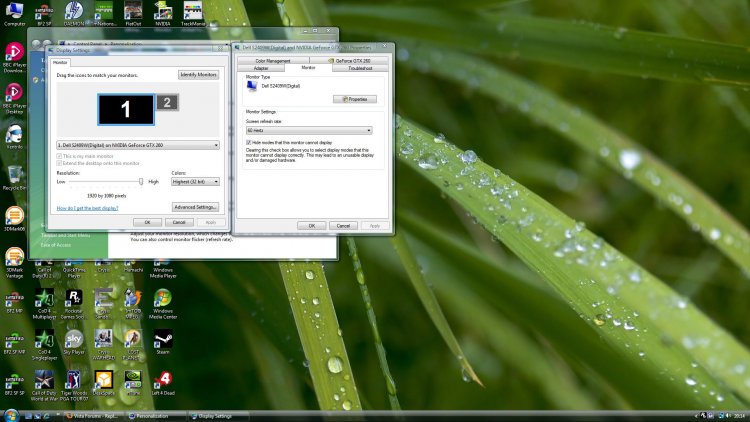
can you post a screenshot of your desktop and resolution settings? including refresh rate? example below
Attached Thumbnails
desktopexample.jpg  
My System SpecsSystem Spec
Old 01-26-2009   #3 (permalink)


Vista x64 + Windows 7 x64 (Ultimate)


Re: Screen Resolution problem

Can it be that the AERO theme is not enable but only Vista Basic or some other theme?
My System SpecsSystem Spec
Old 01-26-2009   #4 (permalink)


Vista Home Premium 32bit


Re: Screen Resolution problem

Quote  Quote: Originally Posted by AstaLaVista View Post
Can it be that the AERO theme is not enable but only Vista Basic or some other theme?
I tried enabling Aero to no avail. Same problem remains.

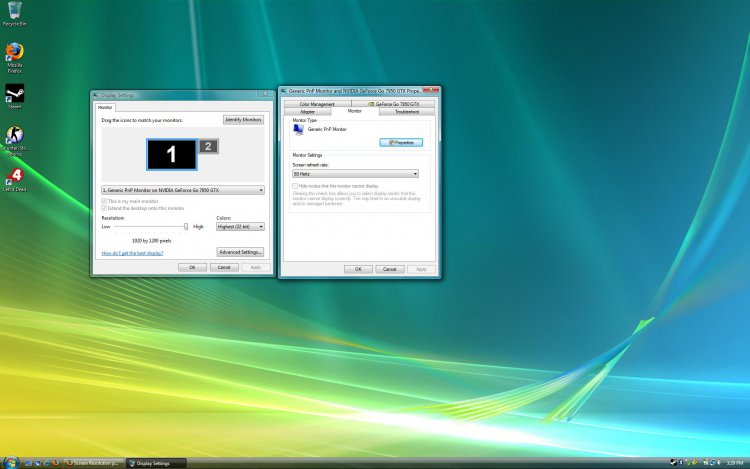
Here is the screenshot:
Attached Thumbnails
1920x1200x60hertz.jpg  
My System SpecsSystem Spec
Old 01-26-2009   #5 (permalink)


Vista Home Premium x64


Re: Screen Resolution problem

Quote  Quote: Originally Posted by ubunturocks View Post
Quote  Quote: Originally Posted by AstaLaVista View Post
Can it be that the AERO theme is not enable but only Vista Basic or some other theme?
I tried enabling Aero to no avail. Same problem remains.

Here is the screenshot:
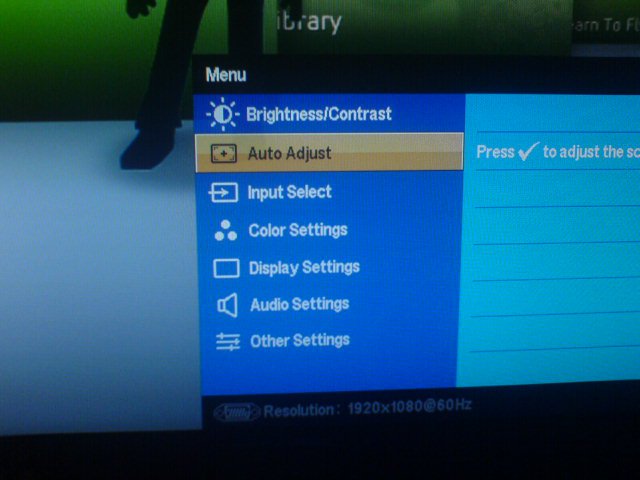
its definately the correct resolution, it might be your monitor needs auto-adjusting, the phase frequency maybe out a bit. have a look on your monitor for the auto adjust, this may be the problem.
Attached Thumbnails
dsc00863.jpg  
My System SpecsSystem Spec
Old 01-26-2009   #6 (permalink)


Vista Home Premium 32bit


Re: Screen Resolution problem

I'm on a laptop there are no buttons on the monitor.


Quote  Quote: Originally Posted by MrNeeds View Post
Quote  Quote: Originally Posted by ubunturocks View Post
Quote  Quote: Originally Posted by AstaLaVista View Post
Can it be that the AERO theme is not enable but only Vista Basic or some other theme?
I tried enabling Aero to no avail. Same problem remains.

Here is the screenshot:
its definately the correct resolution, it might be your monitor needs auto-adjusting, the phase frequency maybe out a bit. have a look on your monitor for the auto adjust, this may be the problem.
My System SpecsSystem Spec
Old 01-27-2009   #7 (permalink)


Vista Home Premium x64


Re: Screen Resolution problem

Quote  Quote: Originally Posted by ubunturocks View Post
I'm on a laptop there are no buttons on the monitor.


Quote  Quote: Originally Posted by MrNeeds View Post
Quote  Quote: Originally Posted by ubunturocks View Post

I tried enabling Aero to no avail. Same problem remains.

Here is the screenshot:
its definately the correct resolution, it might be your monitor needs auto-adjusting, the phase frequency maybe out a bit. have a look on your monitor for the auto adjust, this may be the problem.
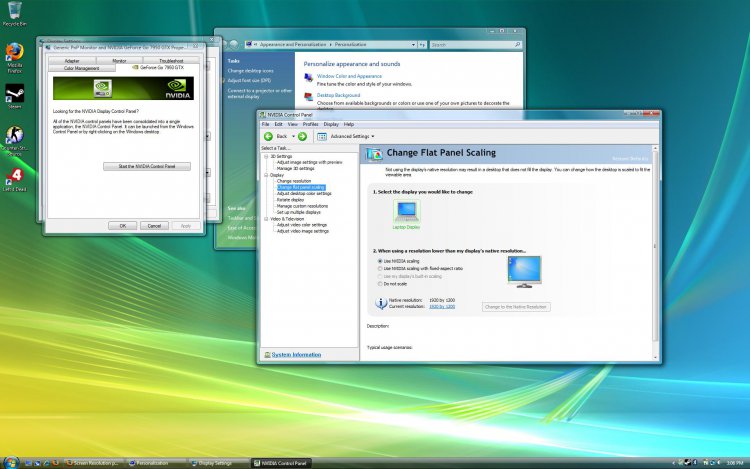
ok can you go to the Nvidia control panel for me and see what info you have under the flat panel scaling options,and also check that theres no custom resolutions set up in that option as well. if in advanced mode, both should be under display.
My System SpecsSystem Spec
Old 01-29-2009   #8 (permalink)


Vista Home Premium 32bit


Re: Screen Resolution problem

Here's the screenshot of the NVidia control panel -> flat panel scaling option. There are no custom resolutions set under Nvidia either... I've checked all this stuff 3x now nothing it working. I think it may be a missing driver for the actual monitor I have because it's a special "Truelife" display...

Thanks for helping


Quote  Quote: Originally Posted by MrNeeds View Post
Quote  Quote: Originally Posted by ubunturocks View Post
I'm on a laptop there are no buttons on the monitor.


Quote  Quote: Originally Posted by MrNeeds View Post
its definately the correct resolution, it might be your monitor needs auto-adjusting, the phase frequency maybe out a bit. have a look on your monitor for the auto adjust, this may be the problem.
ok can you go to the Nvidia control panel for me and see what info you have under the flat panel scaling options,and also check that theres no custom resolutions set up in that option as well. if in advanced mode, both should be under display.
Attached Thumbnails
flatpanelscaling.jpg  
My System SpecsSystem Spec
Old 01-29-2009   #9 (permalink)


Vista Home Premium x64


Re: Screen Resolution problem

Quote  Quote: Originally Posted by ubunturocks View Post
Here's the screenshot of the NVidia control panel -> flat panel scaling option. There are no custom resolutions set under Nvidia either... I've checked all this stuff 3x now nothing it working. I think it may be a missing driver for the actual monitor I have because it's a special "Truelife" display...

Thanks for helping


Quote  Quote: Originally Posted by MrNeeds View Post
Quote  Quote: Originally Posted by ubunturocks View Post
I'm on a laptop there are no buttons on the monitor.

ok can you go to the Nvidia control panel for me and see what info you have under the flat panel scaling options,and also check that theres no custom resolutions set up in that option as well. if in advanced mode, both should be under display.
ok i got a link for you, try and find out exactly what drivers you need from this site according to your manual, drivers that match your hardware>> Drivers & Downloads
My System SpecsSystem Spec
Old 01-30-2009   #10 (permalink)


Vista Ultimate 64 bit


Re: Screen Resolution problem

Hi ubunturock, don't know if this relevant or not that your screen capture shows your resolution of 1920x1080 instead of what you think of 1920x1200. May be that is the different you've seen.

Hope this helps,

Bruce
My System SpecsSystem Spec
Reply

Thread Tools


Similar Threads
Thread Forum
Screen resolution problem, need help. Graphic cards
Screen resolution problem Graphic cards
Screen resolution problem Vista General
Screen Resolution Problem Vista installation & setup
Problem with screen resolution Vista installation & setup


Vista Forums is an independent web site and has not been authorized,
sponsored, or otherwise approved by Microsoft Corporation.
"Windows Vista", the Start Orb, and related materials are trademarks of Microsoft Corp.
© Designer Media Ltd

1 2 3 4 5 6 7 8 9 10 11 12 13 14 15 16 17 18 19 20 21 22 23 24 25 26 27 28 29 30 31 32 33 34 35 36 37 38 39 40 41 42 43 44 45 46