Windows Vista Forums

New Graphics Card wont boot up!!! HELP :)
  1. #1


    Newbie
    Join Date : Mar 2009
    Posts : 4
    Vista Ultimate
    Local Time: 08:28 AM

    New Graphics Card wont boot up!!! HELP :)

    I just bought a ATI Radeon Sapphire HD 3850 Graphics Card. I had someone change the settings in the BIOS to run off the new graphics card, however when we turned the computer on it asked me to insert my windows vista cd, repair, and reboot. I did the repair but it wont fix itself.
    The error says:
    Repair Action: Partition Table Repair
    Result: Failed error code 0x490
    Time taken: 1170 ms

    Does anybody know how to fix this problem?
    thanks
    lindgren


      My System SpecsSystem Spec

  2. #2
    sygnus21's Avatar

    Here to learn
    Join Date : Mar 2008
    Hampton VA
    Posts : 1,033
    Vista Ultimate x64 SP1
    Local Time: 09:28 AM
    usa us virginia


    Re: New Graphics Card wont boot up!!! HELP :)

    Hi Lindgren, you need to list some system specs for further help.

    However this statement is curious

    Quote Originally Posted by Lindgren View Post
    I just bought a ATI Radeon Sapphire HD 3850 Graphics Card. I had someone change the settings in the BIOS to run off the new graphics card,
    You say you bought a Radeon 3850, yet you had someone turn off the "new" card in the BIOS??? What "new graphics card are you talking about"??? This is a very confusing statement.

    This is also why we need your system specs, especially the motherbord model.

    Also be aware that if you're not familiar with BIOS settings, that's going to present a challenge here as not all BIOS's are the same, and thus it would be hard for any one here to walk you through it. Messing around in the BIOS without understanding their settings can render your computer useless.

    Sorry

      My System SpecsSystem Spec

  3. #3


    Newbie
    Join Date : Mar 2009
    Posts : 4
    Vista Ultimate
    Local Time: 08:28 AM


      Thread Starter

    Re: New Graphics Card wont boot up!!! HELP :)

    Here is the link to my computer: Acer Aspire M5100 Desktop - AM5100-EF9500A - Buy.com
    Except i put in a different power supply and the new ATI Radeon Sapphire HD 3850 Graphics Card. It was a company that changed my bios settings to run off the new graphics card. He turned the computer on, told me all i had to do was plug into the new graphics card, and put my vista cd in and follow the steps...
    If i plug my moniter to the old moniter slot, it will boot up fine. If I plug into the new graphics card, it boots into a black screen that tells me to insert my windows vista cd, repair, and reboot.
    the repair finds this problem but cant fix itself.
    Repair Action: Partition Table Repair
    Result: Failed error code 0x490
    Time taken: 1170 ms

    ... any ideas?

      My System SpecsSystem Spec

  4. #4
    sygnus21's Avatar

    Here to learn
    Join Date : Mar 2008
    Hampton VA
    Posts : 1,033
    Vista Ultimate x64 SP1
    Local Time: 09:28 AM
    usa us virginia


    Re: New Graphics Card wont boot up!!! HELP :)

    This statement has got me baffled...

    Quote Originally Posted by Lindgren View Post
    It was a company that changed my bios settings to run off the new graphics card. He turned the computer on, told me all i had to do was plug into the new graphics card, and put my vista cd in and follow the steps...
    Perhaps you misunderstood what they were saying?

    Question...???

    1 - Was Vista installed "before" the 3850 was installed?
    2 - If so, did they say you needed to install drivers for the 3850?
    3 - Do you currently have an operating system installed?
    4 - What operating system is it?

    Also, when you say...

    Quote Originally Posted by Lindgren View Post
    If i plug my moniter to the old moniter slot, it will boot up fine.
    5 - What "old monitor slot" is that - the 3850 or the other card?

    If I go by the system specs in the link you provided - you have an intergrated ATi Radeon X1250 installed on the motherboard.

    If that's the case, it looks like whoever you had mess with your BIOS did not turn of the intergrated video card, which if the "old monitor slot is the x1250, explains why the computer will "boot up fine" and will do a lot to answer questions 1,3, & 5.

    However I still need you to answer all the questions before I can go any further. I ask this because your post/problem is already very confusing as is.

    Sorry

      My System SpecsSystem Spec

  5. #5


    Newbie
    Join Date : Mar 2009
    Posts : 4
    Vista Ultimate
    Local Time: 08:28 AM


      Thread Starter

    Re: New Graphics Card wont boot up!!! HELP :)

    1.Vista was originally on my computer.
    2.The 3850 came with a cd, and i installed the drivers before putting in the 3850.
    3. Yes
    4. Vista ultimate
    5.The old video slot is on the motherboard.

    And the link I provided you was the closest model I could find. This is exactly what I have but It doesn't tell me what motherboard in the specs. Acer Aspire AM5100-U5301A Athlon 64 X2 6000+ 3.0GHz 3GB 500GB DVD±RW Vista Home Premium Acer AM5100-U5301A Aspire M5100

    And I apologize if my post is confusing. lol, sometimes I ramble on....
    Thanks for all your help

      My System SpecsSystem Spec

  6. #6
    sygnus21's Avatar

    Here to learn
    Join Date : Mar 2008
    Hampton VA
    Posts : 1,033
    Vista Ultimate x64 SP1
    Local Time: 09:28 AM
    usa us virginia


    Re: New Graphics Card wont boot up!!! HELP :)

    Quote Originally Posted by Lindgren View Post
    The 3850 came with a cd, and i installed the drivers before putting in the 3850.
    1- You'll need to disable the on-board graphics card through the BIOS. No the card hasn't been disabled, that's why it still works when you plug your monitor into it.
    2- Once the on-board video card is disabled and since you already have the 3850 installed, reinstall the drivers for the 3850.
    3- Plug the monitor into the 3850 and things should work.

    Note that you install drivers "after" you install the video card, or any other component(s). Not before.

    Good luck.

      My System SpecsSystem Spec

  7. #7
    xguntherc's Avatar

    I Click Home To Much
    Join Date : Jan 2008
    Vegas Baby
    Posts : 1,208
    Vista Ultimate x64
    Local Time: 09:28 AM
    usa us nevada


    Re: New Graphics Card wont boot up!!! HELP :)

    ya, you need the item to be in the computer before installing the drivers. so it knows where it's going and what for.

    having the Vista CD has NOTHING to do with installing a new graphics card. thats very weird. you should be able to plug, install new drivers, and play.

    yes you need to disable the old, onboard video. that is why when putting monitor to it, it works. but usually when you install a aftermarket actual Graphics card like yours, it disables onboard for you.

    hm... vista CD should not be needed, or even mentioned.

      My System SpecsSystem Spec

  8. #8


    Newbie
    Join Date : Mar 2009
    Posts : 4
    Vista Ultimate
    Local Time: 08:28 AM


      Thread Starter

    Re: New Graphics Card wont boot up!!! HELP :)

    I agree I need to disable the onboard graphics card. Could you give me detailed directions on how to do that?

    Thank you xguntherc

    `Lindgren

      My System SpecsSystem Spec

  9. #9
    sygnus21's Avatar

    Here to learn
    Join Date : Mar 2008
    Hampton VA
    Posts : 1,033
    Vista Ultimate x64 SP1
    Local Time: 09:28 AM
    usa us virginia


    Re: New Graphics Card wont boot up!!! HELP :)

    Quote Originally Posted by Lindgren View Post
    I agree I need to disable the onboard graphics card. Could you give me detailed directions on how to do that?
    As stated in my earlier post...

    Quote Originally Posted by sygnus21 View Post
    Also be aware that if you're not familiar with BIOS settings, that's going to present a challenge here as not all BIOS's are the same, and thus it would be hard for any one here to walk you through it. Messing around in the BIOS without understanding their settings can render your computer useless.

    Sorry
    Perhaps you could take it back to the person who messes with the BIOS the first time around? What you're looking for is the on-board video settings, it needs to be set to either "off" or "disabled". Shut down the computer, connect the monitor to the new 3850 card. Turn on get into Windows and install the video card drivers.

    Since you're running Vista x64 make sure you get the latest (9.2) x64-bit drivers from here - Catalyst Drivers for 3850 – Vista 64

    How to install the drivers -

    Since you loaded the drivers "before" installing the video card, you'll need to uninstall the old drivers.... (If there are no ATI drivers or software installed, go to the installation procedures below these steps)

    1- Go to Control Panel
    2- Programs and Features
    3- Click "ATI Catalyst Install Manager"

    catalyst-install.jpg

    4- Click Next
    5- Click Uninstall Manager
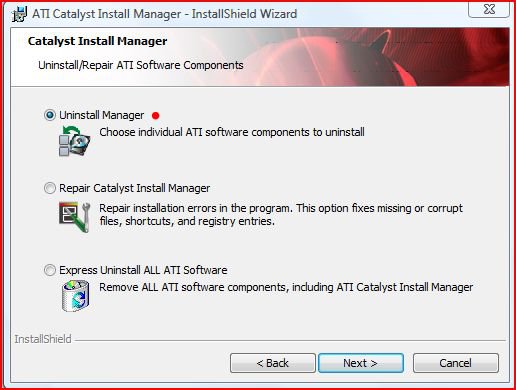
    cim-unistall.jpg

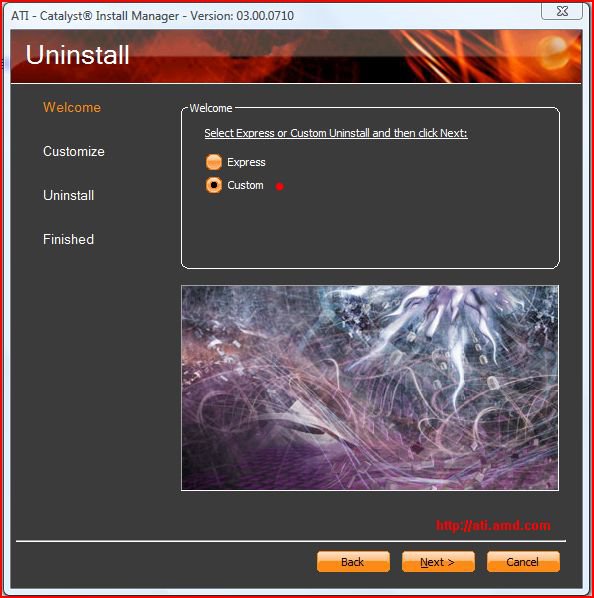
    6- Click Next
    7- Click Custom

    cim-custom-uninstall.jpg

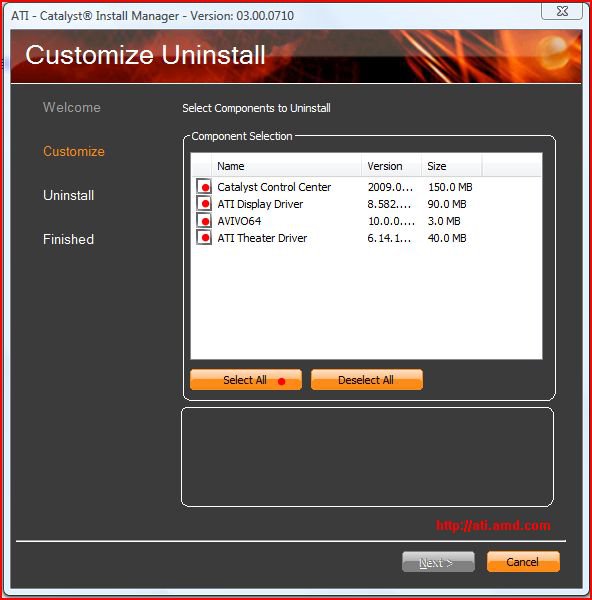
    8- Click Next
    9- Click Select All

    cim-select-all.jpg

    10- Click Next - This will remove the old (previous) software.

    Now we need to install the new software...

    1- Find the file you downloaded and click install. Under Select Components to Install - un-tick "Folding @ Home" It's not required!
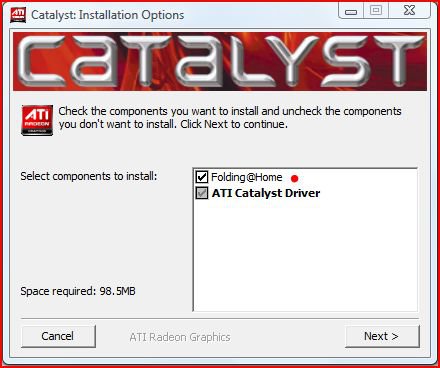
    cat-install-options.jpg

    2- Click Next, leave at default location and click Install
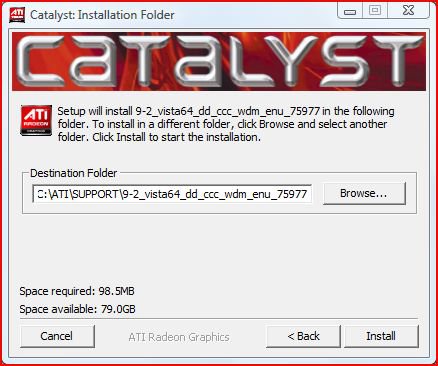
    cat-inst-dest.jpg

    3- Once the files finish installing you will be brought to the Welcome screen where you can choose your language and install additional languages. Click Next
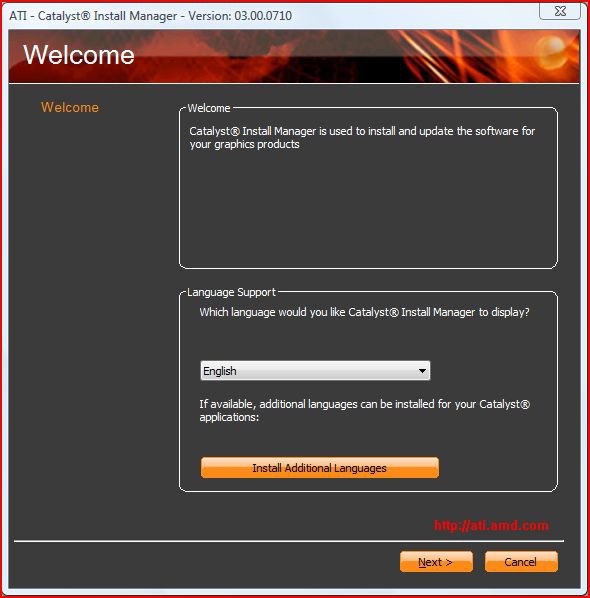
    cat-welcome-sceen.jpg

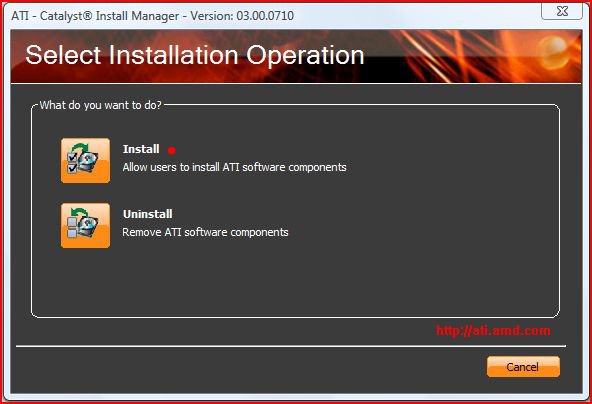
    4- then click Install,

    cat-select-operation.jpg

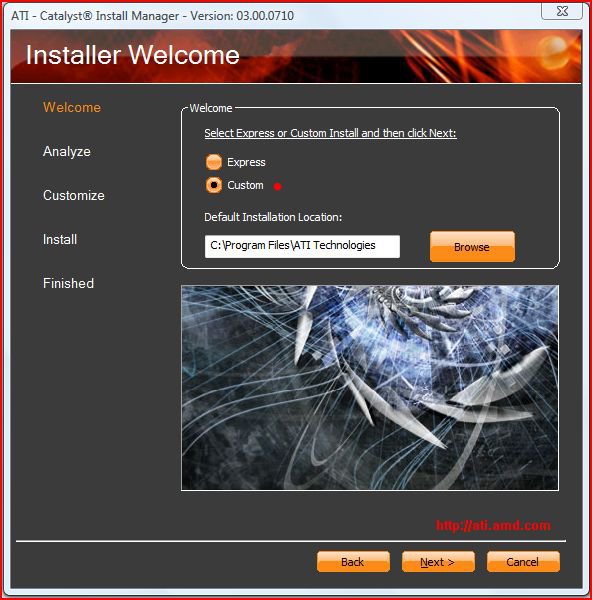
    5- Click Custom

    cat-install-custom.jpg

    6- Click Next and choose Custom - Make sure the items with the red dot next to them is checked!!! Catalyst Registration and the World of Warcraft (trial) aren't needed if you don't want them. Don't worry about the items you can't uncheck. Just click Next, and this will install the drivers and Catalyst Control Center.
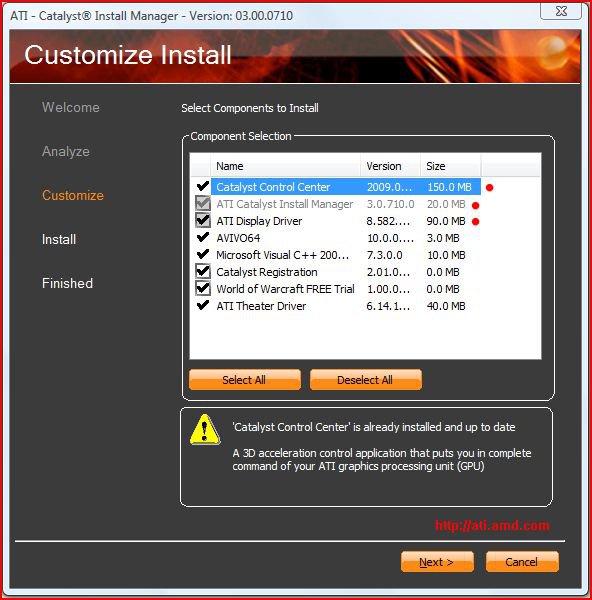
    cat-custom-install.jpg

    7- Reboot and things should be working. If not, then either the card isn't installed properly or there's a driver problem.

    Good luck


    Sorry that I can't help with instructing you on getting into the BIOS.

      My System SpecsSystem Spec

New Graphics Card wont boot up!!! HELP :) problems?

Similar Threads
Thread Thread Starter Forum Replies Last Post
Need a graphics card, which? Gizere Graphic cards 22 02 Nov 2009
Graphics Card vistablackben Graphic cards 8 27 Feb 2009
Vista Home Premium 64 wont boot after new video card BigZed Vista hardware & devices 11 01 Dec 2008
non dx9 graphics card shoeman12 Vista hardware & devices 3 08 Jun 2007
Minimum graphics card to get graphics WEIs of 3.0? 5.9? Alan Cobb Vista performance & maintenance 6 06 Mar 2007