Windows Vista Forums

Problem with Graphics.
  1. #1


    Newbie
    Join Date : Apr 2009
    Posts : 4
    Vista Home Premium X64
    Local Time: 09:21 AM

    Problem with Graphics.

    I've been having some issues with my computer, especially when playing 3d games. I figure the problem is hardware related and has to do with the graphics adapter which is the HD4870x2. For instance its temps when idling is around 80-90 degrees, fan speed is around 30%. The temps does'nt really drop when ingame, and the fan speed does'nt go up much. I really can't figure out whether its defective or not.


    The problem is a follows:
    When playing 3d games Im getting some frame hangs at somewhat regular intervals. Also to mention when I go to the graphic settings all settings are recommended high, but anti alliasing is recommended to none and filtering to trillinear.
    Also in 3dmark06 its struggling to keep the fps up at a decent level, which is somewhere between 20-80 fps in most of the test at full settings. At 1440x900.
    Im very certain my system should be capable of running these tests at these settings without troubles, and yet it can't.


    It seems to me its not the temps that are causing the 3dgame problems, but something different. Perhaps something to do with the detection of the hardware? For instance, CounterStrike:Source, which is a rather old game, the settings that are recommended is high but NO AA or filtering higher than Trillinear. In Day of Defeat:Source the same there, but options such a motion blur are recommeded to be disabled. Even with the multicore support enabled, and its even worse in that game than CSS. But I really don't know whats causing this, could it be software related? Conflicting programs? Driver issue? Could this be related to the error posted below? Could it be other hardware causing the problems?


    I don't know if this is worth mentioning, but in the event viewer I get this error which seems to be related to Catalyst Control Center:
    0000000040: 2009-04-13 22:50:12:134 Exception : Cannot access a disposed object.--Objektnavn: 'DashboardForm'.
    Exception Called by: System.Runtime.Remoting.Messaging.AsyncResult::SyncProcessMessage processID:03928 threadID ) domainNameCCC.exe ) assemblyNamemscorlib, Version=2.0.0.0, Culture=neutral, PublicKeyToken=b77a5c561934e089)

    Your help is much appreciated.
    /Incarnate

      My System SpecsSystem Spec

  2. #2
    mattinahat's Avatar

    m@thue
    Join Date : Jun 2008
    South of the equator
    Posts : 265
    Vista Ultimate x64 SP1
    Local Time: 05:21 PM
    australia au queensland


    Re: Problem with Graphics.

    What program are you using to monitor the fan speed and temps?

      My System SpecsSystem Spec

  3. #3
    Ayporos's Avatar

    know-it-all
    Join Date : Apr 2009
    Nijmegen
    Posts : 128
    Vista business x64
    Local Time: 09:21 AM
    netherlands


    Re: Problem with Graphics.

    Try using a program that lets you manually monitor/edit GPU settings to set your fan speed at 75%.

    In most cases at 100% load your GPU fan speed normally won't exceed 70% speed so if you set it at forced 75% you should be able to see if it is indeed a problem with the automatic fan speed adjustment used by your GPU/graphics drivers.

    If your temperature/gaming problem still persists after having set the fan speed manually (you can check this easily by simply listning to your computer, a GPU fan rotating at 75% makes SIGNIFICANTLY more noise than at regular speed and it is usually even louder than a stock CPU fan)
    I suggest reinstalling/updating your graphics drivers, checking inside your case wether all necessary power connectors are plugged into your GFX card and if worse comes to worse returning your GFX card or atleast have it checked out

      My System SpecsSystem Spec

  4. #4


    Newbie
    Join Date : Apr 2009
    Posts : 4
    Vista Home Premium X64
    Local Time: 09:21 AM


      Thread Starter

    Re: Problem with Graphics.

    Im using Catalyst Control Center. I have tried setting the fan speed at 60% but the problem still persist. And if set to automatic the fan speed is at 27% and it rises to about 36% when in game. I think there might be some detection issues, I've noticed in the performance log that there is some problems with the detection of the hardware when windows is starting.

    I don't know if this is affecting the performance of the machine, but I've a lot of errors in the performance logs. For instance when windows is starting, it takes longer than it should, and the log states something about svchost.exe is taking longer to start and that which is degrading the performance under system startup. It also states in another log that svchost.exe is processing an unusual amount of discactivities and that it is influencing the windows speed. Under start up this driver: atikmdag is also taking longer to start which is degrading the performance of the system, this driver is the ATI Radeon Kernel Mode Driver. Another log states something about dxgkrnl.sys is using to many resources.
    All these logs about files taking longer to load that they are supposed seems to me that there is definately something wrong, and not just with the graphics card. And perhaps, its not the card, but windows or something different thats causing this.

    [Edit]
    One the earliest performance log states that there is a serious resource conflict, and that it is has severely degraded the system's sensitivity. Another log states that the CPU is under too much load and that it has seriously degraded the sensitivity of the system.

    Im not sure what all of this means, but it seems to me that something might have been wrong already from the beginning, perhaps during installation of windows?

    Last edited by Incarnate; 14 Apr 2009 at 12:05 PM.
      My System SpecsSystem Spec

  5. #5
    sygnus21's Avatar

    Here to learn
    Join Date : Mar 2008
    Hampton VA
    Posts : 1,033
    Vista Ultimate x64 SP1
    Local Time: 02:21 AM
    usa us virginia


    Re: Problem with Graphics.

    Hi Incarnate,
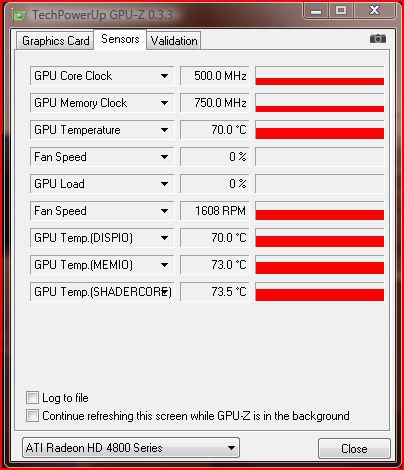
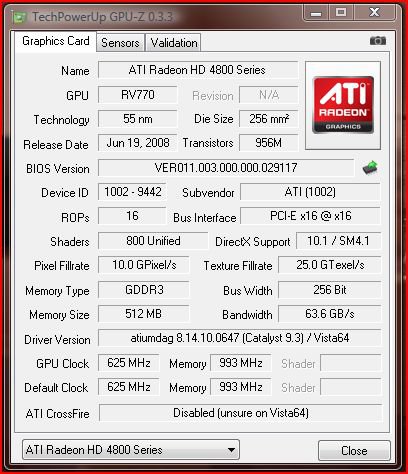
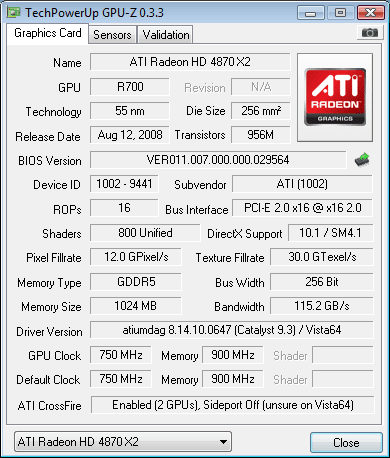
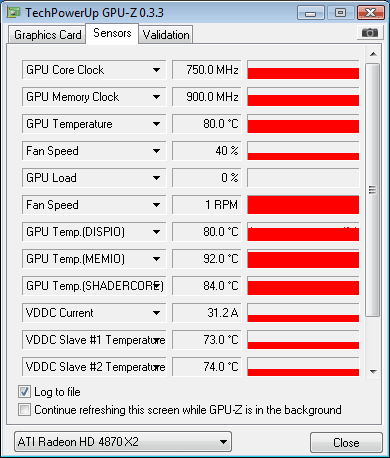
    Run GPU-Z techPowerUp! :: Download TechPowerUp GPU-Z v0.3.3, note what it states for temperatures, GPU load, and, fan RPM on the "Sensors" tab. If you can, post an image of the results here. He's what mine looks like...

    gpu-z-sensors-readings.jpg

    gpu-z-front-tab.jpg

    Also as has been mentioned, remove and reinstall the drivers. If you still have such high temps while idling, then your card could be going bad.

    I will say ttoday's video cards run on the hot side, even at idle speeds, notice my lil' ol' 4850 running around 70 idle! And those are acknowledged normal temps at idle!!! However, I'm not sure if 90 isn't a little to even for a 4870x2. I haven't looked to see what the normal temps on that cards is though.

      My System SpecsSystem Spec

  6. #6


    Newbie
    Join Date : Apr 2009
    Posts : 4
    Vista Home Premium X64
    Local Time: 09:21 AM


      Thread Starter

    Re: Problem with Graphics.

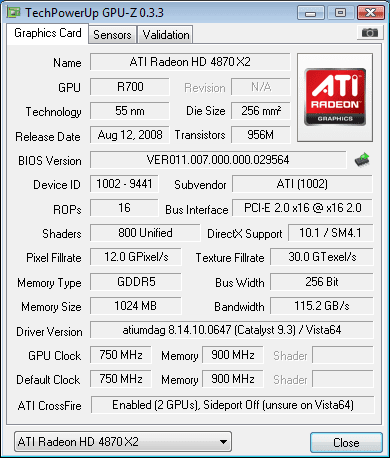
    This is the 1.st. Gpu


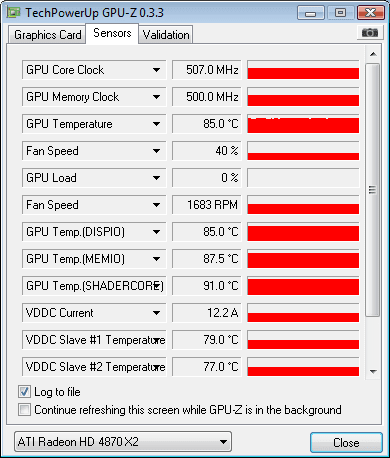
    2.nd. Gpu


    I've just done a test with GPU-Z. It seems that it reads the fan speed to be 40%, but thats not correct. CCC tells me the fan speed is 27%. I've manually overriden the fan speed to 75%, GPU-Z still reads it to be 40%. So could it be a sensor gone bad, or is gpu-z not reading i right?

    Last edited by Incarnate; 14 Apr 2009 at 02:44 PM.
      My System SpecsSystem Spec

  7. #7
    sygnus21's Avatar

    Here to learn
    Join Date : Mar 2008
    Hampton VA
    Posts : 1,033
    Vista Ultimate x64 SP1
    Local Time: 02:21 AM
    usa us virginia


    Re: Problem with Graphics.

    To be honest, I’m not sure which is accurate now...with regards to your problem since you're running an x2. As you can see, I'm just running a single 4850 and never had an issue with GPU-Z.

    Unfortunately, ATI still has fan problems with their cards, i.e. low running fan speeds. Though I've never had an issue with my 4850, in fact, I’ve never used to fan control in CCC, there are plenty of complaints about the fan speed on the cards. I know my 3870 suffered badly to the point of RMA!!!

    And speaking of fan speed...when you say you ramp the fan speed up to 75%, do you hear it ramp up? You should! If not, there is a problem, and GPU-Z "might" be right about the percentage. Something to think about???

    Also have you tried the 9.4 drivers yet? 9.4 driver discussion - http://www.rage3d.com/board/forumdisplay.php?f=59

    Unfortunately I have no experience with crossfire or x2 cards so I can't provide more than just general stuff

      My System SpecsSystem Spec

  8. #8
    Ayporos's Avatar

    know-it-all
    Join Date : Apr 2009
    Nijmegen
    Posts : 128
    Vista business x64
    Local Time: 09:21 AM
    netherlands


    Re: Problem with Graphics.

    sygnus is right.

    Unless you actually HEAR the fan(s) speed up.. they aren't.

    Trust me, speeding your GPU fan up to 75% is VERY distinctively audible.. so unless you are 100% sure you hear it's speeding up.. it isn't.

      My System SpecsSystem Spec

  9. #9


    Newbie
    Join Date : Apr 2009
    Posts : 4
    Vista Home Premium X64
    Local Time: 09:21 AM


      Thread Starter

    Re: Problem with Graphics.

    Quote Originally Posted by Ayporos View Post
    sygnus is right.

    Unless you actually HEAR the fan(s) speed up.. they aren't.

    Trust me, speeding your GPU fan up to 75% is VERY distinctively audible.. so unless you are 100% sure you hear it's speeding up.. it isn't.
    It is speeding up, no worries there. But even with the fan setting at that level and the temps being around 47degreesC Im still getting those problems ingame, and Gpu-z report the fan speed to be at 40%. And whats very strange, as I've stated above is the error message Im getting in the event viewer. But Im getting numerous error report from the same source which is related to the CCC. The source is ACEEventLogSource which logs errors with the CCC. Any ideas to why I get all these errors? (look below)

    Here are some examples..
    1.example.
    0000000021: 2009-04-15 07:52:00:513 Exception <atixcode.dll>: Hentning af COM-klassefabrikken for komponenten med CLSID {981145A7-E08E-48F3-A1C4-52C28BCAAAF9} mislykkedes pga. følgende fejl: 80040154.
    Exception Called by: ATI.ACE.CLI.Aspect.TransCode.Graphics.Wizard.WZ_TransCode::Check processID:03256 threadID:(CCCThreadNew:Wizard) domainName:(CCC.exe ) assemblyName:(CLI.Aspect.TransCode.Graphics.Wizard, Version=2.0.3343.28338, Culture=neutral, PublicKeyToken=90ba9c70f846762e)


    2. example.
    0000000001: 2009-04-15 07:51:54:133 Win32 Language: Current culture language is not an inexact supported language either da-DK
    Error Called by: ATI.ACE.CLI.Component.Runtime.Runtime::.ctor processID:03256 threadID:( ) domainName:(CCC.exe ) assemblyName:(CLI.Component.Runtime, Version=2.0.3343.28198, Culture=neutral, PublicKeyToken=90ba9c70f846762e)


    3. example.
    0000000002: 2009-04-15 07:51:57:533 Exception: No value exists with that name.
    Exception Called by: ATI.ACE.LOG.Foundation.Implementation.Setting::DeleteRegistryFromUser processID:03256 threadID:(CCCThreadNew:Runtime) domainName:(CCC.exe ) assemblyName:(LOG.Foundation.Implementation, Version=2.0.3343.28328, Culture=neutral, PublicKeyToken=90ba9c70f846762e)


    4. example.
    0000000020: 2009-04-15 07:51:58:984 Validation: Caste [0] is null
    Error Called by: ATI.ACE.CCC.Implementation.CCC_Main::CCCNewThreadBegin processID:03256 threadID:(CCCThreadNew:Runtime) domainName:(CCC.exe ) assemblyName:(CCC.Implementation, Version=2.0.3343.28329, Culture=neutral, PublicKeyToken=90ba9c70f846762e)


    5. example.
    0000000022: 2009-04-15 07:52:00:872 Exception <Load>: Filen eller assemblyen 'CLI.AIB.TutorialInfoCentre.Tutorial.Dashboard' eller en af dens afhængigheder kunne ikke indlæses. Den angivne fil blev ikke fundet.
    Exception Called by: ATI.ACE.LOG.Foundation.Services::LoadAssembly processID:03256 threadID:( ) domainName:(CCC.exe ) assemblyName:(LOG.Foundation, Version=2.0.3309.28601, Culture=neutral, PublicKeyToken=90ba9c70f846762e)


    6. example.
    0000000026: 2009-04-15 07:58:04:430 Shared Multi VPU 4 aspect is not available!
    Error Called by: ATI.ACE.CLI.Component.Systemtray.TrayForm::AddCrossFireSettingsToSysTrayMenu processID:03256 threadID:(CCCThreadNew:Systemtray) domainName:(CCC.exe ) assemblyName:(CLI.Component.Systemtray, Version=2.0.3343.28321, Culture=neutral, PublicKeyToken=90ba9c70f846762e)

      My System SpecsSystem Spec

  10. #10
    smarteyeball's Avatar

    Eye know, eye know


    Join Date : Oct 2007
    Australia
    Posts : 1,874
    7 Ultimate x64 : Vista x86 VM :W8 RP x64
    Local Time: 05:21 PM
    australia au queensland


    Re: Problem with Graphics.

    Gpu-Z 3.3 is accurate:

    To ensure the fans are actually running at speed,

    In CCC go to ATI Overdrive and enable it.

    Then enable Manual Fan control. Do this for both cards (select second card from drop down box at the top) :


    To double check the settings have stuck, head to:

    C:\Users\YOURUSERNAME\AppData\Local\ATI\ACE and open profiles.xml

    look for:

    <Feature name="FanSpeedAlgorithm_0">
    <Property name="FanSpeedAlgorithm" value="Manual" />
    </Feature>

    and confirm / set your speed here:

    <Feature name="FanSpeedPercentTarget_0">
    <Property name="Want" value="29" />
    </Feature>

    Each card has it's own value:


    To avoid overly nosily fans at dekstop, you can use the profiles manager to create a low speed fan and a high speed fan profile if you wish. Assign a shortcut to each profile and your set.

    Both ATI overdrive and GPU-Z should repert the correct fan percentage. (forget the rpm in GPU-Z )
    ----

    If those errors persist, it may be worthwhile uninstalling the drivers, running driver sweeepr to clean it all and then re-install the drivers. It looks like a CCC corruption.

      My System SpecsSystem Spec

Page 1 of 2 12 LastLast
Problem with Graphics. problems?

Similar Threads
Thread Thread Starter Forum Replies Last Post
have problem with graphics perx Graphic cards 2 18 Oct 2009
Graphics Problem lagriek Gaming 7 01 Jul 2009
Graphics problem or not? nate42nd Graphic cards 8 01 Feb 2009
Graphics Problem throbinson Graphic cards 23 25 Jan 2009
Graphics Problem Graphics Problem Vista Games 2 01 Oct 2007