Windows Vista Forums

"display driver atikmdag stopped responding and has successfully recovered" error
  1. #1


    Junior Member
    Join Date : May 2009
    Posts : 12
    Vista Ultimate x64
    Local Time: 03:13 AM

    "display driver atikmdag stopped responding and has successfully recovered" error

    i experienced this problem in my computer.
    i've been receiveing black windows in few games (Battlestations Pacific, The Sims 3,Grid, Dirt), and then the game crashes to desktop and the message "display driver atikmdag stopped responding and has successfully recovered" is popped in the taskbar.
    my system is:
    Vista Ultimate 64 bit
    Intel Core i7 920
    HD4870 1024MB
    3*1024mb DDRIII ram

    i add a picture of the error:


    i really be glad if you have solution to this problem


      My System SpecsSystem Spec

  2. #2
    stoneys-nutz's Avatar

    Gamerholic


    Join Date : Apr 2008
    Wale's
    Posts : 2,685
    Vista Ultimate x64, SP2. XP Pro x64 SP3.
    Local Time: 10:13 AM
    uk uk scotland


    Re: "display driver atikmdag stopped responding and has successfully recovered" error

    hello GigaDude
    try this site, it looks like some people have had some success with this problem, good luck, i had the same problem with Nvidia, thats why i went over to ATI.

    Display Driver atikmdag and nvlddmkm Stopped Responding

      My System SpecsSystem Spec

  3. #3


    Junior Member
    Join Date : May 2009
    Posts : 12
    Vista Ultimate x64
    Local Time: 03:13 AM


      Thread Starter

    Re: "display driver atikmdag stopped responding and has successfully recovered" error

    i've already saw this site and tried almost everything there,
    expect of reducing the GPU clocks with ATI-TOOL. the problem can be caused by the GPU clocks? anyway, here are his clocks:
    GPU Clock: 800MHZ
    Memory Clock: 925MHZ


    Thanks for your help,
    wish to solve this problem

      My System SpecsSystem Spec

  4. #4
    stoneys-nutz's Avatar

    Gamerholic


    Join Date : Apr 2008
    Wale's
    Posts : 2,685
    Vista Ultimate x64, SP2. XP Pro x64 SP3.
    Local Time: 10:13 AM
    uk uk scotland


    Re: "display driver atikmdag stopped responding and has successfully recovered" error

    hi GigaDude
    it seems there is a 1001 solutions to this problem but very few if any seem to work, what will work on one system wont work on another, the only thing i can tell you is to check things like temps and memory, rivatuner seems to be helping some people but as i say what works on their system may not work on yours, i think the bottem line is nobody knows what causes this and nobody knows how to fix it 100%, seems strange to me it afflicts both Nvidia and ATI cards, if it was a driver it would only affect one or the other, and its not vista as i had it on xp, if i were you i would play around with clock speeds, both over and under clocking them, also try turning up and down the voltage to the card, start slow and low and see how it goes, you may be lucky and hit it first time lol, i wish you luck with this m8.

      My System SpecsSystem Spec

  5. #5


    Junior Member
    Join Date : May 2009
    Posts : 12
    Vista Ultimate x64
    Local Time: 03:13 AM


      Thread Starter

    Re: "display driver atikmdag stopped responding and has successfully recovered" error

    hi stoneys-nutz
    thank you for your help
    if you please tell me what software should i use for playing around with clock speeds?

    thanks again,
    GigaDude

      My System SpecsSystem Spec

  6. #6
    sygnus21's Avatar

    Here to learn
    Join Date : Mar 2008
    Hampton VA
    Posts : 1,033
    Vista Ultimate x64 SP1
    Local Time: 04:13 AM
    usa us virginia


    Re: "display driver atikmdag stopped responding and has successfully recovered" error

    Hi GigaDude,

    I too had this problem and as stoneys-nutz has suggested, there are plenty of theories and "suggested" solutions on how to solve this problem. Do a Google search on this and you'll come up with hundreds of threads/posts. This error is prevelent with both ATI and Nvidia under Vista.

    One of my many posts about this problem here - The Display driver has stopped working - The Saga

    For "me", the problem went away when I replaced my "faulty" video card.

    Bottom line is there is no one hard fix solution for this error

    Good luck.

      My System SpecsSystem Spec

  7. #7
    stoneys-nutz's Avatar

    Gamerholic


    Join Date : Apr 2008
    Wale's
    Posts : 2,685
    Vista Ultimate x64, SP2. XP Pro x64 SP3.
    Local Time: 10:13 AM
    uk uk scotland


    Re: "display driver atikmdag stopped responding and has successfully recovered" error

    hi again GigaDude
    rivatuner seems to be the one that gets the best results, follow the link below and download it, i would read all the readme's that come with it first and remember to go low and slow on the settings, good luck, i hope you are able to sort this out.


    RivaTuner v2.24 download from Guru3D.com

      My System SpecsSystem Spec

  8. #8
    sygnus21's Avatar

    Here to learn
    Join Date : Mar 2008
    Hampton VA
    Posts : 1,033
    Vista Ultimate x64 SP1
    Local Time: 04:13 AM
    usa us virginia


    Re: "display driver atikmdag stopped responding and has successfully recovered" error

    Not to throw a wrench in the works, but lowering your GPU clock speeds from default specs isn't really "fixing the problem" if that works, it’s just hiding it.

    However if by lowering your clock speeds yields positive results, i.e. no more "Display stopped responding" errors, then I suggest you replace your card as it is incapable of running at it's designed default speeds.

    Also, running tweaking tools on problematic hardware/software isn’t really a good idea as you could wind up getting false positives…or creating more problems.

    Just my two cents.

      My System SpecsSystem Spec

  9. #9


    Junior Member
    Join Date : May 2009
    Posts : 12
    Vista Ultimate x64
    Local Time: 03:13 AM


      Thread Starter

    Re: "display driver atikmdag stopped responding and has successfully recovered" error

    thank you sygnus21,
    my last solution is to go the store and replace my card.
    meanwhile i'll try my best to fix it myself, i listen to your advice and i don't want to lower the clocks. if it's not work with the clocks that came from the factory, so it's a faulty video card.
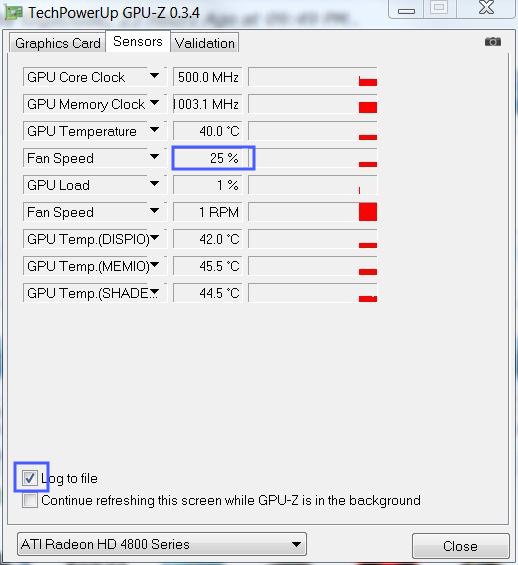
    what i'm going to do, is to clean up the card from dust and maybe increase the fan speed manualy, maybe it's only a problem of high tempature.
    i'll update if i will succeed in what i'm going to do.

    thanks for all the help
    hope to find the right solution for me eventually.

      My System SpecsSystem Spec

  10. #10


    Junior Member
    Join Date : May 2009
    Posts : 12
    Vista Ultimate x64
    Local Time: 03:13 AM


      Thread Starter

    Re: "display driver atikmdag stopped responding and has successfully recovered" error

    I've got a little update:
    it's probably not a problem of temperature- i cleaned up the computer yesterday and just now i got a crash in Battlestations Pacific.

    so, what cause this problem? i have to replace my graphic card?

      My System SpecsSystem Spec

Page 1 of 4 123 ... LastLast
"display driver atikmdag stopped responding and has successfully recovered" error problems?

Similar Threads
Thread Thread Starter Forum Replies Last Post
"Display driver atikmdag stopped responding..." - help needed daledoc1 Graphic cards 7 02 May 2009
Error: Display driver has stopped working and has recovered successfully. Gil80 Graphic cards 30 18 Nov 2008
ATI Drivers causing "display driver stopped responding" errors Italia_nyc Drivers 2 09 Oct 2008
R300 display driver stopped responding and recovered successfully Chitra Visveswaran Vista General 0 22 Dec 2007
Display driver nvlddmkm stopped responding and has successfully recovered. Fearz Vista hardware & devices 3 18 Feb 2007