Windows Vista Forums
Vista Forums Home Join Vista Forums Windows 7 Forum Vista Tutorials Tags
Welcome to Windows Vista Forums. Our forum is dedicated to helping you find solutions with any problems, errors or issues you are experiencing with Windows Vista. The Vista forum also covers news and updates and has an extensive Windows Vista tutorial section that covers a wide range of tips and tricks.

Go Back   Vista Forums > Vista Forums > Graphic cards

Vista - Temp curiosity for 3 9800 GTX+'s

Reply
 
Old 07-09-2009   #1 (permalink)


Vista Home Premium x64 SP2


Temp curiosity for 3 9800 GTX+'s

Hi thare... i was wondering if any of you with triple sli config's have had the temp of your primary card about 20c higher than the other two. now i run all three of these on a 790i ftw digital from EVGA with a q6600 at 3.6 with 8 gb of DDR3 1800 Mhz from Corsair and my ambient temp is about 74c in my work room. before i upgraded to the 790i, i had a 680i sli that i tested 3 way sli on, which worked perfectly and those temps were all the same!... about 40-41c at idle and under load at about 55c. all of the temps for each card were the same and SLI was probably scaling pretty well.

But when i fired up my new 790i and enabled 3 way sli, popped in Fallout 3 and noticed that my temps were way uneven. 72c on the 1st card, 46c on the 2nd card, and 43c on the 3rd card. card fans were at 100% and the driver i used was 186.18. Card's 1 and 2 are running on pci-e 2.0 so if its the bandwidth diff. from the 3rd card thats making the difference, sucks for me because i cant disable it.

please give your opinions as to why this may happen. most of my games are all certified for SLI and have an SLI-enabled profile.

My System SpecsSystem Spec
Old 07-09-2009   #2 (permalink)


Windows 7 x64


Re: Temp curiosity for 3 9800 GTX+'s

Are you sure you've enabled SLI again on your new motherboard? Those temps are like the cards aren't even doing any work.
My System SpecsSystem Spec
Old 07-09-2009   #3 (permalink)


Vista Home Premium x64 SP2


Re: Temp curiosity for 3 9800 GTX+'s

Thats exactly what i thought. Here is a pic of what it looks like in the CP (not exact photo of current CP version). as i am typing this, i read my rooms thermostat is at 75 Fahrenheit and on the EVGA precision utility, card 1 is at 54 idle and cards 2 and 3 are at 43 and 41 idle. wierd.. i check the sli profiles in the 3d settings page of the cp and the games that have sli enabled profiles are either on nv rec. (SLI) or 3 gpu AFR (which i know worked on my other board well). this is also in an antec 1200 so plenty of cooling.


http://images.anandtech.com/reviews/...way_SLI_CP.png
My System SpecsSystem Spec
Old 07-09-2009   #4 (permalink)


Vista Ultimate SP2 x64 : Seven Ultimate x64


Re: Temp curiosity for 3 9800 GTX+'s

I agree with Everlong, it sounds like only the primary card is actually doing the work. Try Using Gpu-z or Everest to log the activity when gaming to verify the cards are actually working or not.

Cards will sometimes have different temps. My second 4890 runs between 5-10 degrees hotter in both idle/load due to it being more confined.
My System SpecsSystem Spec
Old 07-09-2009   #5 (permalink)


Vista Home Premium x64 SP2


Re: Temp curiosity for 3 9800 GTX+'s

well well well... XD i may feel like an idiot but it might have something to do with my cooling. hypothetically i dont know why since my antec 1200 has 8 120mm's and a 200mm on top. but when i popped out the 3rd gpu, both cards are now at 41c respectively. the thing that interested me was that why the other cards werent even growing in temp when the first card was working. and now both work. ill test with 2 way sli for a bit then 3 way and see if it makes a difference.

Last edited by MDA400; 07-09-2009 at 09:05 PM..
My System SpecsSystem Spec
Old 07-09-2009   #6 (permalink)


Vista Home Premium x64 SP2


Re: Temp curiosity for 3 9800 GTX+'s

yup. still not the temps i want in 3 way sli.
My System SpecsSystem Spec
Old 07-10-2009   #7 (permalink)


Vista Ultimate SP2 x64 : Seven Ultimate x64


Re: Temp curiosity for 3 9800 GTX+'s

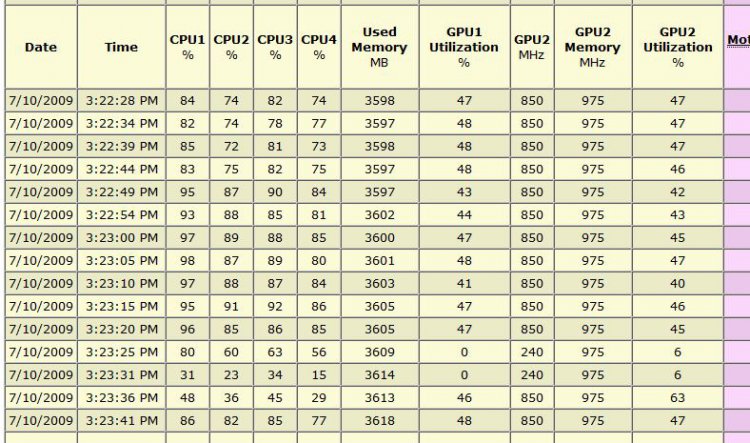
Have you worked out whether all the cards are actually being used?

Like this: (Everest):
ever.jpg

Is your PSU top or bottom mounted? My second card sits right on top of a PCI sound card which is right above my PSU which is why it runs a little hotter.

I can understand your confusion about the top card being the hottest though.
My System SpecsSystem Spec
Old 07-11-2009   #8 (permalink)


Vista Home Premium 64bit SP2


Re: Temp curiosity for 3 9800 GTX+'s

you'd be surprised at how hot the top card can get in 3 way sli , 20 degrees isnt too bad , if its within its range i would'nt worry too much
My System SpecsSystem Spec
Old 07-11-2009   #9 (permalink)


Vista Home Premium x64 SP2


Re: Temp curiosity for 3 9800 GTX+'s

well see this is weird but i can tell my other cards are now doing some of the graphical work because, when i took 1 out of the 3 out of my case just to try temps with 2 way sli (which then they were equally cooled because of the empty space where 3 should be), i noticed that when i put the 3rd back in and ran my games with 3 way sli, the first gpu wouldnt go over 64c and the other cards would only be about 7-8c off from it. so i dont know how trying 2 way sli benefitted 3 way sli, but its gotten better and i just should try to keep my room cool enough and not change anything with the card config.

Oh and the PSU in an antec 1200 is Bottom-mounted.
My System SpecsSystem Spec
Reply

Thread Tools


Similar Threads
Thread Forum
Ati crossfire curiosity... Graphic cards
Core Temp 0.99.4 curiosity. Overclocking & Cooling
Windows Vista strange settings on temp folder AppData\Local\Temp\1 Vista security
Just out of Curiosity Vista General
curiosity... Vista installation & setup


Vista Forums is an independent web site and has not been authorized,
sponsored, or otherwise approved by Microsoft Corporation.
"Windows Vista", the Start Orb, and related materials are trademarks of Microsoft Corp.
© Designer Media Ltd

1 2 3 4 5 6 7 8 9 10 11 12 13 14 15 16 17 18 19 20 21 22 23 24 25 26 27 28 29 30 31 32 33 34 35 36 37 38 39 40 41 42 43 44 45 46