how do u check nivida chip set version on motherboard as i have onboard graphics card as im getting blue screens (mini dumps)and it seems to be related to nivida drivers etc well i hope it does.

You are using an out of date browser. It may not display this or other websites correctly.
You should upgrade or use an alternative browser.
You should upgrade or use an alternative browser.
nivida chipset
- Thread starter fred54321
- Start date
everest has a trial utility that will tell you this, other than that... open your case and look at the board's Brand name & model 
My Computer
System One
-
- Manufacturer/Model
- Custom Built
- CPU
- Intel Q9650 w/CM V8 Cooler...
- Motherboard
- EVGA 780i SLI FTW... Latest Bios & Drivers
- Memory
- Corsair Dominator 8GB (4 x 2GB) PC2-8500C5D
- Graphics card(s)
- EVGA GTX260
- Sound Card
- Realtek High Def Onboard
- Monitor(s) Displays
- Acer 22" LCD Widescreen
- Screen Resolution
- 1680 x 1050
- Hard Drives
- WD Velociraptor 160GB Samsung Sata 750GB Maxtor External 160GB
- PSU
- PC Power & Cooling 750w Silencer
- Case
- Thermaltake Speedo Advance
- Cooling
- Air Cooled... See CPU
- Mouse
- Logitech G7
- Keyboard
- Logitech G15
- Internet Speed
- Comcast 6MB Broadband
- Other Info
- Linksys WRT54G router

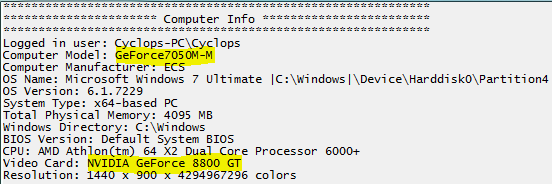
Download and run this tool http://www.vistax64.com/software-tools/176785-vistaforums-sysinfo-tool.html We need the following highlighted information.
My Computer
System One
-
- Manufacturer/Model
- Dwarf Dwf/11/2012 r09/2013
- CPU
- Intel Core-i5-3570K 4-core @ 3.4GHz (Ivy Bridge) (OC 4.2GHz)
- Motherboard
- ASRock Z77 Extreme4-M
- Memory
- 4 x 4GB DDR3-1600 Corsair Vengeance CMZ8GX3M2A1600C9B (16GB)
- Graphics card(s)
- MSI GeForce GTX770 Gaming OC 2GB
- Sound Card
- Realtek High Definition on board solution (ALC 898)
- Monitor(s) Displays
- ViewSonic VA1912w Widescreen
- Screen Resolution
- 1440x900
- Hard Drives
- OCZ Agility 3 120GB SATA III x2 (RAID 0) Samsung HD501LJ 500GB SATA II x2 Hitachi HDS721010CLA332 1TB SATA II Iomega 1.5TB Ext USB 2.0 WD 2.0TB Ext USB 3.0
- PSU
- XFX Pro Series 850W Semi-Modular
- Case
- Gigabyte IF233
- Cooling
- 1 x 120mm Front Inlet 1 x 120mm Rear Exhaust
- Mouse
- Microsoft Comfort Mouse 3000 for Business (USB)
- Keyboard
- Microsoft Comfort Curve Keyboard 3000 (USB)
- Internet Speed
- NetGear DG834Gv3 ADSL Modem/Router (Ethernet) ~4.0 Mb/s (O2)
- Other Info
- Optical Drive: HL-DT-ST BD-RE BH10LS30 SATA Bluray Lexmark S305 Printer/Scanner/Copier (USB) WEI Score: 8.1/8.1/8.5/8.5/8.25 Asus Eee PC 1011PX Netbook (Windows 7 x86 Starter)