![]() |
![]() | ![]() | ![]() | ![]() | ![]() | ![]() | ![]() |
| Welcome to Windows Vista Forums. Our forum is dedicated to helping you find solutions with any problems, errors or issues you are experiencing with Windows Vista. The Vista forum also covers news and updates and has an extensive Windows Vista tutorial section that covers a wide range of tips and tricks. |
| |||||||
![]() |
| |
| | #1 (permalink) |
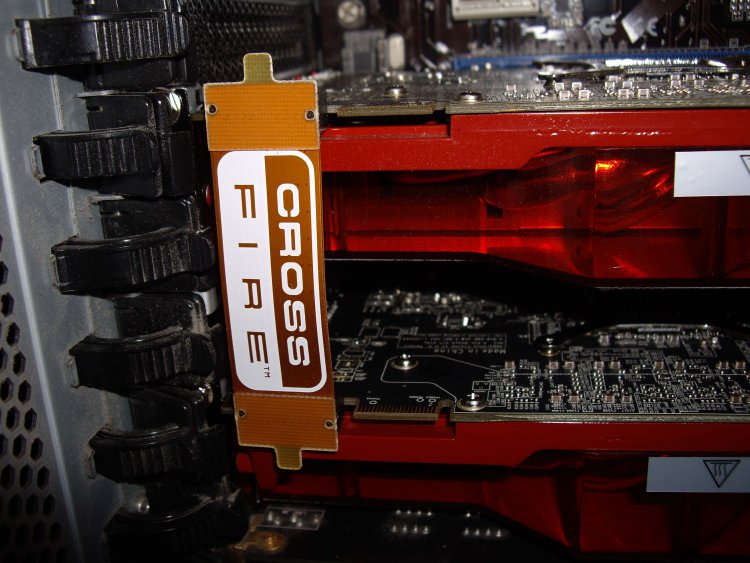
| Vista Home Premium x64/Win7 Ultikmate Technical Preview - x64 | Crossfire Setup Hi All, Looking forward to setup crossfire for the first time on my rig. Specs are as follows: Core i7 920, 2 x WDVR 150GB, 12GB DDR3, Corsair HX1000W and Vista HP x64/Win7 Ultimate X64- intend to crossfire two Sapphire R4890's. Are there any issues I should be on the lookoput for? Can anyone also tell me the correct orientation for the crossfire connectors? Look forward to any responses Thanks |
My System Specs![]() |
| | #2 (permalink) |
| Vista Ultimate SP2 x64 : Seven Ultimate x64 | Re: Crossfire Setup Some games can have varying degrees of graphical glitches when using CF/SLI. On the odd occasion it can cause crashes in some games, but these are usually sorted by drivers and patches, or by disabling CF/SLI. Some people complain about 'micro-stutter' , although I've never had an issue with it. You can't run 3 monitors with CF enabled (I believe the same goes for SLI ) Two cards = Twice the noise. Twice the power usage as well. Not all games scale well with CF/SLI. In fact some games run better with a single GPU. Again this is usually sorted by drivers and patches. Generally speaking though, CF/SLI works very well and the performance increase can be very noticeable. ![]() As for the power connectors, for the first card use the 2 hardwired 6+2 pin plugs. For the second card, use the blue modular cables and connect them into the 12V1 rail. (That's the recommended load distribution by Corsair) |
My System Specs![]() |
| | #3 (permalink) |
| Vista Home Premium x64/Win7 Ultikmate Technical Preview - x64 | Re: Crossfire Setup Thanks smarteyeball for the information. Was planning on using two crossifre connectors ![]() Will let you know how things turn out |
My System Specs![]() |
| | #4 (permalink) |
| Vista Ultimate SP2 x64 : Seven Ultimate x64 | Re: Crossfire Setup ![]() The second crossfire connection is intended for TRI and Quad crossfire setups. Best of luck with it - despite the occasional annoyances with CF, it really can be worth it - especially if you like using xAA |
My System Specs![]() |
![]() |
| Thread Tools | |
| |
Similar Threads | ||||
| Thread | Forum | |||
| Crossfire Fps. | Gaming | |||
| SLI and Crossfire? | Graphic cards | |||
| SLI/crossfire | Graphic cards | |||
| Crossfire | Gaming | |||
| CROSSFIRE! | Vista installation & setup | |||