Windows Vista Forums
Vista Forums Home Join Vista Forums Windows 7 Forum Vista Tutorials Tags
Welcome to Windows Vista Forums. Our forum is dedicated to helping you find solutions with any problems, errors or issues you are experiencing with Windows Vista. The Vista forum also covers news and updates and has an extensive Windows Vista tutorial section that covers a wide range of tips and tricks.

Go Back   Vista Forums > Vista Forums > Microsoft Office

Vista - word 2007 send to buttton greyed out

Reply
 
Old 08-29-2008   #1 (permalink)


Vista home premium


word 2007 send to buttton greyed out

Vista 64 home premium, office 2007 home and students -have word doc open, scroll to send to -and email button is greyed out?

and help????

I am using windows mail and its set as default e-mail program

My System SpecsSystem Spec
Old 08-29-2008   #2 (permalink)


Vista Ultimate x64 MAK, OpenSolaris 5, Gentoo 2008.1....


Re: word 2007 send to buttton greyed out

Hi, mjgrolex, and welcome to the forums.

See The "E-mail" command is missing or is unavailable in Excel 2007, in PowerPoint 2007, or in Word 2007 - As you have the Home and Student version, you don't have Outlook installed, per http://office.microsoft.com/en-us/su...674081033.aspx - so that KB article gives you a workaround for it. Obviously method 1 won't work for you, so try method 2, and if that still does not help, then you might be forced to use method 3 - however, post back if you need help resolving the steps in method 2, because I *do* have Outlook installed and I should be able to verify my registry keys are as listed in that article, and thus export and send it to you to import to see if it will work or not.
My System SpecsSystem Spec
Old 08-29-2008   #3 (permalink)


Vista home premium


Re: word 2007 send to buttton greyed out

thanks

I already tried 2 =no luck

looked at my kids computer and they have a few more things listed in their reg string-

send me what yours says -think its safe to try?

I can simple save a file- open an e-mail and add as an attachment but isn't that so 90s ,,,,

I got so used to send to in old office

thanks
My System SpecsSystem Spec
Old 08-29-2008   #4 (permalink)


Vista Ultimate x64 MAK, OpenSolaris 5, Gentoo 2008.1....


Re: word 2007 send to buttton greyed out

I had a feeling that #2 might not work, because it doesn't explicitly state it but it is implied that #2 still needs Outlook installed.

Export your kids' computer's reg file to a file on the desktop (doesn't matter what the name is) and then edit it in notepad and copy the contents and paste them here in a set of code tags (inside the following: [code][/code] an I'll take a lookie and see if it is safe to import to your computer or not.
My System SpecsSystem Spec
Old 08-30-2008   #5 (permalink)


Vista home premium


Re: word 2007 send to buttton greyed out

Good morning-

here is my kids reg for messaging subsystem- they have Vista 32 and home and student office 07- they did have older office and outlook that I removed to install the office 07- so maybe the old office and outlook installed this stuff -anyway -it works fine on their computer

my send to mail is greyed out but theirs works fine

this it
indows Registry Editor Version 5.00

[HKEY_LOCAL_MACHINE\SOFTWARE\Microsoft\Windows Messaging Subsystem]
"MAPI"="1"
"CMC"="1"
"CMCDLLNAME"="mapi.dll"
"CMCDLLNAME32"="mapi32.dll"
"InstallCmd"="rundll32 setupapi,InstallHinfSection MSMAIL 132 msmail.inf"
"MAPIX"="1"
"MAPIXVER"="1.0.0.1"
"OLEMessaging"="1"

[HKEY_LOCAL_MACHINE\SOFTWARE\Microsoft\Windows Messaging Subsystem\MSMapiApps]
"SearchProtocolHost.exe"="Microsoft Outlook"
"inetsw95.exe"=""
"choosusr.dll"=""
"MSKClnt.exe"="Microsoft Outlook"
"iTunes.exe"="Microsoft Outlook"


think its safe to do this string -it's theirs -also it copied the second part too -the MSMapiApps -think I need that stuff too
My System SpecsSystem Spec
Old 08-30-2008   #6 (permalink)


Vista home premium


Re: word 2007 send to buttton greyed out

and here is my reg file for subsystem

indows Registry Editor Version 5.00
[HKEY_LOCAL_MACHINE\SOFTWARE\Microsoft\Windows Messaging Subsystem]
"MAPI"="1"
[HKEY_LOCAL_MACHINE\SOFTWARE\Microsoft\Windows Messaging Subsystem\MSMapiApps]
"msab32.dll"=""
"nwab32.dll"=""
"SearchProtocolHost.exe"="Microsoft Outlook"
"outstore.dll"="Microsoft Outlook"
"inetsw95.exe"=""
"choosusr.dll"=""
My System SpecsSystem Spec
Old 08-30-2008   #7 (permalink)


Vista Home Premium 32-bit & Vista Ultimate 64-bit both Service Pack 2 W7 Pro RTM 7600 32 & 64


Re: word 2007 send to buttton greyed out

Hi mjgrolex,

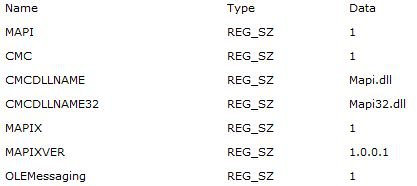
I also have 'Office Home and Student 2007', and my email option is not available as you described. However, having followed the instructions given in KB918792 (link given below), the email option is now available and working. Note the advice about using an account with administrative privileges (for both methods) or providing administrative credentials (second method). Neither method will work otherwise. A suitable account is the one that you created when first installing Vista.

The "E-mail" command is missing or is unavailable in Excel 2007, in PowerPoint 2007, or in Word 2007

Code:
Windows Registry Editor Version 5.00
[HKEY_LOCAL_MACHINE\SOFTWARE\Microsoft\Windows Messaging Subsystem]
"MAPI"="1"
"CMC"="1"
"CMCDLLNAME"="Mapi.dll"
"CMCDLLNAME32"="Mapi32.dll"
"MAPIX"="1"
"MAPIXVER"="1.0.0.1"
"OLEMessaging"="1"
Copy this piece of code into 'Notepad' and save it with a '.reg' extension. Give it a meaningful name, such as 'Office 2007 Email Patch.reg'. You can then click on this file to merge the data into the registry. Note that you will need to do this in an account with administrative privileges (the "right click, select 'Run as administrator', provide administrative credentials" option is NOT available with '.reg' files).

Code:
@ECHO OFF
REG ADD "HKLM\SOFTWARE\Microsoft\Windows Messaging Subsystem" /v MAPI /t REG_SZ /d 1 /f
REG ADD "HKLM\SOFTWARE\Microsoft\Windows Messaging Subsystem" /v CMC /t REG_SZ /d 1 /f
REG ADD "HKLM\SOFTWARE\Microsoft\Windows Messaging Subsystem" /v CMCDLLNAME t/ REG_SZ /d Mapi.dll /f
REG ADD "HKLM\SOFTWARE\Microsoft\Windows Messaging Subsystem" /v CMCDLLNAME32 /t REG_SZ /d Mapi32.dll /f
REG ADD "HKLM\SOFTWARE\Microsoft\Windows Messaging Subsystem" /v MAPIX /t REG_SZ /d 1 /f
REG ADD "HKLM\SOFTWARE\Microsoft\Windows Messaging Subsystem" /v MAPIXVER /t REG_SZ /d 1.0.0.1 /f
REG ADD "HKLM\SOFTWARE\Microsoft\Windows Messaging Subsystem" /v OLEMessaging /t REG_SZ /d 1 /f
An alternative method is to copy the above code into 'Notepad' and save it with a '.bat' extension. Give it a meaningful name, such as 'Office 2007 Email Patch.bat'. Again, if you click on this file it will merge the data into the registry, providing that you do so in an account with administrative privileges. Alternatively, right click on the batch file and select 'Run as administrator'. After providing administrative credentials, the file will execute and the data will be merged into the registry.

Last edited by Dwarf; 08-30-2008 at 11:38 AM..
My System SpecsSystem Spec
Old 08-30-2008   #8 (permalink)


Vista Ultimate x64 MAK, OpenSolaris 5, Gentoo 2008.1....


Re: word 2007 send to buttton greyed out

Dwarf is right - but to save yourself some time you should be able to import the one from your kids' machine just as you were speculating. It contains all of the same items as mine does under
Code:
Windows Registry Editor Version 5.00

[HKEY_LOCAL_MACHINE\SOFTWARE\Microsoft\Windows Messaging Subsystem]
@=""
"CMC"="1"
"CMCDLLNAME32"="mapi32.dll"
"MAPI"="1"
"MAPIX"="1"
"MAPIXVER"="1.0.0.1"
"OLEMessaging"="1"
As mine does, and as is reported in the link I originally provided you.

Interestingly enough, your registry export *does not* have those - and if you had followed step two correctly, it should have had those, so again, Dwarfs supposition that you may not have actually successfully taken step 2 may also be correct.
My System SpecsSystem Spec
Old 09-01-2008   #9 (permalink)


Vista home premium


Re: word 2007 send to buttton greyed out

Quote  Quote: Originally Posted by johngalt View Post
Dwarf is right - but to save yourself some time you should be able to import the one from your kids' machine just as you were speculating. It contains all of the same items as mine does under
Code:
Windows Registry Editor Version 5.00
 
[HKEY_LOCAL_MACHINE\SOFTWARE\Microsoft\Windows Messaging Subsystem]
@=""
"CMC"="1"
"CMCDLLNAME32"="mapi32.dll"
"MAPI"="1"
"MAPIX"="1"
"MAPIXVER"="1.0.0.1"
"OLEMessaging"="1"
As mine does, and as is reported in the link I originally provided you.

Interestingly enough, your registry export *does not* have those - and if you had followed step two correctly, it should have had those, so again, Dwarfs supposition that you may not have actually successfully taken step 2 may also be correct.
I did that -it shows the kids reg files in my system -and the button is still greyed out -doesn't work in Excel with the email button added to qucikbar- either

basically -office 07 doesn't seeem to send to -winsdows mail

and under tools in IE I do programs, add windows mail as default mail handler

update -Powerpoint 07 does work fine -Word-Excel do not

any other thoughts?
My System SpecsSystem Spec
Old 09-01-2008   #10 (permalink)


Vista Home Premium 32-bit & Vista Ultimate 64-bit both Service Pack 2 W7 Pro RTM 7600 32 & 64


Re: word 2007 send to buttton greyed out

Hi mjgrolex,

In that case, try following the 2nd method from my previous post and create a batch file. To save time, just copy and paste the code that I provided and follow the given instructions.
My System SpecsSystem Spec
Reply

Thread Tools


Similar Threads
Thread Forum
Word 2007 Send Buttton Unresponsive Greyed Out Microsoft Office
email box greyed out in Word 2007 Vista mail
Re: Word 2007 Send as Email greyed out Vista mail
can't send a word 2007 document as an attachment Vista mail
Send Word 2007 as an attachment ?? Vista mail


Vista Forums is an independent web site and has not been authorized,
sponsored, or otherwise approved by Microsoft Corporation.
"Windows Vista", the Start Orb, and related materials are trademarks of Microsoft Corp.
© Designer Media Ltd

1 2 3 4 5 6 7 8 9 10 11 12 13 14 15 16 17 18 19 20 21 22 23 24 25 26 27 28 29 30 31 32 33 34 35 36 37 38 39 40 41 42 43 44 45 46