![]() |
![]() | ![]() | ![]() | ![]() | ![]() | ![]() | ![]() |
| Welcome to Windows Vista Forums. Our forum is dedicated to helping you find solutions with any problems, errors or issues you are experiencing with Windows Vista. The Vista forum also covers news and updates and has an extensive Windows Vista tutorial section that covers a wide range of tips and tricks. |
| |||||||
![]() |
| |
| | #1 (permalink) |
| Vista Ultimate 32bit/ Mac OS X 10.5.5 | Wireless network problems, Vista/XP network ok so this problem has been going on for awhile now but has gotten worse somehow... before i could not access my vista computer upstairs from my xp computer downstairs. i've made sure the settings are what they should be on the vista computer since i can easily access my xp computer from the vista computer. now the problem has gotten worse by that i can't access my xp computer from the vista computer or vice versa so now i can't transfer files from each computer. i need to use my external drive or a flash drive. |
My System Specs![]() |
| | #2 (permalink) |
| Vista Ultimate x64 MAK, OpenSolaris 5, Gentoo 2008.1.... | Re: Wireless network problems, Vista/XP network could you ever access the XP machines from Vista after installing SP3? |
My System Specs![]() |
| | #3 (permalink) |
| Vista Ultimate 32bit/ Mac OS X 10.5.5 | Re: Wireless network problems, Vista/XP network from what i remember yeah i was able to... |
My System Specs![]() |
| | #4 (permalink) |
| Vista Home Premium | Re: Wireless network problems, Vista/XP network Have you enable the file and print sharing on both the computers .. Also disable the firewall on the computer. |
My System Specs![]() |
| | #5 (permalink) |
| Vista Ultimate 32bit/ Mac OS X 10.5.5 | Re: Wireless network problems, Vista/XP network yes file and print sharing is enabled on both computers since i use the printers connected to a xp computer upstairs to print things. |
My System Specs![]() |
| | #6 (permalink) |
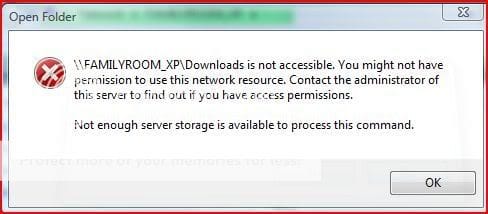
| Vista Ultimate 32bit/ Mac OS X 10.5.5 | Re: Wireless network problems, Vista/XP network well i just uninstalled SP3 but i still have the problem... this is what popups when i try to open a shared folder.. Last edited by hatehereyes; 05-31-2008 at 02:28 PM.. |
My System Specs![]() |
| | #7 (permalink) |
| Vista Ultimate x64 | Re: Wireless network problems, Vista/XP network XP SP3 automatically turns on the Firewall in XP. This is even if you previously turned it off. Go into the control panel on the XP machine, and double check. On one machine, I had to turn it on and off TWICE before it cleared. Can't say why, just that it did. Hope that helps. |
My System Specs![]() |
| | #8 (permalink) |
| Vista Ultimate 32bit/ Mac OS X 10.5.5 | Re: Wireless network problems, Vista/XP network well after i uninstalled SP3 i even try turning off the firewall but still it didn't work... |
My System Specs![]() |
| | #9 (permalink) |
| Vista Ultimate x64 | Re: Wireless network problems, Vista/XP network If you are absolutely sure there is nothing blocking like a firewall on EITHER machine, then try this: On the XP machine, create a new directory in the root of C: called NetAccess After creating it, place the mouse cursor on the new directory and RIGHT CLICK with your mouse. A menu will appear and there will be an entry called "Sharing and Security". Do a normal LEFT CLICK with your mouse on that entry. A new window will open with 3 tabs.... General - Sharing - Customize Click the SHARING tab and you will see two different areas. We are concerned ONLY with the 2nd one, called Network sharing and security. Click the box that says "Share this folder on the network" A check will appear in the box and the name "NetAccess" will appear right below it in the box that says "Share Name" BELOW that box is another box. It says "Allow network users to change my files". Check THAT box as well. Click APPLY in the bottom right of the box, then click OK. The box will disappear. Close ALL windows on the machine and SHUT DOWN. Go to your Vista Machine and SHUT DOWN. Restart your XP Machine. Login. When the machine is fully booted and waiting, THEN go and restart your Vista Machine. Now use your Network browser and find the XP machine, then click on the new folder you created called NetAccess. It should just open up. If this works correctly, you should be able to copy something from your Vista machine and paste it into that new directory. If ALL this works, your problem is with inherited security rights. Rather than explain and try to fix it, it would be MUCH easier to just create new directories on each machine in the same manner as you just did with NetAccess. One thing, do NOT name them the same on both machines. It's just easier to name them differently like VistaAccess on the Vista machine, etc. Hope that helps. |
My System Specs![]() |
| | #10 (permalink) |
| Vista Ultimate 32bit/ Mac OS X 10.5.5 | Re: Wireless network problems, Vista/XP network hmm ok i'll try to do that later when i get home. thanks for that information and hopefully it works out. |
My System Specs![]() |
![]() |
| Thread Tools | |
| |
Similar Threads | ||||
| Thread | Forum | |||
| Vista says my home network wireless is a hidden network | Network & Sharing | |||
| 64bit Vista wireless network problems | Network & Sharing | |||
| Wireless Network Problems | Vista networking & sharing | |||
| Vista Ultimate: Wireless network connection problems and slow internet access | Vista networking & sharing | |||
| Wireless Network Problems since upgrade to vista Via Intel 3945ABG | Vista General | |||