Windows Vista Forums
Vista Forums Home Join Vista Forums Windows 7 Forum Vista Tutorials Tags
Welcome to Windows Vista Forums. Our forum is dedicated to helping you find solutions with any problems, errors or issues you are experiencing with Windows Vista. The Vista forum also covers news and updates and has an extensive Windows Vista tutorial section that covers a wide range of tips and tricks.

Go Back   Vista Forums > Vista Forums > Network & Sharing

Vista - Problem connecting to internet

Reply
 
Old 07-30-2008   #1 (permalink)


Vista Business 32bit


Problem connecting to internet

Hi All,

I am unable to connect to internet using my wireless. I have tried resetting the router and rebooting the laptop. Each time I try connecting to internet the system throws and error " the dependency service or group failed to start". I have tried using vista's diagonse and repair option, but no luck. I have tried restarting the wireless, troubleshooted drives.

On doing the ipconfig /renew at the command prompt the following was seen.
" No operation can be performed on wireless network connection while it has its media disconnected.No operation can be performed on bluetooth network connection while it has its media disconnected. An error occured while releasing interface loopback pseudo-interface1"

On futher diagnoses i have notice that DHCP clinet service is stuck in the "STARTING" state. I am unable to stop and restart it. I have logged using the administrator.

People please help me fix the problem.


Last edited by johngalt; 07-31-2008 at 01:56 AM.. Reason: changed resting to resetting
My System SpecsSystem Spec
Old 07-30-2008   #2 (permalink)


Vista Business x64; Arch Linux


Re: Problem connecting to internet

Just to clarify, are you able to connect to the Internet when using an ethernet connection?
Unplug the router from everything for ~30 seconds, then put everything back in and try again.
If that doesn't work, reset the router entirely.
My System SpecsSystem Spec
Old 07-30-2008   #3 (permalink)


Vista Ultimate x64 MAK, OpenSolaris 5, Gentoo 2008.1....


Re: Problem connecting to internet

If DHCP service is starting but not running, and based upon the error you are receiving, it is probably not the router that is having issues. After doing the above, check your wireless card in Device manager first and foremost to see if it is working correctly. Then report any other devices that are not,. Then check for updated drivers for both your NIC and wireless NIC. Finally, if the problem persists, post back *with a screen shot* of the error message(s).
My System SpecsSystem Spec
Old 07-31-2008   #4 (permalink)


Vista Business 32bit


Re: Problem connecting to internet

Quote  Quote: Originally Posted by BladedThesis View Post
Just to clarify, are you able to connect to the Internet when using an ethernet connection?
Unplug the router from everything for ~30 seconds, then put everything back in and try again.
If that doesn't work, reset the router entirely.

No I am not able to connet using ethernet too. Reseting the router/unplugging does not work.
My System SpecsSystem Spec
Old 07-31-2008   #5 (permalink)


Vista Business x64; Arch Linux


Re: Problem connecting to internet

Quote  Quote: Originally Posted by asmita616 View Post
Quote  Quote: Originally Posted by BladedThesis View Post
Just to clarify, are you able to connect to the Internet when using an ethernet connection?
Unplug the router from everything for ~30 seconds, then put everything back in and try again.
If that doesn't work, reset the router entirely.

No I am not able to connet using ethernet too. Reseting the router/unplugging does not work.
Contact your ISP.
My System SpecsSystem Spec
Old 07-31-2008   #6 (permalink)


Vista Home Premium 32-bit & Vista Ultimate 64-bit both Service Pack 2 W7 Pro RTM 7600 32 & 64


Re: Problem connecting to internet

Hi asmita616 and welcome to the forums

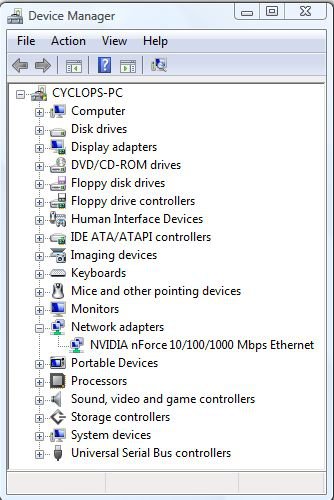
Have you checked 'Device Manager' to see if there are any problems with your network devices? To do this, click on the start orb and type 'Device Manager' into the search box. In the 'Programs' area of the results list, right click on this program and select 'Run as administrator'. After providing administrative credentials, the program will open. Expand the 'Network adapters' category as shown below. Does this (or any other) category have a yellow triangle with an exclamation mark in it next to it? If so, please attach an image (follow the tutorial link below if you are unsure how to do so) showing this to a reply, together with as much detail of your hardware as possible. The more information that we have, the better chance we have of being able to come up with the answer to your problem.
Dwarf

capture.jpg

How to use the Snipping Tool in Vista
My System SpecsSystem Spec
Old 08-02-2008   #7 (permalink)


Vista Ultimate 32bit


I thought that I solved the internet connection problem after updating the NIC driver via the device manager. It works for one day (after reboot my router), but now I have the same problem. My connection works even after Vista update yesterday for a more recent NIC driver (even after reboot system). It's not a DHCP problem with my router because my Linux system is attached to the same router (Zyxel 2602) and get after start immediately via DHCP an IP. I upgrade earlier this week from XP-SP3 to Vista Ultimate and still use the same port on my router (XP has never problems to get an internet connection).

Via diagnose and repair Vista suggests: make sure your internet protocols bindings are correct for local area connection 2.... If I click then I get a warning that Windows cannot find followed with a string of characters. Make sure you typed the name correctly. Indeed I see only the Icon "local area connection". When I try rename to "local area connection 2" Vista don't accept this with the warning that "local area connection 2" exist. I think that is the problem but I don't figure out where "local area connection 2" resides. How I can solve permanently this very trivial and annoying problem?

I have never had such Internet connection problems before (Solaris, Redhat, Fedora, Xandros, Ubuntu and even other Windows generations).

Wouter

Additional information:
I have deleted today the driver and installed again. Update driver and Vista confirms that's the right (NIC) driver. In ipconfig /all I see a wrong subnet mask and the IP isn't in range (must be 192.168.1.x). Local gateway (internal name (dhcp) server) must be 192.168.1.254)

O no, my ADSL/Router works well because my other PC (Linux) and wireless laptop get immediately the right IP from my router (Zyxel 2602). I doubt about a clean install Vista but related to the problem there must be a more clever solution..

C:\Users\wouter>ipconfig /all

Windows IP Configuration

Host Name . . . . . . . . . . . . : pixel
Primary Dns Suffix . . . . . . . :
Node Type . . . . . . . . . . . . : Hybrid
IP Routing Enabled. . . . . . . . : No
WINS Proxy Enabled. . . . . . . . : No

Ethernet adapter Isabelladonk (renamed from "local area connection")

Connection-specific DNS Suffix . :
Description . . . . . . . . . . . : 3Com Gigabit LOM (3C940)
Physical Address. . . . . . . . . : 00-0E-A6-39-E4-79
DHCP Enabled. . . . . . . . . . . : Yes
Autoconfiguration Enabled . . . . : Yes
Link-local IPv6 Address . . . . . : fe80::49a0:209a:24e6:1ee4%10
Autoconfiguration IPv4 Address. . : 169.254.30.228(Preferred)
Subnet Mask . . . . . . . . . . . : 255.255.0.0
Default Gateway . . . . . . . . . :
DHCPv6 IAID . . . . . . . . . . . : 33558182
DNS Servers . . . . . . . . . . . : fec0:0:0:ffff::1%1
fec0:0:0:ffff::2%1
fec0:0:0:ffff::3%1
NetBIOS over Tcpip. . . . . . . . : Enabled

Tunnel adapter Local Area Connection*:

Connection-specific DNS Suffix . :
Description . . . . . . . . . . . : Microsoft ISATAP Adapter
Physical Address. . . . . . . . . : 00-00-00-00-00-00-00-E0
DHCP Enabled. . . . . . . . . . . : No
Autoconfiguration Enabled . . . . : Yes
Default Gateway . . . . . . . . . :
NetBIOS over Tcpip. . . . . . . . : Disabled

C:\Users\wouter>

For your information, I have posted here my problem too..

Last edited by johngalt; 08-05-2008 at 02:28 AM.. Reason: merged for readability.
My System SpecsSystem Spec
Old 08-03-2008   #8 (permalink)


Vista Home Premium 32bit


Re: Problem connecting to internet

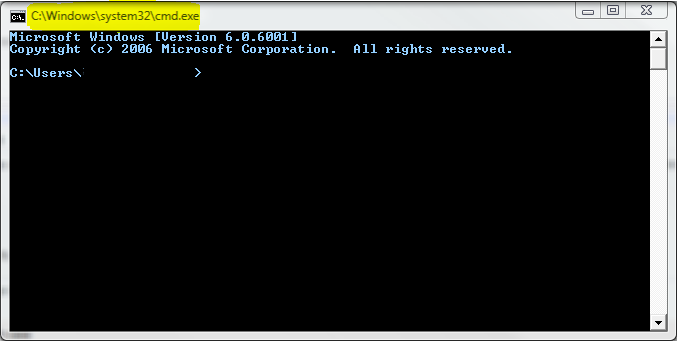
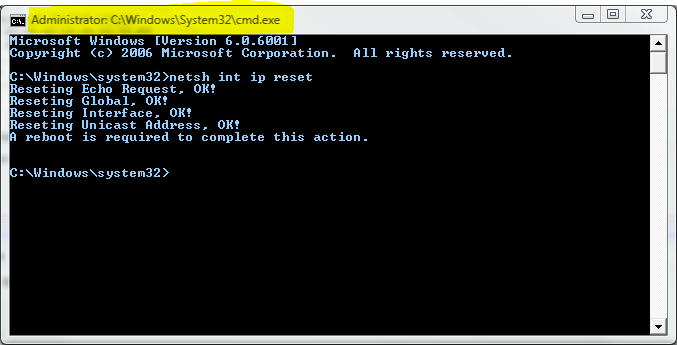
try going to command prompt and type in:

netsh int ip reset resetlog.txt

then press enter, then type in:

netsh winsock reset

then press enter again, then restart the PC and check the IPV4 address again, it should give you a 192.168.1.xx IP address
My System SpecsSystem Spec
Old 08-04-2008   #9 (permalink)


Vista Ultimate 32bit


Re: Problem connecting to internet

In spite of that my account has administrator rights, I get as result: the requested operation requires elevation.. So, I turned off User Account Control, but then: netsh int not found
I have done:
- netsh interface ipv4 reset
- netsh winsock reset
- reboot

Result: problem not solved
Vista look to the wrong network adapter (local area connection 2)


Last edited by johngalt; 08-05-2008 at 02:29 AM.. Reason: Don't use quote when you're the next person to reply.
My System SpecsSystem Spec
Old 08-04-2008   #10 (permalink)


Vista Ultimate 32bit


Re: Problem connecting to internet

I found (finally) the solution...
I have changed in HKEY_LOCAL_MACHINE\SYSTEM\CurrentControlSet\Services\Tcpip\Parameters\Interfaces\{GUID} some parameters like mentioned here.

After ipconfig /renew my PC (finally) gets from the DHCP server (Zyxel 2602) an ip-adres. Solution is reproducible (I hope :-) because after reboot my Vista PC, I get again a regular IP address, like with XP before and my wife's Linux PC :-)

Last edited by wsmaal; 08-04-2008 at 09:57 AM..
My System SpecsSystem Spec
Reply

Thread Tools


Similar Threads
Thread Forum
problem connecting laptop-desktop via cross cable & internet by mo Vista networking & sharing
Re: Problem connecting to internet after Vista Windows update Vista networking & sharing
Problem connecting to Internet Vista General
Internet not connecting Vista hardware & devices
Connecting to internet with RC1 Vista installation & setup


Vista Forums is an independent web site and has not been authorized,
sponsored, or otherwise approved by Microsoft Corporation.
"Windows Vista", the Start Orb, and related materials are trademarks of Microsoft Corp.
© Designer Media Ltd

1 2 3 4 5 6 7 8 9 10 11 12 13 14 15 16 17 18 19 20 21 22 23 24 25 26 27 28 29 30 31 32 33 34 35 36 37 38 39 40 41 42 43 44 45 46