![]() |
![]() | ![]() | ![]() | ![]() | ![]() | ![]() | ![]() |
| Welcome to Windows Vista Forums. Our forum is dedicated to helping you find solutions with any problems, errors or issues you are experiencing with Windows Vista. The Vista forum also covers news and updates and has an extensive Windows Vista tutorial section that covers a wide range of tips and tricks. |
| |||||||
![]() |
| |
| | #1 (permalink) |
| Vista Home | Can't connect to the internet, 3rd BRAND NEW computer that work connect! HELP! I bought a new Dell computer and then got another brand new dell that they replaced for free because they thought something was wrong with it. I returned that one and bought a brand new HP that i still have currently, all have/had Windows VISTA... After being on the phone for hours and hours with Microsoft, Comcast and Dell, there still hasnt been anyone that can resolve the issues... I have a Motorola modem thats connect by ethernet cable to a D-Link wireless router, but is only used as a medium to connect multiple computers to that motorola router through ethernet cables. The connection is good given that i'm typing from my old computer with Windows XP. Plug and play and the internet works no issues. Can this be an issue with the Modem or D-link router? Ethenet Cable? I can not think of anything else and with the Dell computer(s), microsoft and dell tried everything physically possible to try to un-install Vista, do this and do that with everything. Comcast did say that all their modems are Vista friendly and i even tried directly plugging the ethernet cable from the modem to the computer, bypassing the router and that didnt work. One comment that was made was that i had a bad IP address, which they tried to fix and that didnt work either. Please someone help me! Or im going to have to go with a brand new computer that has XP and not Vista. THANKS! |
My System Specs![]() |
| | #2 (permalink) |
| Vista Home | Re: Can't connect to the internet, 3rd BRAND NEW computer that work connect! HELP! anyone? |
My System Specs![]() |
| | #3 (permalink) |
| VISTA HOME PREMIUM X64/ 7 x64 / 7x86 | Re: Can't connect to the internet, 3rd BRAND NEW computer that work connect! HELP! Hi cheese48, It's not that you're being ignored, it must be that no one has an answer. As far as I know none of the regulars here has had a problem with Vista itself connecting - so it's not the o/s . You've tried a couple of different machines - so it's not likely to be the hardware per se. I suspect it's a combination of the ethernet card, the drivers, your router etc. Which would explain why neither Dell nor M$ could figure it out. Sorry I can't offer any solutions either. SIW2 |
My System Specs![]() |
| | #4 (permalink) |
| Vista Home | Re: Can't connect to the internet, 3rd BRAND NEW computer that work connect! HELP! Thanks for the reply...I'm going to go to comcast on friday and trade my modem for a newer "updated" modem and see what that does.... |
My System Specs![]() |
| | #5 (permalink) |
| VISTA HOME PREMIUM X64/ 7 x64 / 7x86 | Re: Can't connect to the internet, 3rd BRAND NEW computer that work connect! HELP! Hope it works out for you SIW2 |
My System Specs![]() |
| | #6 (permalink) |
| Vista Home Premium 32bit | Re: Can't connect to the internet, 3rd BRAND NEW computer that work connect! HELP! Logically, if your connection worked with your old computer then there is nothing wrong with the connection. If three new computers failed to connect then logically it's not the computer. The chances of all three being somehow defective would be remote. If it were me, I'd unplug all the cables, wait a few minutes, connect the cables, configure the router, and see if it works. Doing hard resets on the router and modem and reconfiguring is an option, too. |
My System Specs![]() |
| | #7 (permalink) |
| Vista Home Premium 32-bit & Vista Ultimate 64-bit both Service Pack 2 W7 Pro RTM 7600 32 & 64 | Re: Can't connect to the internet, 3rd BRAND NEW computer that work connect! HELP! Hi chesee48 and welcome to Vista Forums ![]() Although people have had issues with D-Link routers, I think that we can possibly eliminate that here since you tried connecting through it and connecting directly to your modem. Instead, I think that it could be a driver issue. To check this, click on the start orb and type Device Manager into the search box and press enter/return. Click OK when the warning message appears and then click on Network adapters to expand that section. Do you see a yellow warning triangle or a red cross here (or, indeed, any of the other categories)? Please reply with this information, and also with the make and model number of your computer. Please also state whether you have 32-bit or 64-bit Vista installed. |
My System Specs![]() |
| | #8 (permalink) |
| Vista Ult. x64 | Re: Can't connect to the internet, 3rd BRAND NEW computer that work connect! HELP! Hello, Here is what you can do. Do an ipconfig /all and post the result in this forum so we can atleast see what IP you are getting. If it is returning all 0.0.0.0 then there is no connection. I would then go into device manager and check the type of NIC that you have. Go directly to their website and download any available Vista drivers for that NIC. You can also ping your NIC by openign a command prompt and typing in ping 127.0.0.1. If this returns any negative results then you either have a bad NIC or bad drivers. |
My System Specs![]() |
| | #9 (permalink) |
| Vista Home | Re: Can't connect to the internet, 3rd BRAND NEW computer that work connect! HELP! Thank you very much for the replies guys, ive been sick with food poisoning the past few days so when i get a chance i will do all the above and see what i get..... Thank you again |
My System Specs![]() |
| | #10 (permalink) |
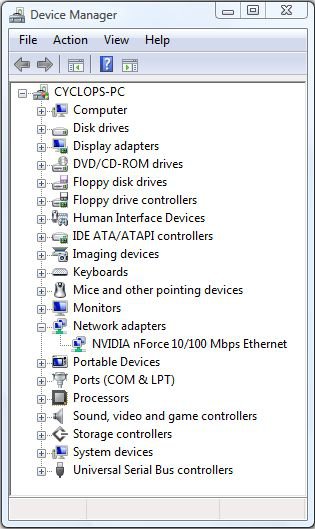
| Vista Home | Re: Can't connect to the internet, 3rd BRAND NEW computer that work connect! HELP! Hi chesee48 and welcome to Vista Forums ![]() Although people have had issues with D-Link routers, I think that we can possibly eliminate that here since you tried connecting through it and connecting directly to your modem. Instead, I think that it could be a driver issue. To check this, click on the start orb and type Device Manager into the search box and press enter/return. Click OK when the warning message appears and then click on Network adapters to expand that section. Attachment 9330 Do you see a yellow warning triangle or a red cross here (or, indeed, any of the other categories)? Please reply with this information, and also with the make and model number of your computer. Please also state whether you have 32-bit or 64-bit Vista installed. HP E5200 |
My System Specs![]() |
![]() |
| Thread Tools | |
| |
Similar Threads | ||||
| Thread | Forum | |||
| Can Connect to Router but unable to connect to internet | Vista networking & sharing | |||
| Can not connect to work/home wireless Internet connection.... HELP!!! | Network & Sharing | |||
| How To Connect An XP Computer To The Internet Through A Vista X64 PC | Network & Sharing | |||
| How to get other users in my computer to connect to internet | Vista installation & setup | |||
| new computer with vista/cannot connect to internet using isp route | Vista networking & sharing | |||