![]() |
![]() | ![]() | ![]() | ![]() | ![]() | ![]() | ![]() |
| Welcome to Windows Vista Forums. Our forum is dedicated to helping you find solutions with any problems, errors or issues you are experiencing with Windows Vista. The Vista forum also covers news and updates and has an extensive Windows Vista tutorial section that covers a wide range of tips and tricks. |
| |||||||
![]() |
| |
| | #1 (permalink) |
| Vista Ultimate x64 | wireless network card(s) - epic fail since building a new rig last christmas ive had endless problems with wireless networking. specs: asus p5q-se intel e8400 4gb corsair dominator ram palit hd4870 1gb seagate sata II 500gb corsair tx series 650w vista ultimate 64 bit wireless cards: d-link g510 rev C and Asus wl-138g v2 With the g510 i can get a connection to the internet but im getting only 1mbps despite 22mb internet, browsing and downloads are painfully slow. With the wl-138g i can only get a local connection or connection with limited access. Ive tried everything i can think of: Wipe, reinstall and try new drivers, tried all pc slots removed second stick of ram updated bios, cleared cmos reinstalled vista I've even installed xp on a spare hard drive and i get the exact same problems. After all this, i thought i must have a faulty mobo so i returned it to the reseller, they told me they have "confirmed the fault" and sent me a new one. Yesterday i put my pc back together without any cards, installed the asus drivers and put the card in, connected fine and got good speeds on the internet. I rejoiced and celebrated, thinking it was all over. Then, this morning i booted up and i got no connection at all, after loads of tinkering im back to square one and both cards are operating like they did before the motherboard replacement. Now, i have no idea what to try next and how to get this fixed. Please, help me out! |
My System Specs![]() |
| | #2 (permalink) |
| Vista Ultimate X64 SP2 | Re: wireless network card(s) - epic fail Wireless A is what I use (I have a A/B/G card), while my wife and desktop computer use Wireless G I have 19MB (19587kbps) down, 3MB (3743kbps) up. it also depends are your High speed Internet access, are you using DSL, Dial up or High Speed cable? perhaps you should look at "available" networks , I suspect many are on the same G network which will make it sluggish. Try going into the router and change the channel. Try 11, and others untill you find one that is faster. Last edited by rive0108; 05-20-2009 at 03:07 PM.. |
My System Specs![]() |
| | #3 (permalink) |
| Vista x64 + Windows 7 x64 (Ultimate) | Re: wireless network card(s) - epic fail Dumb question but... why can't you run that rig "Wired" instead? Have you tried Disabling IPV6? Have you updated the wireless adapters to their latest firmaware/drivers? Have you disable the onboard adapters... if any? What kind of router are you using? Latest firmware? Have you tried using "OpenDNS" as your DNS carrier? if not, goggle it and try it. |
My System Specs![]() |
| | #4 (permalink) |
| Vista Ultimate x64 | Re: wireless network card(s) - epic fail Internet is DSL, ive played around with channels a bit, but i dont think that it would affect my speed to the extent that it has. I think its more of a hardware problem...maybe. and believe me i would love to just use wired. but 30m of cable from one end of the house to another is not going to happen. Have you tried Disabling IPV6? yes Have you updated the wireless adapters to their latest firmaware/drivers? yes Have you disable the onboard adapters... if any? yupp What kind of router are you using? Latest firmware? O2 wireless box III and yep Have you tried using "OpenDNS" as your DNS carrier? if not, goggle it and try it. Tried it, no change |
My System Specs![]() |
| | #5 (permalink) |
| Vista Ultimate X64 SP2 | Re: wireless network card(s) - epic fail Try unplugging the dsl modem (kill power), then unplug Router (kill Power), then turn off PC wait 10 minutes power on dsl modem, few minutes later power on router, then turn on pc. |
My System Specs![]() |
| | #6 (permalink) |
| Vista Ultimate x64 | Re: wireless network card(s) - epic fail ive tried that a numerous times and i either still get the slow connection with the one card, or no connection with the second card. |
My System Specs![]() |
| | #7 (permalink) |
| Vista Ultimate X64 SP2 | Re: wireless network card(s) - epic fail try a new router/card then-first connect directly to modem make sure its not that. |
My System Specs![]() |
| | #8 (permalink) |
| Vista Ultimate x64 | Re: wireless network card(s) - epic fail ive tried connecting to the router directly with ethernet by taking my pc downstairs and it was working great. I normally connect my pc to my laptop and use my laptop as a network bridge, that gets me a decent connection. Im thinking of getting another card but wouldnt be suprised if it had the same issues. |
My System Specs![]() |
| | #9 (permalink) |
| Vista Ultimate X64 SP2 | Re: wireless network card(s) - epic fail Well if it works under ethernet, then its one of two things; either the cards are bad (doubtful), or its User error, and you have messed up the Windows settings somehow. I suggest you restore to a point before the issues occured. |
My System Specs![]() |
| | #10 (permalink) |
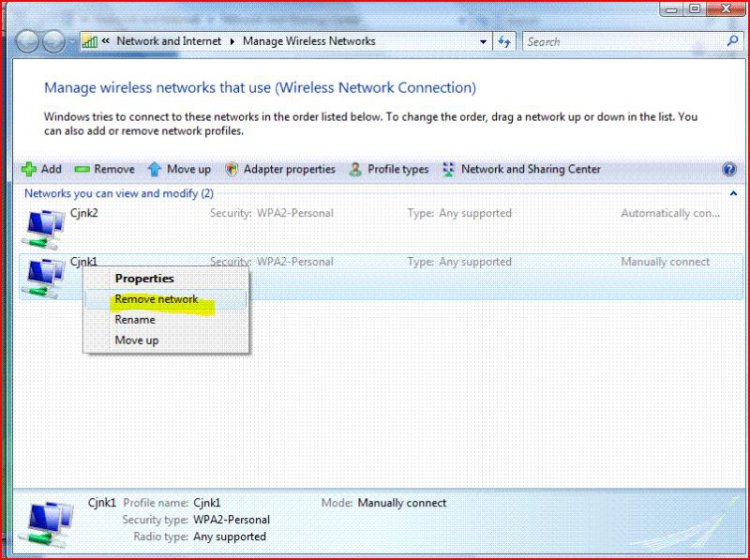
| Vista Ultimate X64 SP2 | Re: wireless network card(s) - epic fail Another thing is to delete all wireless connections, then recreate them. |
My System Specs![]() |
![]() |
| Thread Tools | |
| |
Similar Threads | ||||
| Thread | Forum | |||
| "Sync" is "Epic Fail"! | Live Mail | |||
| wireless network card? | Network & Sharing | |||
| Best Wireless PCI Network Card??? | Network & Sharing | |||
| Dell Wireless WLAN Card Wireless Network Controller has stopped working | Network & Sharing | |||
| Wireless USB Network card for X64 | Network & Sharing | |||