Windows Vista Forums
Vista Forums Home Join Vista Forums Windows 7 Forum Vista Tutorials Tags
Welcome to Windows Vista Forums. Our forum is dedicated to helping you find solutions with any problems, errors or issues you are experiencing with Windows Vista. The Vista forum also covers news and updates and has an extensive Windows Vista tutorial section that covers a wide range of tips and tricks.

Go Back   Vista Forums > Vista Forums > Network & Sharing

Vista - Netgear Wireless Virgin Router Problem

Reply
 
Old 06-15-2009   #1 (permalink)


Vista Home Premium 64 bit


Netgear Wireless Virgin Router Problem

Just moved house and have taken on Virgins 10mb BB service.

All works brilliant on my PC running Vista 64bit when I connect direct from the modem however , I want to use the Wireless Netgear router to hardwire a games room next door.

I have used the wireless installation disc and get through as far as the point where my pc finds the router. When booted up all lights appear as they should so I know its not a dud.

All connections are as they should be but my PC cannot find the Netgear Router.

I have tried numerous reboots and have even spoken to Virgin Tech Support!!!! who said it might be the port settings.

Any clues anyone?

My System SpecsSystem Spec
Old 06-15-2009   #2 (permalink)


Vista Ultimate X64, Windows 7 X64, XP Pro X64, Vista Home Premium X86


Re: Netgear Wireless Virgin Router Problem

try to install it wired and than go wireless. i think that might be your issue.
My System SpecsSystem Spec
Old 06-16-2009   #3 (permalink)


Vista Home Premium 64bit


Re: Netgear Wireless Virgin Router Problem

I don't know how to help you but I thought I would share an experience I had. Iwas using a wireless router for awhile (netgear) and it worked but not very good. I chose to go wireless because I had priced ethernet cables at the local retail stores and based on the price of cable it appeared that a wireless router and and the acompanying PCI adapter would be half as much money. Then I searched amazon for ethernet cables and found a Belkin cat6 50 ft for around $10. So I bought two. I didn't need but one though, I wasn't sure how much length I needed. My point is I could buy two 50ft's cheaper than a retail store wanted for one 10ft. I used the wireless router I already had to connect the cable to. It's fast, simple, and reliable.
If this isn't helpful sorry, but maybe it is. GOOD LUCK
My System SpecsSystem Spec
Old 06-16-2009   #4 (permalink)


Vista Home Premium x64


Re: Netgear Wireless Virgin Router Problem

Quote  Quote: Originally Posted by staffspeted View Post
Just moved house and have taken on Virgins 10mb BB service.

All works brilliant on my PC running Vista 64bit when I connect direct from the modem however , I want to use the Wireless Netgear router to hardwire a games room next door.

I have used the wireless installation disc and get through as far as the point where my pc finds the router. When booted up all lights appear as they should so I know its not a dud.

All connections are as they should be but my PC cannot find the Netgear Router.

I have tried numerous reboots and have even spoken to Virgin Tech Support!!!! who said it might be the port settings.

Any clues anyone?
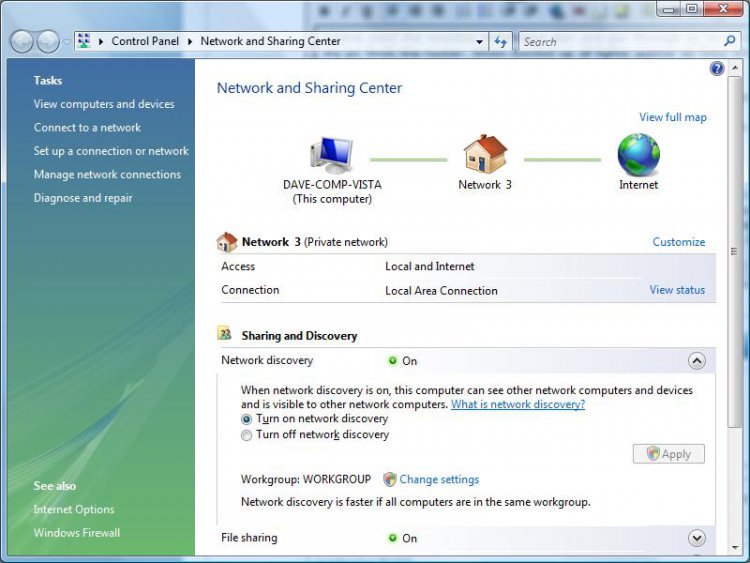
this probably may help you but you need to set this in network and sharing center, i have included a pic to illustrate, you need to turn on network discovery, what you are experiencing is port blocking on vista to stop random people connecting to your local area network and chucking viruses your way, this shouldnt be the case with your connection as you have a private network in your home.
network-discovery.jpg
My System SpecsSystem Spec
Reply

Thread Tools


Similar Threads
Thread Forum
Connecting Vista laptop my Netgear Virgin Wireless Network... Please Help Network & Sharing
Netgear WGRv6 Wireless Router Network & Sharing
Connect Virgin media router to netgear to make wireless? Network & Sharing
Netgear wireless/router Vista General
connecting to a wireless router using netgear vista Vista networking & sharing


Vista Forums is an independent web site and has not been authorized,
sponsored, or otherwise approved by Microsoft Corporation.
"Windows Vista", the Start Orb, and related materials are trademarks of Microsoft Corp.
© Designer Media Ltd

1 2 3 4 5 6 7 8 9 10 11 12 13 14 15 16 17 18 19 20 21 22 23 24 25 26 27 28 29 30 31 32 33 34 35 36 37 38 39 40 41 42 43 44 45 46