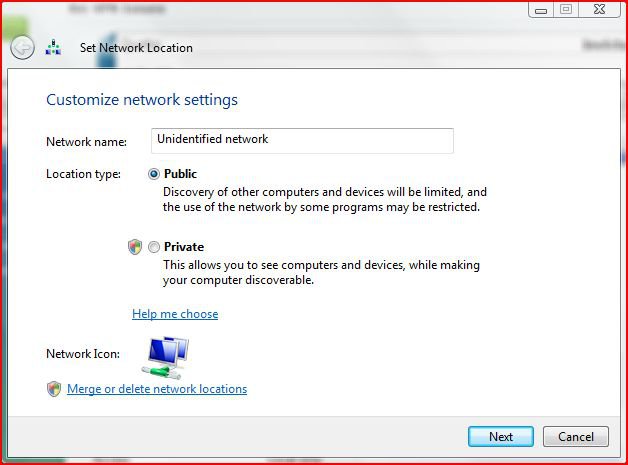
We've got some naughty vista machines on our hand...
The machine has two NICs, both of which are connected to the Internet in the following fashion:
route 1: NIC 1 -- Internet (preferred Internet connection)
route 2: NIC 2 -- Switch -- Linux Cluster -- Internet (preferred LAN connection)
|-------(Printer, NAS, etc)
The linux cluster is consisted of some RedHat workstations, all of which are connected to the internet independently, but one of them (the frontend) also distribute IP and does NAT for the LAN. Also connected to the switch include some network resources, and this Vista machine.
Long story short, in the Vista machine, the route 2 is somehow always preferred by Vista to behaves as default connection. I changed the Interface metric for the NIC 2 to be 100 and NIC 1 to be 10, as well as moved NIC 1 to the top of Connections list in "Advanced Settings" in "Network Connections".
I can connect to the Internet no problem either way, but the problem comes when some softwares such as Matlab requires network license, which is by IP, which I assigned statically to NIC 1.
NIC 2 is currently set as obtain IP from DHCP, but it's really a static IP as the DHCP server (aka the cluster frontend) assigns IP based on MAC. NIC 2 also received default gateway. If I statically assign the IP and not input the default gateway, then NIC 1 is automatically preferred. But that's also problematic because then the network becomes "Unidentified Netowrk".
Sorry to be so lengthy. Ideally I would want either the interface metric or the "Advanced Settings" priority to work.
Please help.
The following are the prints of ipconfig and route print (I apologize to have to make fake MAC address and IP address.) 123.45.67.237 is the preferred external IP, and the 10.1.255.247 is the LAN IP.
C:\Users\Admin>ipconfig /all
*
Windows IP Configuration
*
** Host Name . . . . . . . . . . . . : vista
** Primary Dns Suffix* . . . . . . . :
** Node Type . . . . . . . . . . . . : Unknown
** IP Routing Enabled. . . . . . . . : No
** WINS Proxy Enabled. . . . . . . . : No
** DNS Suffix Search List. . . . . . : local
*
Ethernet adapter Internet:
*
** Connection-specific DNS Suffix* . :
** Description . . . . . . . . . . . : Intel(R) 82567LM-3 Gigabit Network Connec
tion
** Physical Address. . . . . . . . . : 00-24-E8-FB-DC-38
** DHCP Enabled. . . . . . . . . . . : No
** Autoconfiguration Enabled . . . . : Yes
** Link-local IPv6 Address . . . . . : fe80::1e2:a5a3:ec63:c305%11(Preferred)
** IPv4 Address. . . . . . . . . . . : 123.45.67.237(Preferred)
** Subnet Mask . . . . . . . . . . . : 255.255.255.0
** Default Gateway . . . . . . . . . : 123.45.67.1
** DHCPv6 IAID . . . . . . . . . . . : 251667688
** DHCPv6 Client DUID. . . . . . . . : 00-01-00-01-11-BB-4A-BA-00-24-E8-FB-DC-38
*
** DNS Servers . . . . . . . . . . . : 123.45.89.1
************************************** 123.45.89.2
******************************* *******123.45.89.3
** NetBIOS over Tcpip. . . . . . . . : Enabled
*
Ethernet adapter LAN:
*
** Connection-specific DNS Suffix* . : local
** Description . . . . . . . . . . . : Broadcom NetXtreme Gigabit Ethernet
** Physical Address. . . . . . . . . : 00-10-18-4E-AD-C3
** DHCP Enabled. . . . . . . . . . . : Yes
** Autoconfiguration Enabled . . . . : Yes
** Link-local IPv6 Address . . . . . : fe80::d596:20bc:456d:8e59%12(Preferred)
** IPv4 Address. . . . . . . . . . . : 10.1.255.247(Preferred)
** Subnet Mask . . . . . . . . . . . : 255.255.0.0
** Lease Obtained. . . . . . . . . . : Tuesday, June 16, 2009 10:57:46 AM
** Lease Expires . . . . . . . . . . : Tuesday, June 16, 2009 11:41:43 AM
** Default Gateway . . . . . . . . . : 10.1.1.1
** DHCP Server . . . . . . . . . . . : 10.1.1.1
** DHCPv6 IAID . . . . . . . . . . . : 285216792
** DHCPv6 Client DUID. . . . . . . . : 00-01-00-01-11-BB-4A-BA-00-24-E8-FB-DC-38
*
** DNS Servers . . . . . . . . . . . : 10.1.1.1
** NetBIOS over Tcpip. . . . . . . . : Enabled
*
Tunnel adapter Local Area Connection* 6:
*
** Media State . . . . . . . . . . . : Media disconnected
** Connection-specific DNS Suffix* . :
** Description . . . . . . . . . . . : Microsoft ISATAP Adapter
** Physical Address. . . . . . . . . : 00-00-00-00-00-00-00-E0
** DHCP Enabled. . . . . . . . . . . : No
** Autoconfiguration Enabled . . . . : Yes
*
Tunnel adapter Local Area Connection* 7:
*
** Connection-specific DNS Suffix* . :
** Description . . . . . . . . . . . : Teredo Tunneling Pseudo-Interface
** Physical Address. . . . . . . . . : 02-00-54-55-4E-01
** DHCP Enabled. . . . . . . . . . . : No
** Autoconfiguration Enabled . . . . : Yes
** IPv6 Address. . . . . . . . . . . : 2001:0:4137:9e50:2470:2b4a:f5fe:8(Preferr
ed)
** Link-local IPv6 Address . . . . . : fe80::2470:2b4a:f5fe:8%10(Preferred)
** Default Gateway . . . . . . . . . :
** NetBIOS over Tcpip. . . . . . . . : Disabled
*
Tunnel adapter Local Area Connection* 11:
*
** Media State . . . . . . . . . . . : Media disconnected
** Connection-specific DNS Suffix* . :
** Description . . . . . . . . . . . : Microsoft ISATAP Adapter #2
** Physical Address. . . . . . . . . : 00-00-00-00-00-00-00-E0
** DHCP Enabled. . . . . . . . . . . : No
** Autoconfiguration Enabled . . . . : Yes
*
Tunnel adapter Local Area Connection* 12:
*
** Media State . . . . . . . . . . . : Media disconnected
** Connection-specific DNS Suffix* . : local
** Description . . . . . . . . . . . : Microsoft ISATAP Adapter #3
** Physical Address. . . . . . . . . : 00-00-00-00-00-00-00-E0
** DHCP Enabled. . . . . . . . . . . : No
** Autoconfiguration Enabled . . . . : Yes
*
Tunnel adapter Local Area Connection* 13:
*
** Connection-specific DNS Suffix* . :
** Description . . . . . . . . . . . : Microsoft 6to4 Adapter
** Physical Address. . . . . . . . . : 00-00-00-00-00-00-00-E0
** DHCP Enabled. . . . . . . . . . . : No
** Autoconfiguration Enabled . . . . : Yes
** IPv6 Address. . . . . . . . . . . : 2002:a443:1aed::a443:1aed(Preferred)
** Default Gateway . . . . . . . . . : 2002:c058:6301::c058:6301
** DNS Servers . . . . . . . . . . . : 123.45.89.1
************************************** 123.45.89.2
************************************** 123.45.89.3
** NetBIOS over Tcpip. . . . . . . . : Disabled
*
C:\Users\Admin>
C:\Users\Admin>route print
===========================================================================
Interface List
*11 ...00 24 e8 fb ab ab ...... Intel(R) 82567LM-3 Gigabit Network Connection
*12 ...00 10 18 4e cd cd ...... Broadcom NetXtreme Gigabit Ethernet
* 1 ........................... Software Loopback Interface 1
*15 ...00 00 00 00 00 00 00 e0* Microsoft ISATAP Adapter
*10 ...02 00 54 55 4e 01 ...... Teredo Tunneling Pseudo-Interface
*13 ...00 00 00 00 00 00 00 e0* Microsoft ISATAP Adapter #2
*20 ...00 00 00 00 00 00 00 e0* Microsoft ISATAP Adapter #3
*21 ...00 00 00 00 00 00 00 e0* Microsoft 6to4 Adapter
===========================================================================
*
IPv4 Route Table
===========================================================================
Active Routes:
Network Destination******* Netmask********* Gateway****** Interface* Metric
********* 0.0.0.0********* 0.0.0.0***** 123.45.67*** 123.45.67.237*** 266
********* 0.0.0.0********* 0.0.0.0******** 10.1.1.1**** 10.1.255.247*** 200
******** 10.1.0.0***** 255.255.0.0******** On-link***** 10.1.255.247*** 356
**** 10.1.255.247* 255.255.255.255*** *****On-link***** 10.1.255.247*** 356
**** 10.1.255.255* 255.255.255.255******** On-link***** 10.1.255.247*** 356
******* 127.0.0.0******* 255.0.0.0******** On-link******** 127.0.0.1*** 306
******* 127.0.0.1* 255.255.255.255******** On-link******** 127.0.0.1*** 306
* 127.255.255.255* 255.255.255.255******** On-link******** 127.0.0.1*** 306
***** 123.45.67.0*** 255.255.255.0******** On-link**** 123.45.67.237*** 266
*** 123.45.67.237* 255.255.255.255******** On-link**** 123.45.67.237*** 266
*** 123.45.67.255 *255.255.255.255******** On-link**** 123.45.67.237*** 266
***** 169.254.0.0***** 255.255.0.0******** On-link**** 123.45.67.237*** 286
* 169.254.255.255* 255.255.255.255******** On-link**** 123.45.67.237*** 266
******* 224.0.0.0******* 240.0.0.0******** On-link******** 127.0.0.1*** 306
******* 224.0.0.0******* 240.0.0.0******** On-link**** 123.45.67.237*** 266
******* 224.0.0.0******* 240.0.0.0******** On-link***** 10.1.255.247*** 356
* 255.255.255.255* 255.255.255.255******** On-link******** 127.0.0.1*** 306
* 255.255.255.255* 255.255.255.255******** On-link**** 123.45.67.237*** 266
* 255.255.255.255* 255.255.255.255******** On-link***** 10.1.255.247*** 356
===========================================================================
Persistent Routes:
* Network Address********* Netmask* Gateway Address* Metric
********* 0.0.0.0********* 0.0.0.0***** 123.45.67.1* Default
===========================================================================
*
IPv6 Route Table
===========================================================================
Active Routes:
*If Metric Network Destination***** Gateway
*21** 1110 ::/0******************** 2002:c058:6301::c058:6301
* 1*** 306 ::1/128***************** On-link
*10**** 18 2001::/32*************** On-link
*10*** 266 2001:0:4137:9e50:2470:2b4a:f5fe:8/128
*********************************** On-link
*21** 1010 2002::/16*************** On-link
*21*** 266 2002:a443:1aed::a443:1aed/128
*********************************** On-link
*11*** 266 fe80::/64*************** On-link
*12*** 266 fe80::/64*************** On-link
*10*** 266 fe80::/64*************** On-link
*11*** 266 fe80::1e2:a5a3:ec63:c305/128
*********************************** On-link
*10*** 266 fe80::2470:2b4a:f5fe:8/128
*********************************** On-link
*12 ***266 fe80::d596:20bc:456d:8e59/128
*********************************** On-link
* 1*** 306 ff00::/8**************** On-link
*10*** 266 ff00::/8**************** On-link
*11*** 266 ff00::/8**************** On-link
*12*** 266 ff00::/8**************** On-link
===========================================================================
Persistent Routes:
* None
*
C:\Users\Admin>
Thank you so much for your help.
The machine has two NICs, both of which are connected to the Internet in the following fashion:
route 1: NIC 1 -- Internet (preferred Internet connection)
route 2: NIC 2 -- Switch -- Linux Cluster -- Internet (preferred LAN connection)
|-------(Printer, NAS, etc)
The linux cluster is consisted of some RedHat workstations, all of which are connected to the internet independently, but one of them (the frontend) also distribute IP and does NAT for the LAN. Also connected to the switch include some network resources, and this Vista machine.
Long story short, in the Vista machine, the route 2 is somehow always preferred by Vista to behaves as default connection. I changed the Interface metric for the NIC 2 to be 100 and NIC 1 to be 10, as well as moved NIC 1 to the top of Connections list in "Advanced Settings" in "Network Connections".
I can connect to the Internet no problem either way, but the problem comes when some softwares such as Matlab requires network license, which is by IP, which I assigned statically to NIC 1.
NIC 2 is currently set as obtain IP from DHCP, but it's really a static IP as the DHCP server (aka the cluster frontend) assigns IP based on MAC. NIC 2 also received default gateway. If I statically assign the IP and not input the default gateway, then NIC 1 is automatically preferred. But that's also problematic because then the network becomes "Unidentified Netowrk".
Sorry to be so lengthy. Ideally I would want either the interface metric or the "Advanced Settings" priority to work.
Please help.
The following are the prints of ipconfig and route print (I apologize to have to make fake MAC address and IP address.) 123.45.67.237 is the preferred external IP, and the 10.1.255.247 is the LAN IP.
C:\Users\Admin>ipconfig /all
*
Windows IP Configuration
*
** Host Name . . . . . . . . . . . . : vista
** Primary Dns Suffix* . . . . . . . :
** Node Type . . . . . . . . . . . . : Unknown
** IP Routing Enabled. . . . . . . . : No
** WINS Proxy Enabled. . . . . . . . : No
** DNS Suffix Search List. . . . . . : local
*
Ethernet adapter Internet:
*
** Connection-specific DNS Suffix* . :
** Description . . . . . . . . . . . : Intel(R) 82567LM-3 Gigabit Network Connec
tion
** Physical Address. . . . . . . . . : 00-24-E8-FB-DC-38
** DHCP Enabled. . . . . . . . . . . : No
** Autoconfiguration Enabled . . . . : Yes
** Link-local IPv6 Address . . . . . : fe80::1e2:a5a3:ec63:c305%11(Preferred)
** IPv4 Address. . . . . . . . . . . : 123.45.67.237(Preferred)
** Subnet Mask . . . . . . . . . . . : 255.255.255.0
** Default Gateway . . . . . . . . . : 123.45.67.1
** DHCPv6 IAID . . . . . . . . . . . : 251667688
** DHCPv6 Client DUID. . . . . . . . : 00-01-00-01-11-BB-4A-BA-00-24-E8-FB-DC-38
*
** DNS Servers . . . . . . . . . . . : 123.45.89.1
************************************** 123.45.89.2
******************************* *******123.45.89.3
** NetBIOS over Tcpip. . . . . . . . : Enabled
*
Ethernet adapter LAN:
*
** Connection-specific DNS Suffix* . : local
** Description . . . . . . . . . . . : Broadcom NetXtreme Gigabit Ethernet
** Physical Address. . . . . . . . . : 00-10-18-4E-AD-C3
** DHCP Enabled. . . . . . . . . . . : Yes
** Autoconfiguration Enabled . . . . : Yes
** Link-local IPv6 Address . . . . . : fe80::d596:20bc:456d:8e59%12(Preferred)
** IPv4 Address. . . . . . . . . . . : 10.1.255.247(Preferred)
** Subnet Mask . . . . . . . . . . . : 255.255.0.0
** Lease Obtained. . . . . . . . . . : Tuesday, June 16, 2009 10:57:46 AM
** Lease Expires . . . . . . . . . . : Tuesday, June 16, 2009 11:41:43 AM
** Default Gateway . . . . . . . . . : 10.1.1.1
** DHCP Server . . . . . . . . . . . : 10.1.1.1
** DHCPv6 IAID . . . . . . . . . . . : 285216792
** DHCPv6 Client DUID. . . . . . . . : 00-01-00-01-11-BB-4A-BA-00-24-E8-FB-DC-38
*
** DNS Servers . . . . . . . . . . . : 10.1.1.1
** NetBIOS over Tcpip. . . . . . . . : Enabled
*
Tunnel adapter Local Area Connection* 6:
*
** Media State . . . . . . . . . . . : Media disconnected
** Connection-specific DNS Suffix* . :
** Description . . . . . . . . . . . : Microsoft ISATAP Adapter
** Physical Address. . . . . . . . . : 00-00-00-00-00-00-00-E0
** DHCP Enabled. . . . . . . . . . . : No
** Autoconfiguration Enabled . . . . : Yes
*
Tunnel adapter Local Area Connection* 7:
*
** Connection-specific DNS Suffix* . :
** Description . . . . . . . . . . . : Teredo Tunneling Pseudo-Interface
** Physical Address. . . . . . . . . : 02-00-54-55-4E-01
** DHCP Enabled. . . . . . . . . . . : No
** Autoconfiguration Enabled . . . . : Yes
** IPv6 Address. . . . . . . . . . . : 2001:0:4137:9e50:2470:2b4a:f5fe:8(Preferr
ed)
** Link-local IPv6 Address . . . . . : fe80::2470:2b4a:f5fe:8%10(Preferred)
** Default Gateway . . . . . . . . . :
** NetBIOS over Tcpip. . . . . . . . : Disabled
*
Tunnel adapter Local Area Connection* 11:
*
** Media State . . . . . . . . . . . : Media disconnected
** Connection-specific DNS Suffix* . :
** Description . . . . . . . . . . . : Microsoft ISATAP Adapter #2
** Physical Address. . . . . . . . . : 00-00-00-00-00-00-00-E0
** DHCP Enabled. . . . . . . . . . . : No
** Autoconfiguration Enabled . . . . : Yes
*
Tunnel adapter Local Area Connection* 12:
*
** Media State . . . . . . . . . . . : Media disconnected
** Connection-specific DNS Suffix* . : local
** Description . . . . . . . . . . . : Microsoft ISATAP Adapter #3
** Physical Address. . . . . . . . . : 00-00-00-00-00-00-00-E0
** DHCP Enabled. . . . . . . . . . . : No
** Autoconfiguration Enabled . . . . : Yes
*
Tunnel adapter Local Area Connection* 13:
*
** Connection-specific DNS Suffix* . :
** Description . . . . . . . . . . . : Microsoft 6to4 Adapter
** Physical Address. . . . . . . . . : 00-00-00-00-00-00-00-E0
** DHCP Enabled. . . . . . . . . . . : No
** Autoconfiguration Enabled . . . . : Yes
** IPv6 Address. . . . . . . . . . . : 2002:a443:1aed::a443:1aed(Preferred)
** Default Gateway . . . . . . . . . : 2002:c058:6301::c058:6301
** DNS Servers . . . . . . . . . . . : 123.45.89.1
************************************** 123.45.89.2
************************************** 123.45.89.3
** NetBIOS over Tcpip. . . . . . . . : Disabled
*
C:\Users\Admin>
C:\Users\Admin>route print
===========================================================================
Interface List
*11 ...00 24 e8 fb ab ab ...... Intel(R) 82567LM-3 Gigabit Network Connection
*12 ...00 10 18 4e cd cd ...... Broadcom NetXtreme Gigabit Ethernet
* 1 ........................... Software Loopback Interface 1
*15 ...00 00 00 00 00 00 00 e0* Microsoft ISATAP Adapter
*10 ...02 00 54 55 4e 01 ...... Teredo Tunneling Pseudo-Interface
*13 ...00 00 00 00 00 00 00 e0* Microsoft ISATAP Adapter #2
*20 ...00 00 00 00 00 00 00 e0* Microsoft ISATAP Adapter #3
*21 ...00 00 00 00 00 00 00 e0* Microsoft 6to4 Adapter
===========================================================================
*
IPv4 Route Table
===========================================================================
Active Routes:
Network Destination******* Netmask********* Gateway****** Interface* Metric
********* 0.0.0.0********* 0.0.0.0***** 123.45.67*** 123.45.67.237*** 266
********* 0.0.0.0********* 0.0.0.0******** 10.1.1.1**** 10.1.255.247*** 200
******** 10.1.0.0***** 255.255.0.0******** On-link***** 10.1.255.247*** 356
**** 10.1.255.247* 255.255.255.255*** *****On-link***** 10.1.255.247*** 356
**** 10.1.255.255* 255.255.255.255******** On-link***** 10.1.255.247*** 356
******* 127.0.0.0******* 255.0.0.0******** On-link******** 127.0.0.1*** 306
******* 127.0.0.1* 255.255.255.255******** On-link******** 127.0.0.1*** 306
* 127.255.255.255* 255.255.255.255******** On-link******** 127.0.0.1*** 306
***** 123.45.67.0*** 255.255.255.0******** On-link**** 123.45.67.237*** 266
*** 123.45.67.237* 255.255.255.255******** On-link**** 123.45.67.237*** 266
*** 123.45.67.255 *255.255.255.255******** On-link**** 123.45.67.237*** 266
***** 169.254.0.0***** 255.255.0.0******** On-link**** 123.45.67.237*** 286
* 169.254.255.255* 255.255.255.255******** On-link**** 123.45.67.237*** 266
******* 224.0.0.0******* 240.0.0.0******** On-link******** 127.0.0.1*** 306
******* 224.0.0.0******* 240.0.0.0******** On-link**** 123.45.67.237*** 266
******* 224.0.0.0******* 240.0.0.0******** On-link***** 10.1.255.247*** 356
* 255.255.255.255* 255.255.255.255******** On-link******** 127.0.0.1*** 306
* 255.255.255.255* 255.255.255.255******** On-link**** 123.45.67.237*** 266
* 255.255.255.255* 255.255.255.255******** On-link***** 10.1.255.247*** 356
===========================================================================
Persistent Routes:
* Network Address********* Netmask* Gateway Address* Metric
********* 0.0.0.0********* 0.0.0.0***** 123.45.67.1* Default
===========================================================================
*
IPv6 Route Table
===========================================================================
Active Routes:
*If Metric Network Destination***** Gateway
*21** 1110 ::/0******************** 2002:c058:6301::c058:6301
* 1*** 306 ::1/128***************** On-link
*10**** 18 2001::/32*************** On-link
*10*** 266 2001:0:4137:9e50:2470:2b4a:f5fe:8/128
*********************************** On-link
*21** 1010 2002::/16*************** On-link
*21*** 266 2002:a443:1aed::a443:1aed/128
*********************************** On-link
*11*** 266 fe80::/64*************** On-link
*12*** 266 fe80::/64*************** On-link
*10*** 266 fe80::/64*************** On-link
*11*** 266 fe80::1e2:a5a3:ec63:c305/128
*********************************** On-link
*10*** 266 fe80::2470:2b4a:f5fe:8/128
*********************************** On-link
*12 ***266 fe80::d596:20bc:456d:8e59/128
*********************************** On-link
* 1*** 306 ff00::/8**************** On-link
*10*** 266 ff00::/8**************** On-link
*11*** 266 ff00::/8**************** On-link
*12*** 266 ff00::/8**************** On-link
===========================================================================
Persistent Routes:
* None
*
C:\Users\Admin>
Thank you so much for your help.