chmillman
Member
Hi all,
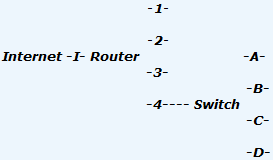
This is not really a Vista question but rather a Windows networking one. I have a VDSL wireless modem/router (supplied by my ISP) which has 4 cabled ports. Problem is, now I have 5 cabled devices I need to connect - 2 computers, a network printer, a TV via internet decoder box, and now an IP webcam. 5 devices, 4 ports... I can't get a different router w/ more ports, the VDSL stuff is special here and only supplied by my ISP currently.
So, can I put a regular old 4 port network switch cabled to one of the router ports and expand my network that way? Everything needs internet access except of course the printer.
TIA, --ch
This is not really a Vista question but rather a Windows networking one. I have a VDSL wireless modem/router (supplied by my ISP) which has 4 cabled ports. Problem is, now I have 5 cabled devices I need to connect - 2 computers, a network printer, a TV via internet decoder box, and now an IP webcam. 5 devices, 4 ports... I can't get a different router w/ more ports, the VDSL stuff is special here and only supplied by my ISP currently.
So, can I put a regular old 4 port network switch cabled to one of the router ports and expand my network that way? Everything needs internet access except of course the printer.
TIA, --ch
My Computer
System One
-
- Manufacturer/Model
- HP HDX 16
- CPU
- Core2Duo T9400
- Motherboard
- HP
- Memory
- 4Gb
- Graphics Card(s)
- Nvidia 9600 GT M
- Sound Card
- -
- Monitor(s) Displays
- -
- Screen Resolution
- 1920 x 1080
- Hard Drives
- 320 Gb 5400 RPM