![]() |
![]() | ![]() | ![]() | ![]() | ![]() | ![]() | ![]() |
| Welcome to Windows Vista Forums. Our forum is dedicated to helping you find solutions with any problems, errors or issues you are experiencing with Windows Vista. The Vista forum also covers news and updates and has an extensive Windows Vista tutorial section that covers a wide range of tips and tricks. |
| |||||||
![]() |
| |
| | #1 (permalink) |
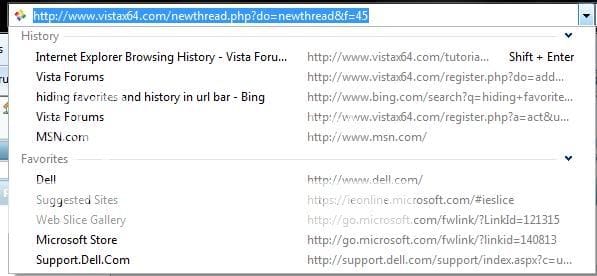
| Vista Ultimate x64 | Hiding favorites and history in address bar? ![]() As you can see it displays history and favorites, is it possible to just hide this feature and not delete it? I'd like the adress bar to just show URLs not history and favorites. Thanks in advance. -Nick |
My System Specs![]() |
| | #2 (permalink) |
| Vista Home Premium SP2 32bit, Windows7x32bit | You can try this: Tools-> Internet Options->Content click settings in Autocomplete, untick Browsing History and Favourites. HTH. |
My System Specs![]() |
| | #3 (permalink) |
| Vista Ultimate x64 | Worked perfectly, Many thanks! -Nick |
My System Specs![]() |
| | #4 (permalink) |
| Vista Home Premium SP2 32bit, Windows7x32bit | |
My System Specs![]() |
![]() |
| Thread Tools | |
| |
Similar Threads | ||||
| Thread | Forum | |||
| Hiding Ip address ! | Network & Sharing | |||
| 'Latency' In Desktop Apps, Task Bar Hiding, and IE8 Favorites With Vista 64-bit; Implications? | Vista General | |||
| hiding/changing sender address | Vista mail | |||
| favorites and history | Vista file management | |||
| Hiding IP Address | Vista General | |||