![]() |
![]() | ![]() | ![]() | ![]() | ![]() | ![]() | ![]() |
| Welcome to Windows Vista Forums. Our forum is dedicated to helping you find solutions with any problems, errors or issues you are experiencing with Windows Vista. The Vista forum also covers news and updates and has an extensive Windows Vista tutorial section that covers a wide range of tips and tricks. |
| |||||||
![]() |
| |
| | #1 (permalink) |
| Vista Home Premium 32bit | Broadcom Wireless Card stopped working. Hello. Well, a couple weeks ago my wireless started acting buggy. It wouldn't work, but if I restarted my laptop it would usually start again. Now it's not working at all. I've tried reinstalling the drivers with the disc that came with my computer and downloading the drivers from the dell website. The device does show up in my device manager. I've tried deleting it, so it reinstalls, didn't work. It is enabled in BIOS. I have tried the little wireless switch and the hotkey. I have a Dell Inspiron 1521 Broadcom 440x 10/100 Intergrated Controller |
My System Specs![]() |
| | #2 (permalink) |
| Vista 32 win 7 7600 32 bit | Re: Broadcom Wireless Card stopped working. Hello. Well, a couple weeks ago my wireless started acting buggy. It wouldn't work, but if I restarted my laptop it would usually start again. Now it's not working at all. I've tried reinstalling the drivers with the disc that came with my computer and downloading the drivers from the dell website. The device does show up in my device manager. I've tried deleting it, so it reinstalls, didn't work. It is enabled in BIOS. I have tried the little wireless switch and the hotkey. I have a Dell Inspiron 1521 Broadcom 440x 10/100 Intergrated Controller I have the same computer and my wifi card is the dell 1390. the broadcom is the wired device. could you go into device manager (type device manager in search) and see if there is an "unknown" device? that might be your wifi. Ken Edit Im 32bit you 32 or 64? |
My System Specs![]() |
| | #3 (permalink) |
| Vista Home Premium 32bit | Re: Broadcom Wireless Card stopped working. Jibby I have the same computer and my wifi card is the dell 1390. the broadcom is the wired device. could you go into device manager (type device manager in search) and see if there is an "unknown" device? that might be your wifi. Ken Edit Im 32bit you 32 or 64? I'm 32 bit. Nope there is no unknown device at all. So I take it that my wifi isn't there then . But I did download drivers for the 1390, because I seen it somewhere on the disc or website I think that it was on my computer.-Jibby Last edited by Jibby; 08-27-2009 at 09:03 PM.. Reason: Forgot to add some info. |
My System Specs![]() |
| | #4 (permalink) |
| Vista 32 win 7 7600 32 bit | Re: Broadcom Wireless Card stopped working. jibby so in device manager you have the broadcom, and a wifi under network? Ken |
My System Specs![]() |
| | #5 (permalink) |
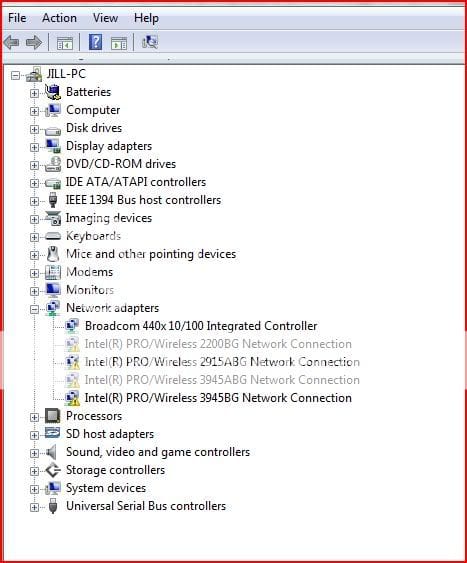
| Vista Home Premium 32bit | Re: Broadcom Wireless Card stopped working. Well there is the Broadcom Controller and there's: Intel(R) PRO/Wireless 2200BG Network Connection Intel(R) PRO/Wireless 2915ABG Network Connection Intel(R) PRO/Wireless 3945ABG Network Connection Intel(R) PRO/Wireless 3945BG Network Connection And all those have a /!\ on them. |
My System Specs![]() |
| | #6 (permalink) |
| Vista Business | Re: Broadcom Wireless Card stopped working. uninstall all fothe wireless devices from device manager. reboot, might see what it really is |
My System Specs![]() |
| | #7 (permalink) |
| Vista Home Premium 32bit | Re: Broadcom Wireless Card stopped working. Okay I just tried that and ran the windows network diagnostics. Before it said that it couldn't find any drivers associated with the Intel(R) PRO/Wireless...(even though I did download those too) now it says "Install wireless networking hardware, and verify the correct drivers are loaded." |
My System Specs![]() |
| | #8 (permalink) |
| Vista Business | Re: Broadcom Wireless Card stopped working. Do you know for what the network adapter is? Does the device manager see the wireless NIC but with bangs!... if removed them from device manager from pervious step and then it repopulated, then at least the OS is seeing something. Rt.click the network device under network adapters and select update driver software |
My System Specs![]() |
| | #9 (permalink) |
| Vista Home Premium 32bit | Re: Broadcom Wireless Card stopped working. The only thing under network adapters now is the Broadcom 440x 10/100 Integrated Controller and it says the driver information for that is up to date. |
My System Specs![]() |
| | #10 (permalink) |
| Vista Business | Re: Broadcom Wireless Card stopped working. do you have a recovery CD.. with the driver install. I have seen some nic's that dont even show up until the install is complete Another thing to try is to use the system restore |
My System Specs![]() |
![]() |
| Thread Tools | |
| |
Similar Threads | ||||
| Thread | Forum | |||
| Dell Wireless WLAN Card Wireless Network Controller has stopped working | Network & Sharing | |||
| Wireless Card Driver(Wireless not working) | Network & Sharing | |||
| Video card just stopped working | Vista hardware & devices | |||
| Video Card Stopped Working | Vista hardware & devices | |||
| Broadcom wireless card issue | Vista hardware & devices | |||