Hello guys, i can't connect to the internet via cable! there's no lan cable icon even, i downloaded all the hardwares that are for this cause! from the hp website and installed them, but still nothing have been changed. i even re-installed it from the recovery manager and restared, but still no icon and when i plug in the cable nothing happens. i realy need ur help guys i dono whats the problem. i was using the cable before i restared and it was working good!

You are using an out of date browser. It may not display this or other websites correctly.
You should upgrade or use an alternative browser.
You should upgrade or use an alternative browser.
Can not connect to the internet via cable..
- Thread starter rebelme
- Start date

Click start
Click Control Panel
Click Network and Internet
Click Network and Sharing Centre
Click Manage Network Connections
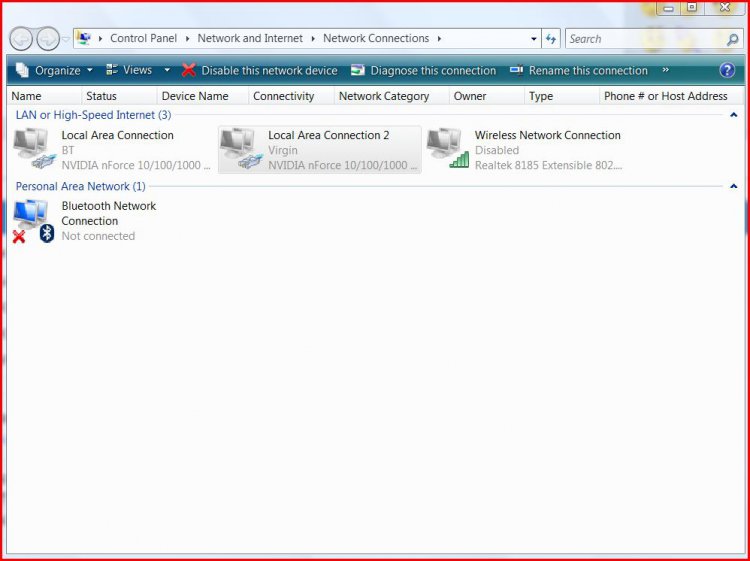
You should see something like this:~

Above you see Local Area Connections
Right click on it and click on enable...
If that don't help let us know...
Click Control Panel
Click Network and Internet
Click Network and Sharing Centre
Click Manage Network Connections
You should see something like this:~
Above you see Local Area Connections
Right click on it and click on enable...
If that don't help let us know...
Attachments
My Computer
System One
-
- Manufacturer/Model
- Custom Built
- CPU
- Intel Core 2 Quad Q6600 G0 St
- Motherboard
- Asus STRIKER EXTREME 680I SLI
- Memory
- Corsair 4GB Kit (4x1GB) DDR2 800MHz/PC2-6400 XMS2 Memory
- Graphics card(s)
- Point Of View 8800GT 512MB GDD
- Sound Card
- Soundmax 5.1
- Monitor(s) Displays
- Samsung 46"
- Screen Resolution
- 1080P
- Hard Drives
- 1x WD Raptor WD360ADFD 36GB SATA 10KRPM 16MB Cache 1x WD Raptor WD740DFD 74GB SATA 10KRPM 16MB Cache
- PSU
- Coolermaster 600W
- Case
- Coolermaster nVidia
- Cooling
- Arctic Cooling Extreme
- Mouse
- MS Wireless Laser mouse 8000
- Keyboard
- MS Wireless Entertainment Keyboard 7000
- Internet Speed
- 1.2mb & 10mb


z3r010
Staff member
Have you checked device manager to make sure that the network adapter has not some how become disabled in there?
My Computers
System One System Two
-
- Operating System
- Windows 11 Workstation
- Manufacturer/Model
- doofenshmirtz evil incorporated
- CPU
- Ryzen 9 5950X
- Motherboard
- Asus ROG Crosshair VIII Formula
- Memory
- Corsair Vengeance RGB PRO Black 64GB (4x16GB) 3600MHz AMD Ryzen Tuned DDR4
- Graphics card(s)
- ASUS AMD Radeon RX 6900 XT 16GB ROG Strix LC OC
- Sound Card
- Creative
- Monitor(s) Displays
- 3 x27" Dell U2724D & 1 x 34" Dell U3415W
- Hard Drives
- Samsung 980 Pro 1TB M.2 2280 PCI-e 4.0 x4 NVMe Solid State Drive
- PSU
- 1500W ThermalTake Toughpower
- Case
- ThermalTake Level 10 GT
- Cooling
- Enermax Liqtech 240
- Mouse
- Logitech Performance MX
- Keyboard
- Surface Ergonomic.
- Internet Speed
- 350 Mb/s
- Other Info
- WinTV NovaTD HP CP1515n Color Laser Sony BD-5300S-0B Blu-ray Writer Microsoft LifeCam Cinema APC 750i Smart UPS
-
- Operating System
- windows 10
- Manufacturer/Model
- Surface Pro 3
- CPU
- 1.9GHz Intel Core i5-4300U (dual-core, 3MB cache, up to 2.9GHz with Turbo Boost)
- Memory
- 4GB
- Monitor(s) Displays
- 12" Multi Touch
- Screen Resolution
- 2160 x 144
- Hard Drives
- 128GB
- Mouse
- Logitech
- Keyboard
- yes
- Internet Speed
- 350 Mb/s

Ok Right click on
Realtek RTL8101 in Network adapters,
Click on Uninstall
Then right click on Network adapters
click on scan for hardware changes and the adapter should reaplly itself.
Now go back to Network connections the adapter should now present itself.
Click on enable and you should have a connection at this point....
Realtek RTL8101 in Network adapters,
Click on Uninstall
Then right click on Network adapters
click on scan for hardware changes and the adapter should reaplly itself.
Now go back to Network connections the adapter should now present itself.
Click on enable and you should have a connection at this point....
My Computer
System One
-
- Manufacturer/Model
- Custom Built
- CPU
- Intel Core 2 Quad Q6600 G0 St
- Motherboard
- Asus STRIKER EXTREME 680I SLI
- Memory
- Corsair 4GB Kit (4x1GB) DDR2 800MHz/PC2-6400 XMS2 Memory
- Graphics card(s)
- Point Of View 8800GT 512MB GDD
- Sound Card
- Soundmax 5.1
- Monitor(s) Displays
- Samsung 46"
- Screen Resolution
- 1080P
- Hard Drives
- 1x WD Raptor WD360ADFD 36GB SATA 10KRPM 16MB Cache 1x WD Raptor WD740DFD 74GB SATA 10KRPM 16MB Cache
- PSU
- Coolermaster 600W
- Case
- Coolermaster nVidia
- Cooling
- Arctic Cooling Extreme
- Mouse
- MS Wireless Laser mouse 8000
- Keyboard
- MS Wireless Entertainment Keyboard 7000
- Internet Speed
- 1.2mb & 10mb
^^^^^^^^
DONE!! UR THE BEST! THX ALOT MAN!
but why did this happen any idea?
DONE!! UR THE BEST! THX ALOT MAN!
but why did this happen any idea?
My Computer
No idea!
My Computer
System One
-
- Manufacturer/Model
- Custom Built
- CPU
- Intel Core 2 Quad Q6600 G0 St
- Motherboard
- Asus STRIKER EXTREME 680I SLI
- Memory
- Corsair 4GB Kit (4x1GB) DDR2 800MHz/PC2-6400 XMS2 Memory
- Graphics card(s)
- Point Of View 8800GT 512MB GDD
- Sound Card
- Soundmax 5.1
- Monitor(s) Displays
- Samsung 46"
- Screen Resolution
- 1080P
- Hard Drives
- 1x WD Raptor WD360ADFD 36GB SATA 10KRPM 16MB Cache 1x WD Raptor WD740DFD 74GB SATA 10KRPM 16MB Cache
- PSU
- Coolermaster 600W
- Case
- Coolermaster nVidia
- Cooling
- Arctic Cooling Extreme
- Mouse
- MS Wireless Laser mouse 8000
- Keyboard
- MS Wireless Entertainment Keyboard 7000
- Internet Speed
- 1.2mb & 10mb