
This site is just a treasure chest of info!
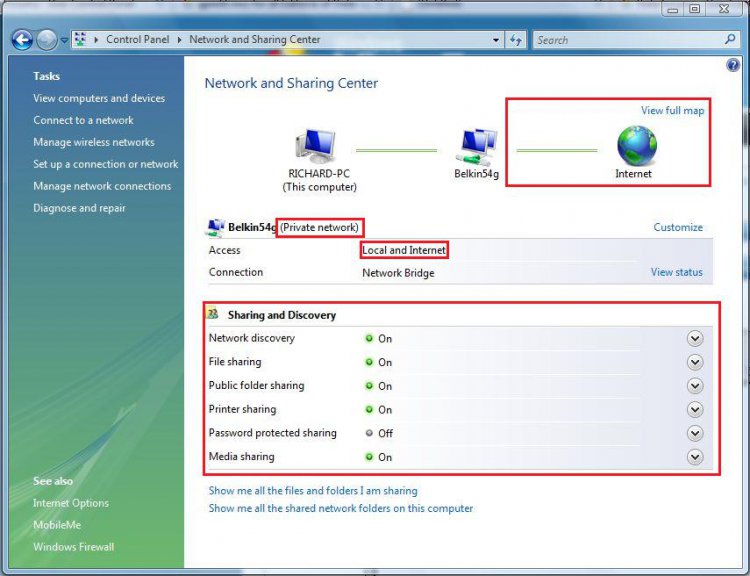
I'm trying to troubleshoot a problem. I have a Win7 Home Premium 32bit netbook and a Vista Home Premium 64bit laptop on a wireless network. I'm able to share files, folders, and a printer with no problem, but I can't seem to share the DVD drive on the laptop. I want to be able to install software on the Win7 netbook using the Vista laptop's DVD drive over the network. The DVD drive is shared and given full control permission. It shows up on the Win7 netbook, but when I try to access it, it says Windows cannot access (drive name). You do not have permission to access (drive name). Contact your network administrator to request access.
After browsing the net for a solution, I think an entry in the Vista registry is restricting access to the drive through a group policy. I saw on another forum where changing the Default value to 0 may correct this issue. I also changed the ValueType value to 0. Neither worked for me. Then I noticed that DisplayName value, @wsecedit.dll,-59098. (See picture) I researched and found out that it had something to do with a Group Policy restriction. Since there is no Group Policy Editor for Vista Home Premium, could I simply delete that entry? How else could I change or edit that? (I saw on this forum where someone is working on Group Policy Editor for all versions of Vista). Any help or advice would be greatly apprectiated.
dtgVA
I'm trying to troubleshoot a problem. I have a Win7 Home Premium 32bit netbook and a Vista Home Premium 64bit laptop on a wireless network. I'm able to share files, folders, and a printer with no problem, but I can't seem to share the DVD drive on the laptop. I want to be able to install software on the Win7 netbook using the Vista laptop's DVD drive over the network. The DVD drive is shared and given full control permission. It shows up on the Win7 netbook, but when I try to access it, it says Windows cannot access (drive name). You do not have permission to access (drive name). Contact your network administrator to request access.
After browsing the net for a solution, I think an entry in the Vista registry is restricting access to the drive through a group policy. I saw on another forum where changing the Default value to 0 may correct this issue. I also changed the ValueType value to 0. Neither worked for me. Then I noticed that DisplayName value, @wsecedit.dll,-59098. (See picture) I researched and found out that it had something to do with a Group Policy restriction. Since there is no Group Policy Editor for Vista Home Premium, could I simply delete that entry? How else could I change or edit that? (I saw on this forum where someone is working on Group Policy Editor for all versions of Vista). Any help or advice would be greatly apprectiated.
dtgVA
Attachments

Last edited:


 Is this service something that's on all Vista Home Premium 64bit computers or does this have something to do with the way Gateway images and installs Windows from the factory?
