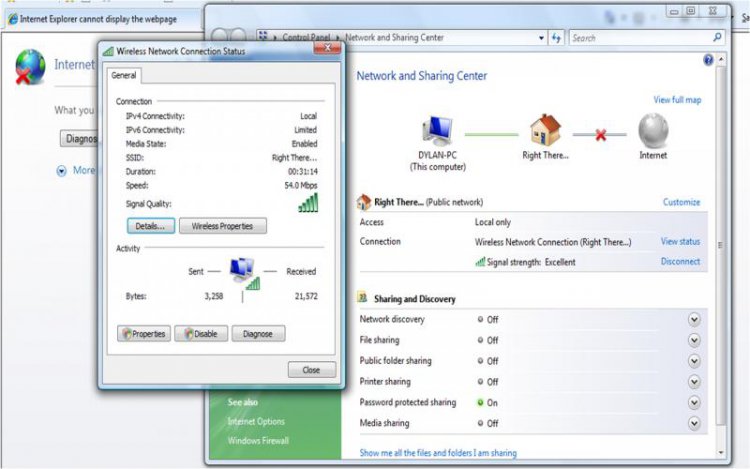
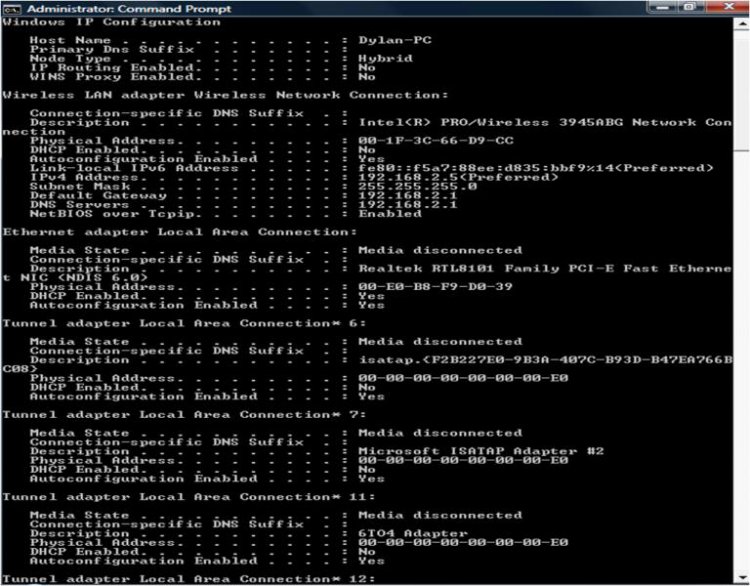
I am experiencing local access only on a gateway laptop.

You have no default gateway setup. You need to change your network configuration. Is your internet setup to automatically connect when you connect to the wireless network or do you need to also establish a separate broadband connection?
I have absolutely no knowledge on this subject.
Here is a link which may provide some help for you :
Fixing the local only internet access issue in Windows Vista
Fixing the local only internet access issue in Windows Vista | The Bit Guru

That solution applies only if the following exists:
We don't know that to be the case (we don't know if the computer has ever been able to connect before and it suddenly stopped - in which case this is not the problem because it would not have ever been able to connect in that case). Also that article provides only the manual registry fixes whereas the Microsoft Article Windows Vista cannot obtain an IP address from certain routers or from certain non-Microsoft DHCP servers provides a Mr. Fixit which does it automatically (assuming those are the conditions and that's what is causing the problem).
- You connect a Windows Vista-based computer to a network.
- A router or other device that is configured as a Dynamic Host Configuration Protocol (DHCP) server is configured on the network.
- The router or the other device does not support the DHCP BROADCAST flag.
I recommend holding off on this possible solution until we've more clearly identified the problem and the situation.
Have you ever connected to the internet before with this laptop at this location? If so, when did the connection problem first start?
I hope this helps.
Good luck!
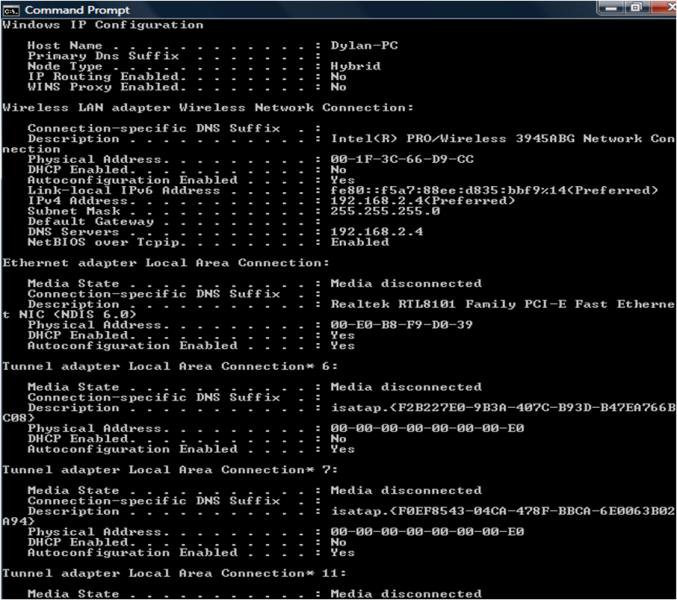
I am on another laptop now which is Vista-based. The computer which is not connecting used to work at the office where there is a guest network. And it stopped working, my boss attempted to get it to work again and asked if I wouldnt mind checking it out. It has never connected to my personal router.

Go to Start / Computer / System Properties / and tell me if it says Domain or Workgroup in the middle section covering the computer name and such things.
It says workgroup
Here's some more information: The drivers are up to date, I've run the diagnose/repair, I unchecked the TCP/IPv6, Attempted a system restore but there were no checkpoints to go back to from before the laptop was unable to connect to the internet, I had McAfee 360 and I uninstalled it, none of this has changed the status of connectivity.

It's good it's workgroup - if domain, that would almost certainly be at least part of the reason (it would be reason enough on its own) and fixing that might mess up the machine for use at the office.
Try setting up a specific internet connection (I assume it's broadband so a broadband connection) as opposed to trying to go through the local connection. Then while connected to the local connection, also connect to the new internet connection and see if that works. You'll need to configure the internet connection properly to connect but I think the default settings will mostly work except you need the proper router and ISP addresses (but you should have those). Yes, you'll have two connections running simultaneously but that's how my own network worked (and the only way I could get it to work) until about 3 weeks ago when the new modem I got from the ISP connected automatically through the local connection.
I hope this helps.
Good luck!
| Similar Threads | ||||
| Thread | Thread Starter | Forum | Replies | Last Post |
| Local access only, please help! | rikkar | Network & Sharing | 35 | 29 Jun 2009 |
| Local Access Only | Gryffin | Network & Sharing | 8 | 12 Jan 2009 |
| Wireless router - Local access OK but NO internet access - HELP!! | Dave Doc | Vista networking & sharing | 1 | 20 Dec 2007 |
| Cannot Get Internet Access - Local Access Only | ColinCC | Vista General | 12 | 22 Aug 2007 |
| Public network connection only "Access: Local" & not Local & Inter | Iain M | Vista networking & sharing | 1 | 29 Jul 2007 |