Windows Vista Forums
Vista Forums Home Join Vista Forums Windows 7 Forum Vista Tutorials Tags
Welcome to Windows Vista Forums. Our forum is dedicated to helping you find solutions with any problems, errors or issues you are experiencing with Windows Vista. The Vista forum also covers news and updates and has an extensive Windows Vista tutorial section that covers a wide range of tips and tricks.

Go Back   Vista Forums > Vista Forums > Overclocking & Cooling

Vista - Disabling RPM sensor

Reply
 
Old 10-25-2008   #1 (permalink)


Vista Home Premium 64-bit.


Disabling RPM sensor

I just plugged in an AMD Athelon 6000+ and attempted to cool it with an Arctic Freezer Pro 64. Due to the lower rpm fan, my system shuts down when I boot. Arctic recommends disabling the rpm sensor and using the temp control instead. Makes sense to me but I can't figure out how to get to that part of my BIOS when I hit F10 on boot. I've been all over the place several times and don't see where these sensors are.

Can anyone tell me, step by step, how to get to that part of the bios? I sure would appreciate it.

My System SpecsSystem Spec
Old 10-26-2008   #2 (permalink)


ultimate 64 SP1


Re: Disabling RPM sensor

Hi t rasa.....Welcome to the Vista forums

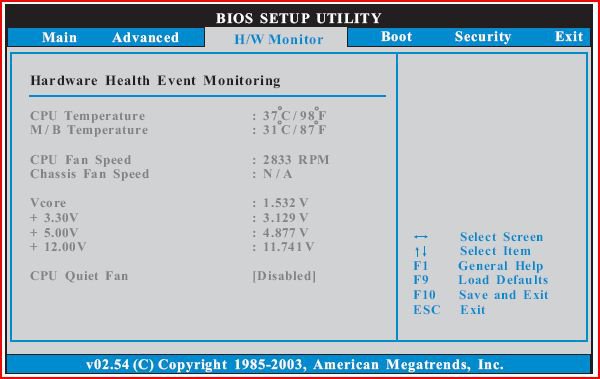
i have the same cooler (the 775 version)....& while im not sure about your boards BIOS layout, it should contain a ''quiet fan'' option
usually located in the H/W monitoring section of the BIOS....

disable this & use an app called ''Speedfan'' to control the CPU HSF.

have another rummage around in there & get back to us...

SK
My System SpecsSystem Spec
Old 10-26-2008   #3 (permalink)


Vista Ultimate x64 SP1


Re: Disabling RPM sensor

Quote  Quote: Originally Posted by t rasa View Post
I just plugged in an AMD Athelon 6000+ and attempted to cool it with an Arctic Freezer Pro 64. Due to the lower rpm fan, my system shuts down when I boot. Arctic recommends disabling the rpm sensor and using the temp control instead. Makes sense to me but I can't figure out how to get to that part of my BIOS when I hit F10 on boot. I've been all over the place several times and don't see where these sensors are.

Can anyone tell me, step by step, how to get to that part of the bios? I sure would appreciate it.
I'd say your problems are bigger than just finding the right fan setting? Nothing about this sounds right or good, but maybe that's just me?
Quote:
Due to the lower rpm fan, my system shuts down when I boot
That set off alarm bells. I don't care how low your heatsink fan is spinning, just booting the machine isn't going to raise the core to shutdown temps before your fan is spinning at whatever speed. I'm guessing somewhere in the 1,200rpm range? As long as the heatsink is attached properly, the fan should have no bearing on this whatsoever. If you're not booting, it isn't because your fan is "slow".
My System SpecsSystem Spec
Old 10-26-2008   #4 (permalink)


ultimate 64 SP1


Re: Disabling RPM sensor

i would have to agree with fumz....

when you boot the system ALL fans should fire up to 100% & then calm down, if your HSF fails to do this maybe it needs re seating.

if the HSF is not properly seated the system will fail to boot.

SK
My System SpecsSystem Spec
Old 10-26-2008   #5 (permalink)


Vista Home Premium 64-bit.


Re: Disabling RPM sensor

Quote  Quote: Originally Posted by Fumz View Post
Quote  Quote: Originally Posted by t rasa View Post
I just plugged in an AMD Athelon 6000+ and attempted to cool it with an Arctic Freezer Pro 64. Due to the lower rpm fan, my system shuts down when I boot. Arctic recommends disabling the rpm sensor and using the temp control instead. Makes sense to me but I can't figure out how to get to that part of my BIOS when I hit F10 on boot. I've been all over the place several times and don't see where these sensors are.

Can anyone tell me, step by step, how to get to that part of the bios? I sure would appreciate it.
I'd say your problems are bigger than just finding the right fan setting? Nothing about this sounds right or good, but maybe that's just me?
Quote:
Due to the lower rpm fan, my system shuts down when I boot
That set off alarm bells. I don't care how low your heatsink fan is spinning, just booting the machine isn't going to raise the core to shutdown temps before your fan is spinning at whatever speed. I'm guessing somewhere in the 1,200rpm range? As long as the heatsink is attached properly, the fan should have no bearing on this whatsoever. If you're not booting, it isn't because your fan is "slow".
As I understand from the Arctic tech, the system isn't shutting down because the CPU temp is too high. It's shutting down because the fan rpm is too low. It shuts down before the CPU temp has a chance to shut it down. He says the rpm sensor is an artifact that is no longer needed because of all the different fan-speeds and that temp is what matters anyway. I bought into this because it makes sense physically. (To me anyway.)

I was already running Speedfan and my CPU temps are fine, so far, with just the sink that came stock on the 5000+. I had heard that the 6000+ runs hot so I ordered the Arctic to go with it. I really should have gotten a Video fan setup because my XFX 8600 card is the hot one. The system is running great but being as I have the Arctic and the RMA has expired, I want to install it.

My problem is that I can't find my way, through the BIOS menu, to the "quiet fan" setting Skunksmash referred to. I have a little Nettle2 MoBo with Phoenix V6.0-Rev. 5.27 build 73NAv3PrA1. Running Vista HPrem SP1 64-bit with 8GHz RAM.
My System SpecsSystem Spec
Old 10-26-2008   #6 (permalink)


ultimate 64 SP1


Re: Disabling RPM sensor

so you cant even explore the BIOS before it shuts down...??

if you are able too, go to the temp & voltage monitoring section it should be in here somewhere.

SK
My System SpecsSystem Spec
Old 10-26-2008   #7 (permalink)


Vista Home Premium 64-bit.


Re: Disabling RPM sensor

Quote  Quote: Originally Posted by skunksmash View Post
so you cant even explore the BIOS before it shuts down...??

if you are able too, go to the temp & voltage monitoring section it should be in here somewhere.

SK
Oh no. I'm running OK with the original heat sink reinstalled. I've just never had much experience beyond the basics with BIOS. I can't find these settings you refer to. I'm going into BIOS during boot with F10. None of the menu options get me to these settings.

As I said, I bought the Arctic because I had heard so many say the 6000+ runs hot. The RMA has expired and, as I have it, I want to install it.
My System SpecsSystem Spec
Old 10-26-2008   #8 (permalink)


Vista Ultimate x64 SP1


Re: Disabling RPM sensor

Quote  Quote: Originally Posted by t rasa View Post
As I understand from the Arctic tech, the system isn't shutting down because the CPU temp is too high. It's shutting down because the fan rpm is too low. It shuts down before the CPU temp has a chance to shut it down. He says the rpm sensor is an artifact that is no longer needed because of all the different fan-speeds and that temp is what matters anyway. I bought into this because it makes sense physically. (To me anyway.)
That makes little to no sense at all. Imho, whoever is talking to you isn't being straight. Machines shut down for a lot of reasons; low fan speed isn't one of them. Rpm monitoring isn't "an artifact", it's a well used much needed tool. If someone is trying to convince you otherwise, go elsewhere for advice.

That a pretty beefy hunk of metal you've got on your cpu, and that's a relatively low clocked core (2.6GHz). As you've said, temps aren't a problem. So if tempurature isn't a problem, how on earth could fan speed, per se, be the cause of the shutdown? It can't because that's just nonsense. With that heatsink and cpu, you should be able to boot with no fan.

Quote  Quote: Originally Posted by t rasa View Post
My problem is that I can't find my way, through the BIOS menu, to the "quiet fan" setting Skunksmash referred to. I have a little Nettle2 MoBo with Phoenix V6.0-Rev. 5.27 build 73NAv3PrA1. Running Vista HPrem SP1 64-bit with 8GHz RAM.
I've never seen a "quiet fan" option in any bios. I'm not saying this option doesn't exists, it's just that I've seen more than my fair share of bioses and none of them contained it. If you can't find what you're looking for, it's probably because it doesn't exist, at least on your board.

A bios doesn't make a fan quiet, setting its rpm low makes it more quiet. Think about it? If you're looking to use the bios to keep rpm's low, then what's the point of disabling the bios' rmp monitoring? Rpm monitoring is the only possible way a bios could keep fan speeds low, right?

You should have also gotten in the kit a manual adjusting knob the can be attached either through the floppy drive, through a rear pci slot... or one that just hangs in the case? If you got one of those, use it.

My initial impression, just based on what you're experiencing, is that the fans Arctic is using are crap and are creating a big draw on the board. That would explain the shutdown on less than really aggressive boards?
My System SpecsSystem Spec
Old 10-26-2008   #9 (permalink)


ultimate 64 SP1


Re: Disabling RPM sensor

Quote  Quote: Originally Posted by t rasa View Post
Quote  Quote: Originally Posted by skunksmash View Post
so you cant even explore the BIOS before it shuts down...??

if you are able too, go to the temp & voltage monitoring section it should be in here somewhere.

SK
Oh no. I'm running OK with the original heat sink reinstalled. I've just never had much experience beyond the basics with BIOS. I can't find these settings you refer to. I'm going into BIOS during boot with F10. None of the menu options get me to these settings.

As I said, I bought the Arctic because I had heard so many say the 6000+ runs hot. The RMA has expired and, as I have it, I want to install it.
ok..... so with the stock HSF on there its fan spins at normal RPM & everything is fine..??

but when you install the ACooler the fan spins too slow..?? is this correct, have you witnessed it with your own eyes or are you just baseing this on what the manufacturer told you..??

if the stock HSF works normally the PWM header for the CPU is fine.
i don't suppose you have the ability to try the ACooler in another rig, the unit could be malfunctioning.

your board may not have an option to control fan speed, & you cant get to windows to knock it up to 100%, its ''catch 22'' really

the only options i see from this end are..... find another rig to test the ACooler
or find another aftermarket cooler to test on your board.

or you could buy a fan controller & attach the HSF to it, but this is a lot of work for a simple task.

SK
My System SpecsSystem Spec
Old 10-26-2008   #10 (permalink)


Vista Home Premium 64-bit.


Re: Disabling RPM sensor

Quote  Quote: Originally Posted by Fumz View Post
Quote  Quote: Originally Posted by t rasa View Post
As I understand from the Arctic tech, the system isn't shutting down because the CPU temp is too high. It's shutting down because the fan rpm is too low. It shuts down before the CPU temp has a chance to shut it down. He says the rpm sensor is an artifact that is no longer needed because of all the different fan-speeds and that temp is what matters anyway. I bought into this because it makes sense physically. (To me anyway.)
That makes little to no sense at all. Imho, whoever is talking to you isn't being straight. Machines shut down for a lot of reasons; low fan speed isn't one of them. Rpm monitoring isn't "an artifact", it's a well used much needed tool. If someone is trying to convince you otherwise, go elsewhere for advice.

That a pretty beefy hunk of metal you've got on your cpu, and that's a relatively low clocked core (2.6GHz). As you've said, temps aren't a problem. So if tempurature isn't a problem, how on earth could fan speed, per se, be the cause of the shutdown? It can't because that's just nonsense. With that heatsink and cpu, you should be able to boot with no fan.

Quote  Quote: Originally Posted by t rasa View Post
My problem is that I can't find my way, through the BIOS menu, to the "quiet fan" setting Skunksmash referred to. I have a little Nettle2 MoBo with Phoenix V6.0-Rev. 5.27 build 73NAv3PrA1. Running Vista HPrem SP1 64-bit with 8GHz RAM.
I've never seen a "quiet fan" option in any bios. I'm not saying this option doesn't exists, it's just that I've seen more than my fair share of bioses and none of them contained it. If you can't find what you're looking for, it's probably because it doesn't exist, at least on your board.

A bios doesn't make a fan quiet, setting its rpm low makes it more quiet. Think about it? If you're looking to use the bios to keep rpm's low, then what's the point of disabling the bios' rmp monitoring? Rpm monitoring is the only possible way a bios could keep fan speeds low, right?

You should have also gotten in the kit a manual adjusting knob the can be attached either through the floppy drive, through a rear pci slot... or one that just hangs in the case? If you got one of those, use it.

My initial impression, just based on what you're experiencing, is that the fans Arctic is using are crap and are creating a big draw on the board. That would explain the shutdown on less than really aggressive boards?
---------------------------------------------------------------------------
You could be right about the fan being crap. But, the information on this thread is getting diScombobbled. My CPU is not a 2.6, it's a 3.2.

It wouldn't be the first time I got bad advice from a branded tech. He could have just been keeping me busy until the RMA expired.

This is from the Arctic website:
The Computer switches off after a couple of seconds:
The BIOS of some mainboard manufacturers compares the speed of the fan with a specified value. If the fan speed does not match the specified value, either the PC emits a warning or switches off. Contrary to the temperature control, the RPM control is of no importance, since fan speeds will be between 500 and 7000 RPM depending o­n the type of fan. This RPM control can de deactivated in the BIOS settings. Please consult your mainboard manufacturer for more information regarding these settings.

In the case of the PC is not booting or immediately switching off, attach the plug of the cooler to the auxiliary power of the mainboard and attach a second fan with higher RPM to the primary power socket. Now the PC can boot allowing the RPM control to be deactivated in the BIOS settings. We recommend using a temperature control instead of a RPM control. The cooler does not need to be removed from the processor for this procedure.
____________________________________________________________________

The tech, offered to send me a new fan if nothing else works. I think Arctic is a reputable manufacturer. I couldn't find any ref. to an RPM control on my MoBo site. Just thought I'd get some advice from the pros here before I did anything.

Thanks to you and Skunksmash for all your time. I appreciate it.

t rasa
My System SpecsSystem Spec
Reply

Thread Tools


Similar Threads
Thread Forum
Remote Sensor doesn't work Vista hardware & devices
Extension Cable for Sensor Vista installation & setup
RC2 and Temp Sensor Pgms Vista General
Biometric sensor on VAIO Vista hardware & devices
UPEK Touchstrip sensor Vista hardware & devices


Vista Forums is an independent web site and has not been authorized,
sponsored, or otherwise approved by Microsoft Corporation.
"Windows Vista", the Start Orb, and related materials are trademarks of Microsoft Corp.
© Designer Media Ltd

1 2 3 4 5 6 7 8 9 10 11 12 13 14 15 16 17 18 19 20 21 22 23 24 25 26 27 28 29 30 31 32 33 34 35 36 37 38 39 40 41 42 43 44 45 46